
Despite the new Health Monitoring & Recovery feature of XenApp 4.5, I continue to implementing a “Self Healing” mechanism for the Print Spooler service.
As per the following screenshot the Spoolsvc.cmd command script will run after 5 seconds of the service failure. This is set for the First, Second and Subsequent failures.
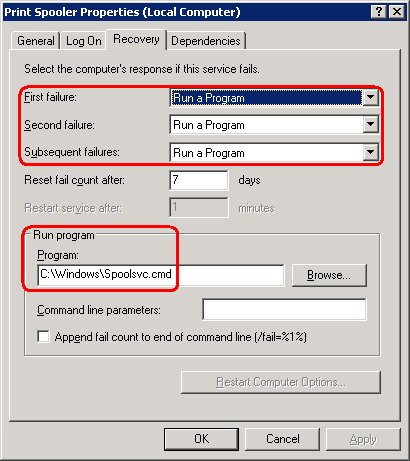
The Spoolsvc.cmd command file stops the service, cleans out the spooler folder, and then restarts the service.
Note that whilst the default Microsoft settings instruct the service to restart, in cases where there is a corrupt or stuck print job, or pending print jobs to non-existent (disconnected) client autocreated printers, simply restarting the service may often not be enough to address the problem. Deleting stale print jobs BEFORE restarting the spooler is going to clean things up nicely.
Note: You cannot use variables in the “Program” path. ie %SystemRoot%\Spoolsvc.cmd will not work.
@Echo off
:: This script is for the Print Spooler Service Self Healing mechanism. It will clear corrupt or stuck print jobs,
:: or pending print jobs to non-existent (disconnected) client auto-created printers.
::
:: Revision 2.0
:: Written by Jeremy@jhouseconsulting.com

SetLocal

:: Stop the Citrix Print Manager and Print Spooler Services.
net stop cpsvc 2>&1|FIND "1060"
IF errorlevel 1 (set cpsvc=Installed) Else (Echo The Citrix Print Manager Service is not installed.)
Echo.
net stop spooler /Y
:: The /Y syntax is used so that it will automatically stop other sevices that are dependant on it.

:: Find the location of the Spool Folder.
Set Key=HKLM\SYSTEM\CurrentControlSet\Control\Print\Printers
for /f "tokens=3 " %%i in ('REG QUERY %%KEY%% /v DefaultSpoolDirectory ^| find "DefaultSpoolDirectory"') DO Set SpoolFolder=%%i

:: Delete the stale print jobs.
Echo Deleting all stale print jobs from the "%SpoolFolder%" folder.
del %SpoolFolder%\*.* /q

:: Restart the Print Spooler and Citrix Print Manager Services.
Echo.
net start spooler
If /I "%cpsvc%"=="Installed" (
Echo.
net start cpsvc
)

EndLocal
EXIT /b 0
Here is the script I use to modify the service…
Option Explicit

Dim WshShell, strCommandLine

Set WshShell = WScript.CreateObject("WScript.Shell")

' The command will run the %SystemRoot%\Spoolsvc.cmd batch file after 5 seconds of the
' service failure. This will be set for the First, Second and Subsequent failures.
' Note that the Spoolsvc.cmd should be placed in the %SystemRoot% folder during the
' server build process.

strCommandLine = "sc failure spooler reset= 604800 actions= run/5000 command= %SystemRoot%\Spoolsvc.cmd"
WshShell.Run "%COMSPEC% /c " & strCommandLine, 2, True
wscript.echo "Modified the print spooler service for self healing"

Set WshShell = Nothing

wscript.quit(0)
