Installing, Configuring, Securing and Using MDT Webservices – Part 3

In Part 1 we walked through the installation and configuration of Deployment Webservices.

In Part 2 we walked through securing the Webservice.

In this part I will demonstrate how to use the Webservice via a PowerShell script to securely move a computer object during the operating system deployment (OSD) task sequence using Microsoft Deployment Toolkit (MDT).

To achieve the end result we need to:

  • Create some deployment share rules in MDT (CustomSettings.ini)
  • Add two “Run PowerShell Script” tasks to the Task Sequence
  • Download and place the PowerShell Script into the deployment share Scripts folder
Read more

Script to Create a Summary Overview and Full Report of all Contact Objects in a Domain

This PowerShell script is one of the most comprehensive you will find that provides a thorough overview and full report of all contact objects in a domain. It is the culmination of many Active Directory audit and reviews and therefore contains valuable input from many customers.

A lot of thought has been put into the logic within this script to help an organisation understand:

  • Contacts that are mail-disabled
  • Contacts that are ADFS Farm objects, which are Contact objects located under the certificate sharing container.
  • Contacts that are UM Integration objects
  • Contacts that are conflicting/duplicate objects (name contains CNF:)
  • Contacts that have expired
  • Contacts that have no manager set
  • Contacts that have been left in the default Users container (CN=Users)

FYI:

  • Mail-enabled contacts are derived from the targetAddress, proxyAddresses, legacyExchangeDN, and mailNickName attributes.

Read more

Script to Create an Overview and Full Report of all Group Objects in a Domain

This PowerShell script is one of the most comprehensive you will find that provides a thorough overview and full report of all group objects in a domain. It is the culmination of many Active Directory audit and reviews and therefore contains valuable input from many customers.

A lot of thought has been put into the logic within this script to help an organisation understand:

  • A breakdown of each group type (category and scope) that have been created
  • Groups with no members
  • Groups that are flagged as critical system objects
  • Groups that are protected objects (AdminSDHolder) where their adminCount attribute is set to 1
  • Groups that are conflicting/duplicate objects (name contains CNF: and/or sAMAccountName contains $Duplicate)
  • Groups that are mail-enabled
  • Distribution groups that are mail-disabled
  • Groups that are Unix-enabled
  • Groups that have expired
  • Groups with SID history
  • Groups with no Manager (managedBy)
  • The non-“Microsoft” default groups that have been left in the default Users container

FYI:

  • Mail-enabled groups are derived from the proxyAddresses, legacyExchangeDN, mailNickName, and reportToOriginator attributes, where reportToOriginator must be set to TRUE. This is not well documented.
  • Unix-enabled groups are derived from the gidNumber, msSFU30Name, and msSFU30NisDomain attributes.

Read more

Script to Create an Active Directory Schema Update Report

This PowerShell script was written by the awesome Ashley McGlone (AKA Goatee PFE) and published to the TechNet Script Center. It was also blogged on the Scriting Guy TechNet site. However, it did need some updates to keep up with the newer schema updates as well as adding the SCCM (ConfigMgr) versions. As Ashley has not updated it since 19th September 2013 I thought I’d update it myself and post it here until he gets the time to update the script and publish an updated version.

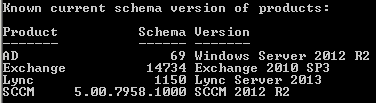
It will report the versions of the following products as per the sample screen shot from one of my customers:

  • Active Directory
  • Exchange
  • Lync
  • System Center Configuration Manager (SCCM) – ConfigMgr

Schema Version of Products

Please ensure you read the Scripting Guy’s blog titled “How to Find Active Directory Schema Update History by Using PowerShell“, which provides some great documentation on the script as well as some valuable comments that have helped to implement the updates.

The original script can be found here on the TechNet Script Center: PowerShell Active Directory Schema Update Report

Read more

Script to Create an Overview of all Computer Objects in a Domain

This PowerShell script will provide an overview and count of all computer objects in a domain based on Operating System and Service Pack. It helps an organisation to understand the number of stale and active computers against the different types of operating systems deployed in their environment.

Computer objects are filtered into 4 categories:

  • Windows Servers
  • Windows Workstations
  • Other non-Windows (Linux, Mac, etc)
  • Windows Cluster Name Objects (CNOs) and Virtual Computer Objects (VCOs)

A Stale object is derived from 2 values ANDed together:

  • PasswordLastChanged > $MaxPasswordLastChanged days ago
  • LastLogonDate > $MaxLastLogonDate days ago

By default the script variable for $MaxPasswordLastChanged is set to 90 and the variable for $MaxLastLogonDate is set to 30. These can easily be adjusted to suite your definition of a stale object.

The Active objects column is calculated by subtracting the Enabled_Stale value from the Enabled value. This gives us an accurate number of active objects against each Operating System.

Read more

Script to Create, Import and Export Group Policy WMI Filters

This PowerShell script will Create, Import and Export Group Policy WMI Filters.

I wrote this script to cover a number of different scenarios:

  • To create a default set of GPO WMI Filters for new builds.
  • To document existing WMI filters for health checks and audits.
  • To provide a mechanism to migrate WMI filters between Dev, Test, QA and Prod.

Read more

Script to Create a Report on the Primary Groups (primaryGroupID) in Use

This PowerShell script will enumerate all user accounts in a Domain and report on the primary groups (primaryGroupID) in use.

It will also total up the number of enabled and disabled user accounts that each group is applied to.

The output of this script helps with remediation tasks and perhaps even a redesign to implement some standards for the many different use cases.

Read more

Script to Generate a Group Policy Object (GPO) Version Report

Is there a version match between your Group Policy Object (GPO) containers and templates?

This PowerShell script will check that the version of each GPO is consistent in the Active Directory Group Policy Container (GPC) and on each Domain Controller in the Group Policy Template (GPT).

All Windows Operating Systems (since Windows 2000) will apply the GPO regardless of a version mismatch. However, a version mismatch will typically mean that some settings will simply not be applied because they haven’t been replicated correctly across the environment. Replication issues with good old flaky FRS and perhaps (but rarely) the newer DFS-R is often the reason that the GPT gets out of sync and lags behind the GPC. This is such a common problem.

Read more

Active Directory Health Check, Audit and Remediation Scripts

PowerShell Logo

I’ve been doing Active Directory work for many years and as such have a library of hundreds of scripts to assist with health checks, audits, and remediation tasks that I would like to share with the community.

But it’s not just a case of providing a script that creates a CSV or screen output, etc, as the output needs to be thoroughly explained so that the results are correctly understood and interpreted. The last thing I want is for someone to take the output of one of my scripts and start looking for a problem that does not exist, or making unnecessary modifications to their environment. This means that each script requires a separate article of it’s own. I have been doing this to date, but wanted to create a post to list all scripts used for health checks, audits and remediation tasks; linking them in as I blog about each one. I will also link out to other peoples scripts and articles that I use and find valuable.

I hope you find this a valuable source of information.

Read more

Script to Find Missing Subnets in Active Directory

This PowerShell script will collect all Netlogon.log files from the Domain Controllers, export the last x lines and combine it into one file of unique IP Addresses in CSV format. This easily and simply allows you to then identify any missing subnets that need to be added and associated to an Active Directory Site.

Yes, there are a couple of good examples of this type of script already available on the Internet. The trouble with them is that they would not produce reliable results, especially across environments where Domain Controllers were not all at the same Windows Server versions. Not a great practice, but it does happen in the larger environments where migrations are completed in phases. I’ve previously blogged about the change to the fields in the Netlogon.log file. I also found that other scripts were quite inefficient when reading and collecting the Netlogon.log files over WAN connections. The Report the AD Missing Subnets from the NETLOGON.log script by Francois-Xavier CAT was the best available. So I used it as a base to help derive the results I was after.

Read more