Script to Create an Active Directory Schema Update Report

This PowerShell script was written by the awesome Ashley McGlone (AKA Goatee PFE) and published to the TechNet Script Center. It was also blogged on the Scriting Guy TechNet site. However, it did need some updates to keep up with the newer schema updates as well as adding the SCCM (ConfigMgr) versions. As Ashley has not updated it since 19th September 2013 I thought I’d update it myself and post it here until he gets the time to update the script and publish an updated version.

It will report the versions of the following products as per the sample screen shot from one of my customers:

  • Active Directory
  • Exchange
  • Lync
  • System Center Configuration Manager (SCCM) – ConfigMgr
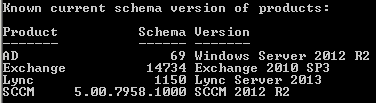
Schema Version of Products

Please ensure you read the Scripting Guy’s blog titled “How to Find Active Directory Schema Update History by Using PowerShell“, which provides some great documentation on the script as well as some valuable comments that have helped to implement the updates.

The original script can be found here on the TechNet Script Center: PowerShell Active Directory Schema Update Report

Read more

Script to Generate a Group Policy Object (GPO) Version Report

Is there a version match between your Group Policy Object (GPO) containers and templates?

This PowerShell script will check that the version of each GPO is consistent in the Active Directory Group Policy Container (GPC) and on each Domain Controller in the Group Policy Template (GPT).

All Windows Operating Systems (since Windows 2000) will apply the GPO regardless of a version mismatch. However, a version mismatch will typically mean that some settings will simply not be applied because they haven’t been replicated correctly across the environment. Replication issues with good old flaky FRS and perhaps (but rarely) the newer DFS-R is often the reason that the GPT gets out of sync and lags behind the GPC. This is such a common problem.

Read more

Scripting updates to the GPT.ini for the Local Group Policy

Updated on 27th October 2010.

I came across a challenge whilst working on a big XenApp deployment in a Novell environment. I needed to make changes to the Local Group Policy Object on all Terminal / Citrix servers. This was specifically required for implementation of a logoff script, as logoff scripts are not supported via Zen Polices in a Terminal Services environment.

As always, I wanted to automate it and found that there was a real lack of information about how this can be easily achieved. Anyway, I thought that modifying the Local Policy on all XenApp servers would be a pain, but it ended up being very simple indeed.

Admittedly, I could have just copied a new gpt.ini and scripts.ini into place, but then it would not have respected any previous changes and settings that had already been made to the gpt.ini. So this script checks existing configuration settings before making any changes to the gpt.ini file.

Enjoy!!

Read more