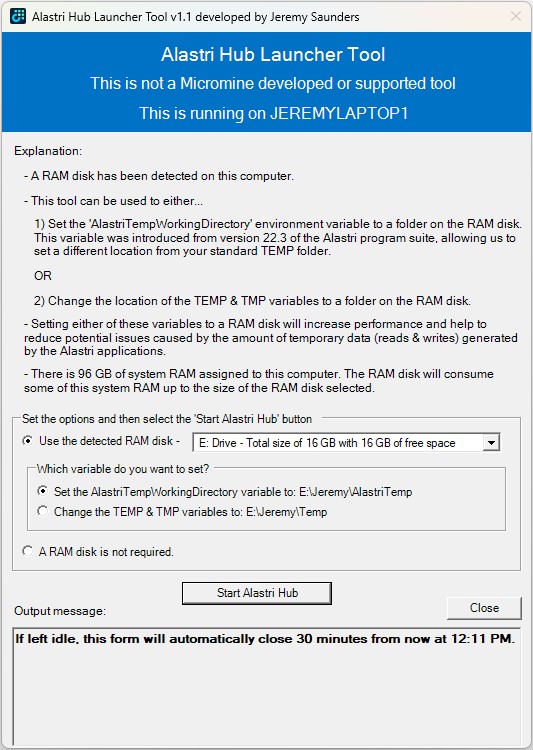
I would like to introduce you to a PowerShell tool I originally created in early 2024, which was in the research and planning stage for about 12 months previous to that whilst I was finding a suitable RAM Disk solution. If you or your customer runs Micromine Alastri Software, especially in a virtualised desktop platform from Vendors such as Citrix, Omnissa, Parallels, Dizzion, Microsoft and Amazon, you may want to consider using this tool to help increase performance and reduce potential issues caused by the amount of temporary data (reads & writes) generated and consumed by the Alastri applications.
Horizon
Cold Starting and/or Hydrating Your Applications To Improve Their Startup Times
In the End User Computing (EUC) space we know that after the first time the application starts post reboot, the next time is faster. The first startup is referred to as a cold startup and all subsequent runs are warm startups. The first time the application starts, components of the application, such as the EXEs (executables) and DLLs (dynamic link libraries) need to be loaded from disk, which can delay the startup time. All subsequent runs will then read the data from the file system cache, which is memory managed by the Operating System.
The way we prepare a system for a user is to cold start (pre-launch) the applications when the system starts. We do this by starting and then terminating each process, such as winword.exe.
Citrix Self-Service Session Reset Tool Process Flows
***Updated for the release of v1.6.
There are eight (8) main process flows for the how the Citrix Self-Service Session Reset Tool works:
- User Opens Web Page Process Flow
- Get Sessions Process Flow
- Logoff Sessions Process Flow
- Disconnect Sessions Process Flow
- Restart Machines and Forcefully Restart Machines Process Flow
- Hide Sessions and Unhide Sessions Process Flow
- Get Processes Process Flow
- Terminate Processes Process Flow
Each flow is documented and visually represented below.
Citrix Self-Service Session Reset Tool
***Please refer to my article on Development Planning for the Citrix Self-Service Session Reset Tool to learn about what updates and new features are being worked on.
***If using a release less than v1.9, please refer to the release history below to understand the new features, enhancements and fixes now included.
This tool has been labelled as a game changer for any Citrix customer. It’s proven time and time again that it has a huge impact on reducing the burden on the Service Desk and Operations Teams by empowering users to get themselves back up and running in the shortest possible time.
No matter how stable your Citrix platform is, one of the biggest challenges for any Citrix customer is being able to reduce Service Desk calls and user downtime by empowering users with the ability to clear their own sessions, or recover them by terminating rogue processes. Several free scripts and a paid for tool are available, but none of them really achieve the best outcome. Some of them still require users to run a “Citrix session”, which they often can not do because the broker may be trying to reconnect them back to a stuck, hung, broken session or unhealthy host. When this happens they get into an endless loop of failure and get very frustrated. This can impact brand reputation and user satisfaction, leaving users with a poor felt experience. Some have even implemented a separate Citrix Environment to run these scripts from. In my opinion this is as waste of resources and an overhead for management. It still doesn’t always work due to Citrix Workspace (Receiver) reconnection issues and is often over complicating it for users.
My goals were to:
- Create a tool that is easy to use, even for users that struggle with technology.
- Create a tool that enables users to not only get themselves back up and running in the shortest possible time, but also reduces the reliance on Service Desk and even second level support teams.
- Create a tool that does not rely on any ICA/HDX connectivity to a Citrix platform. This was extremely important!
- Create a tool that would allow support for multiple Citrix Virtual Apps and Desktops (CVAD aka XenApp and XenDesktop) Sites.
- Create a tool that works across trusted Domains.
- Create a tool that works across the IT and OT landscape.
- Create a tool that can easily be extended/expanded for other use cases.
- Create a tool that’s modular so that other brokers such as VMware Horizon and Leostream can easily be added.
- Create API’s with a Web front-end.
- Create a tool that can be used to develop a microapp.
- Create a tool that can easily be called by any scripting language such as PowerShell and Python.
- Create a tool that can be enhanced, debugged and supported by others.
- Create a tool for the community, because I love doing that!
Best Practice for the Windows Time (W32TIME) Service for RDSH and VDI workloads
When using image deployment mechanisms for RDSH and VDI workloads, such as Citrix PVS, Citrix MCS and VMware View Composer, it’s extremely important to reconfigure the Windows Time (w32time) Service to ensure that the LastBootUpTime is accurate. If it’s not accurate, it effects monitoring, the correlation of log data, event triggers, etc.
The default Manual trigger of the Windows Time service is based on domain membership, which seems to cause issues as the image boots and changes name to the correct target name. Without having a deep enough understanding on the inner workings of these technologies, I can only assume that the default trigger of the Windows Time service is not compatible with the way the imaging mechanisms work on boot up to change the computer name and join to an Active Directory computer object. There may be a point during startup where Windows detects that it’s not domain joined and therefore stops the Windows Time service, which seems to throw the time out.