Script to modify the defaultSecurityDescriptor attribute on the Group-Policy-Container schema class object

Last week I published an article about the changes in the behavior of Group Policy processing after the deployment of security update MS16-072 under KB3163622. It included a script to assist with the remediation of Group Policy permissions: Script to report on and remediate the Group Policy security change in MS16-072.

Of course that’s not where it ends. What about new Group Policies? Do you create a procedure that requires you to add “Domain Computers” with Read permission every time you create a new Group Policy Object (GPO)? No…of course not!

What we need to do now is change the defaultSecurityDescriptor attribute on the Group-Policy-Container schema class object so that new GPOs are created with Domain Computers having Read permissions by default. Microsoft didn’t released an official script or method to do this, so here’s the next best thing.

Read more

Script to report on and remediate the Group Policy security change in MS16-072

Computer can read again!

On June 14th 2016 Microsoft released security update MS16-072 under KB3163622 that changes the behavior of Group Policy processing so that user group policies are now retrieved by using the machine’s security context instead of the user’s security context. This is a by-design behavior change from Microsoft to protect computers from a security vulnerability.

Update 23/06/2016: Microsoft finally released an official response to this patch via the Directory Services team: Deploying Group Policy Security Update MS16-072 \ KB3163622

This is a problem for people that implement security filtering on their Group Policy Objects (GPOs), as it removes the default Authenticated Users group not only from the “Apply group policy” permission, but also from the “Read” permission.

Read more

Script to Create an Active Directory Schema Update Report

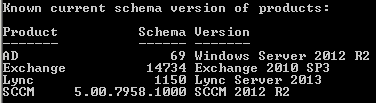
This PowerShell script was written by the awesome Ashley McGlone (AKA Goatee PFE) and published to the TechNet Script Center. It was also blogged on the Scriting Guy TechNet site. However, it did need some updates to keep up with the newer schema updates as well as adding the SCCM (ConfigMgr) versions. As Ashley has not updated it since 19th September 2013 I thought I’d update it myself and post it here until he gets the time to update the script and publish an updated version.

It will report the versions of the following products as per the sample screen shot from one of my customers:

  • Active Directory
  • Exchange
  • Lync
  • System Center Configuration Manager (SCCM) – ConfigMgr

Schema Version of Products

Please ensure you read the Scripting Guy’s blog titled “How to Find Active Directory Schema Update History by Using PowerShell“, which provides some great documentation on the script as well as some valuable comments that have helped to implement the updates.

The original script can be found here on the TechNet Script Center: PowerShell Active Directory Schema Update Report

Read more

Active Directory Health Check, Audit and Remediation Scripts

PowerShell Logo

I’ve been doing Active Directory work for many years and as such have a library of hundreds of scripts to assist with health checks, audits, and remediation tasks that I would like to share with the community.

But it’s not just a case of providing a script that creates a CSV or screen output, etc, as the output needs to be thoroughly explained so that the results are correctly understood and interpreted. The last thing I want is for someone to take the output of one of my scripts and start looking for a problem that does not exist, or making unnecessary modifications to their environment. This means that each script requires a separate article of it’s own. I have been doing this to date, but wanted to create a post to list all scripts used for health checks, audits and remediation tasks; linking them in as I blog about each one. I will also link out to other peoples scripts and articles that I use and find valuable.

I hope you find this a valuable source of information.

Read more

Creating a Message of the Day banner using a HTA

A customer asked me to assist with implementing a “Message of the Day” (MOTD) banner into their logon scripts. I had written one years ago that was part of a kix32 script, but found that it no longer worked with the wkix32 script processor. I guess that I could have debugged it and fixed it up, but it was old and tired, and needed a face lift. I was always keen to write one using a HTA (HTML Application), so took this opportunity to do so. In my opinion a HTML Application provides a far more professional look for the users.

Read more