The Citrix Virtual Apps and Desktops & Desktops as a Service Health Check Script on Steroids

UPDATE: Version 1.5.9 released on 3rd March 2026. See below for all the details.

Since November 2014 many of us have been using the amazing Sacha Thomet’s XenApp and XenDesktop Health Check Script. I’ve made my own modifications to it over the years, but never contributed and shared anything publicly until June 2025. My motivation is to give the community some amazing visibility of their Citrix environments that they’ve never had before. I took the last release from Sacha, which was the February 2022 update, together with some modules I’d previously written, and overhauled the whole process from top to bottom, and wrote even more modules. Sacha has kindly committed my pull requests to his GitHub repository, which officially adds me as Contributor!

CVAD & DaaS Health Check Script on Steroids

Read more

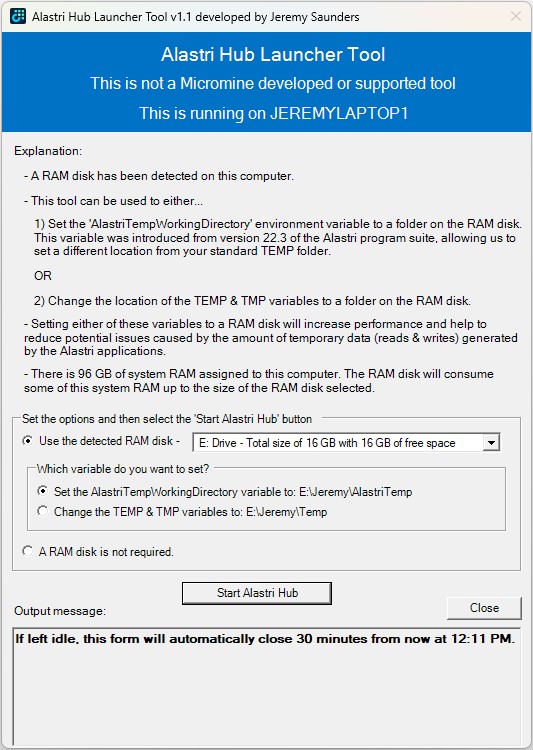
The Micromine Alastri Hub Launcher Tool that leverages a RAM Disk for Temporary Data

I would like to introduce you to a PowerShell tool I originally created in early 2024, which was in the research and planning stage for about 12 months previous to that whilst I was finding a suitable RAM Disk solution. If you or your customer runs Micromine Alastri Software, especially in a virtualised desktop platform from Vendors such as Citrix, Omnissa, Parallels, Dizzion, Microsoft and Amazon, you may want to consider using this tool to help increase performance and reduce potential issues caused by the amount of temporary data (reads & writes) generated and consumed by the Alastri applications.

Alastri Hub Launcher

Read more

The Citrix PVS Target Device Driver is a SCSI Adapter Bully

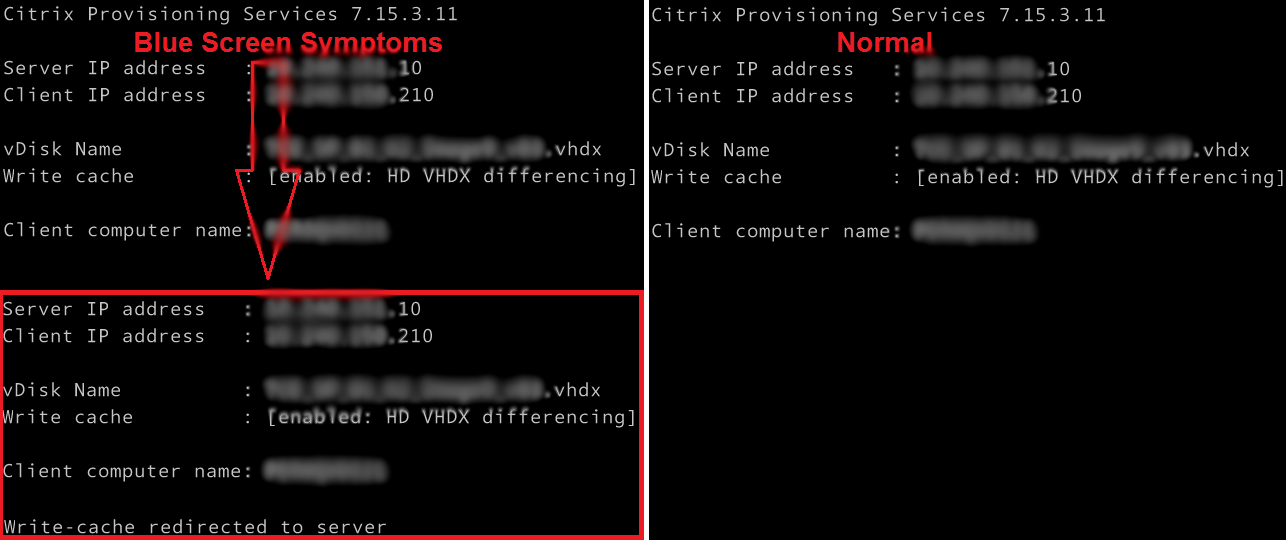
Working on a Citrix upgrade project a few years ago I was continually getting a blue screen when a Citrix PVS image booted. The symptom was obvious during the boot process. It was as if there were two NICs or the image was trying to load twice. PVS write-cache was also incorrectly being redirected to the server.

PVS Target Agent Blue Screen Symptoms

I checked and rechecked all the obvious suspects, such as ghosted NICs and other devices, old DHCP information, antivirus, etc. Everything looked good. It really did not make a lot of sense. I then stripped all the apps and tools out of the build and it worked! So what was I doing wrong?

Read more

Cold Starting and/or Hydrating Your Applications To Improve Their Startup Times

In the End User Computing (EUC) space we know that after the first time the application starts post reboot, the next time is faster. The first startup is referred to as a cold startup and all subsequent runs are warm startups. The first time the application starts, components of the application, such as the EXEs (executables) and DLLs (dynamic link libraries) need to be loaded from disk, which can delay the startup time. All subsequent runs will then read the data from the file system cache, which is memory managed by the Operating System.

Hydrate and Cold Start your applications

The way we prepare a system for a user is to cold start (pre-launch) the applications when the system starts. We do this by starting and then terminating each process, such as winword.exe.

Read more

ESRI ArcGIS Pro and Desktop License Type and Program Selector User Interfaces

Updated 17th July 2024

Here are two awesome User Interfaces (UI’s) I built that will compliment any ESRI ArcGIS Pro (AGP) and/or ArcGIS Desktop (AGD) deployment. More specifically from my point of view, they have been developed with a Citrix Published Application, VMware Horizon, Remote Desktop, VDI and AVD deployment in mind, giving the users the ability to easily switch licensing types and launching the different programs and tools, making life much easier for them.

ArcGIS Pro Challenges

  • Changing the licensing is not as simple as it seems, especially when launching it as a published application. This is because you have to change it from within the program once launched; and then the program needs to restart for the new licensing type to work. What that means is that the ArcGISPro.exe process will terminate and restart. Whilst that happens a published application session may log itself off, as there are no processes running to keep it open. The code in this UI will manipulate the user registry values before starting ArcGIS Pro, and therefore setting the licensing type as required. I call this Self-Service by allowing the users to switch License Levels/Types on demand!
  • Having a single interface allowed me to integrate other tools and processes as requested by users over time that could all be associated with ArcGIS Pro. For example, users wanted an easy way to start File Explorer in the same session. Let’s make it easy for the users to do their work! That’s my job!
  • Update on 17th July 2024 for Python code changes I completed in back February:
    • Due to some corporate licensing challenges with ArcGIS Pro, the ArcGIS Pro License Selector has been updated for the following reasons:
    • It defaults to a Basic license, regardless of what you last used. If you need to use a Standard or Advanced license type, please select it before launching ArcGIS Pro. This behaviour can be changed back by using the AlwaysDefaultToBasic script variable as documented below.
    • I have added a “Reset Extensions” checkbox, that is selected by default. This will remove any Extensions you may have selected in your previous session, as the licensing for some of these Extension is also limited. You have the option here of deselecting it if you wish to continue to use previously selected Extensions in your new session. This behaviour can be changed back by using the AlwaysResetExtensions script variable as documented below.
    • Unfortunately, neither of these settings are managed by ESRI at an enterprise level, so I’ve enhanced this tool to assist in reducing the usage of the more advanced licensing options.
    • I have also improved the flow of the Python code.

ArcGIS Desktop Challenges

  • In a large enterprise deployment, setting the licensing model can be a pain. This is done via a user environment variable. So you could use Group Policy Preferences to target them based on AD Security Groups. But that adds an administrative overhead, and users must then log support tickets via the Service Desk, which creates unnecessary overhead and lost time whilst they wait for it to be actioned. That’s not agile, and doesn’t allow users to change their license type to suite their needs. The code in this UI will manipulate the user environment variable before starting the ArcGIS Desktop program of choice, such as ArcMap or ArcCatalog, and therefore setting the licensing type as required. Again, I call this Self-Service by allowing the users to switch License Levels/Types on demand!
  • There are way too many Start Menu items to publish, which is not a neat and tidy way to present it, so why not just present it via a single UI?
  • Having a single interface allowed me to integrate all the common ArcGIS Desktop programs and other tools and processes as requested by users over time that could all be associated with ArcGIS Desktop. For example, users wanted an easy way to start File Explorer in the same session, and they wanted a way to install specific Python modules that are not part of the default Python install. Again, let’s make it easy for the users to do their work! That’s my job.
  • ArcGIS Administrator notes:
$acl= get-acl -path "HKLM:\SOFTWARE\Wow6432Node\ESRI"
$inherit = [system.security.accesscontrol.InheritanceFlags]"ContainerInherit, ObjectInherit"
$propagation = [system.security.accesscontrol.PropagationFlags]"None"
$rule=new-object system.security.accesscontrol.registryaccessrule "USERS","FullControl",$inherit,$propagation,"Allow"
$acl.addaccessrule($rule)
$acl|set-acl
 
$acl= get-acl -path "HKLM:\SOFTWARE\Wow6432Node\Classes\CLSID\{E6BDAA76-4D35-11D0-98BE-00805F7CED21}"
$inherit = [system.security.accesscontrol.InheritanceFlags]"ContainerInherit, ObjectInherit"
$propagation = [system.security.accesscontrol.PropagationFlags]"None"
$rule=new-object system.security.accesscontrol.registryaccessrule "USERS","FullControl",$inherit,$propagation,"Allow"
$acl.addaccessrule($rule)
$acl|set-acl

Read more

XDPing C# Function

I wrote this C# (csharp) function back in 2020 when developing the Self-Service Session Reset Tool. I have since enhanced it for improved error checking and logging and am happy to share it here for anyone else who wants to leverage it. I released a PowerShell version back in 2019. I like to integrate these functions into the scripts and tools I create as part of the health checks I do. I believe that by checking that the Broker’s Registrar service is reachable, listening and processing requests on its configured port, we can only then assume it is in a healthy state.

Read more

Citrix Virtual Delivery Agent (VDA) Post Install Script

Updated 18th July 2025

Whilst some of these items can be excluded from the Virtual Delivery Agent (VDA) installation, checking and managing them in a post install script ensures we have consistency between all installations and VDA versions. All these actions need to take place in the base image, hence why they are managed in a script and not via Group Policies. This script has been built from years of lessons learnt and developing best practices. It will…

  • Disable the Telemetry Service
  • Disable the VDA Ceip Service
  • Disable the CtxAppVService (from 7.14 to 7.15 CU4/1906)
  • Disable the App-V Package Cleanup (from 7.15 CU5/1909)
  • Disable the Smart Card Services and Launcher
  • Implement the Citrix Desktop Service (BrokerAgent) Scheduled Task
  • Configure the UviProcessExcludes
  • Configure the CtxHooks
  • Configure the UPMEvent
  • Update the BrokerAgent.exe.config file
  • Enable the SaveRsopToFile registry value if it exists

Read more

XDPing PowerShell Function

I wanted to write valid PowerShell function to do an XDPing the same way Citrix do with their Health Assistant tool. I was struggling a little to get the PowerShell code working as expected, so in the end I used the JetBrains dotPeek .NET decompiler to decompile the VDAAssistant.Backend.dll, which is a component of the Citrix Health Assistant Tool. This allowed me to reverse engineer and understand how Citrix does it in C# .NET, which is then easy for me to convert to PowerShell. Yeah…okay, so I cheated at little 😉 I also released a C# (csharp) function I wrote back in 2020.

I used this PowerShell function in two scripts:

To test if the Broker service is reachable, listening and processing requests on its configured port, you can issue blank HTTP POST requests at the Broker’s Registrar service, which is located at /Citrix/CdsController/IRegistrar. If the first line displayed/returned is “HTTP/1.1 100 Continue“, then the Broker service responded and is deemed to be healthy.

Read more

Script to Import and Bind a Certificate to the Default Web Site

SSL CertificateThis Powershell script will import and bind a certificate to the Default Web Site. I use this script for Citrix StoreFront and Director deployments, but it’s written to be very flexible and versatile so can be used for other tasks.

The original idea came from scripts written by Thomas Albaek and Jerome Quief for Citrix StoreFront.

The way I’ve written this script it will actually remove any existing certificate bindings first, which is really handy for pushing out updated certificates as I found that other scripts written to do this task would fail when run more than once.

Read more