
Updated 19th October 2010…
This is what I call the “bees knees” of scripts for deploying VMware Tools. It will detect if it’s being installed on a Terminal/Citrix Server, and remove the appropriate components that may impede performance, etc.
I was initially using an old well know script to set the video acceleration. However, my friend Jamie Morrison, has written an even better one, which I’ve included as a function within this script. I also found a really nice PowerShell script for Setting Video Hardware Acceleration Level.
One of the tasks performed by the installation of VMware Tools is that it replaces the “Standard VGA Graphics Adapter” driver with the “VMware SVGA II” driver. It then detects if the Hardware Acceleration has previously been set to Full. If it hasn’t, it’ll prompt you with the following message box even if you are using the /qb (quiet with a basic user interface) MSIEXEC switch.
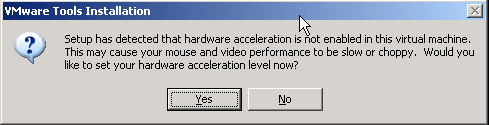
On the other hand using the /qn switch disables the VM_CheckHWAcceleration action altogether. However, I try to avoid using the /qn switch for these sorts of things, as then you can’t see what’s going on when monitoring it from the console, etc.
So the trick is to set the Hardware Acceleration to Full before installing VMware Tools. Then, when it runs the detection mechanism by calling the VM_CheckHWAcceleration action within the MSI package, it will read back that it has already been set and complete the silent installation without any prompts.
Place the below InstallVMwareTools.vbs script in a folder, extracting the VMware Tools iso into a subfolder called “VMware Tools”.
Note that the only line in the script you may want to change is the strLogLocation definition, which sets the location of the MSI log file. As you can see I place it in the “%SystemDrive%\bldlogs” folder.
Enjoy!!!
' VMware Tools installation script.

' For Citrix/Terminal/RDS Servers, don't install VMware Tools components that can impede
' performance. These include:
' - MemCtl - Memory Control Driver (vmmemctl – reclaims memory using the balloon driver)
' - vmdesched - Descheduled Time Accounting (experimental)
' - Sync - Filesystem Sync Driver (LGTO_SYNC - can halt I/O disrupting services/users)
' - Hgfs - Shared Folders (vmhgfs – not supported on ESX)

' There is now evidence to suggest that under ESX4.x and certain deployment scenarios
' leaving the memory control driver enabled can assist with performance. Discussions with
' VMware suggest that it will only be used when the host is under memory pressure and will
' intelligently select memory to balloon in conjunction with the operating system. The
' alternative is the host paging out virtual machine memory to disk, which may be highly
' active, possibly suspending a virtual machine for milliseconds at a time. This situation
' should not arise if suitable resources are available, but an unexpected event such as a
' host failure may cause this. Therefore, a boolean value of blnRemoveMemoryBaloonDriver
' has been added that can be set to True or False depending on your requirements.

' Before we proceed we first need to check that the "Terminal Services" (TermServ) service
' is running, otherwise using the WMI provider to query the Win32_TerminalServiceSetting
' properties will return a null value. Note that the WMI provider namespace is slighly
' different between Windows 2003 and Windows 2008.

' Reference for Unattended Installation of VMware Tools in Windows:
' http://communities.vmware.com/servlet/JiveServlet/downloadBody/12413-102-4-13370/VMware%20Tools%20-%20Unattended_Install.pdf

' The setVideoAcceleration function was written by Jamie Morrison (http://theether.net/)

' It's expecting the latest version of VMware Tools to be extracted into a subfolder called
' "VMware Tools". So your folder structure will look like this...
' - InstallVMwareTools.vbs (this script)
' - VMware Tools (this is a folder that contains the extracted VMware Tools)

' Version 1.6 released on 19th October 2010.
' Written by Jeremy@jhouseconsulting.com on 1st December 2008.

Option Explicit

Dim objFSO, objFolder, wshShell, oShellLink, strScriptPath, strLogLocation, strOS
Dim strOptions, strCommandLine, strRegKey, blnDeleteVMwareUserProcess, blnReturn
Dim strProcessorArchitecture, strMSI, blnNewInstall, blnRemoveMemoryBaloonDriver
Dim strvalue, blnMoveStartMenuFolder, strITToolsFolder, strAllUsersProfile
Dim strLogFile, strFrom, strTo

'********** These are the script variables that can be changed **********

' Setting this to false will not remove the VMware memory balloon driver.
blnRemoveMemoryBaloonDriver = False

' Removing the "VMware User Process" (VMwareUser.exe) from the Run key causes no detrement
' to the running Guest. It may cause some loss of functionality from VMware Tools e.g. Drag
' and drop/copy and paste operations which does not seem to affect ICA sessions. Change this
' value to False if you do not want to disable the VMwareUser.exe process.
blnDeleteVMwareUserProcess = True

' Setting this to true will move the VMware Start Menu folder to the Start Menu subfolder
' defined.
blnMoveStartMenuFolder = True
strITToolsFolder = "IT Tools"

' Set the log file location
strLogLocation = "%SystemDrive%\bldlogs"

' Set the log file name
strLogFile = "VMwareTools.Log"

'************************************************************************

set WshShell = WScript.CreateObject("WScript.Shell")
set objFSO = CreateObject("Scripting.FileSystemObject")

strLogLocation = WshShell.ExpandEnvironmentStrings(strLogLocation)

strScriptPath = Left(WScript.ScriptFullName, InstrRev(WScript.ScriptFullName, "\"))

' Create the log file folder
If NOT objFSO.FolderExists(strLogLocation) Then
  objFSO.CreateFolder(strLogLocation)
End If

strProcessorArchitecture = WshShell.ExpandEnvironmentStrings("%PROCESSOR_ARCHITECTURE%")
strAllUsersProfile = WshShell.ExpandEnvironmentStrings("%ALLUSERSPROFILE%")

strOS = GetOSFamily()

' Modifying the video hardware acceleration
If setVideoAcceleration Then
    wscript.echo "Updated Video Hardware Acceleration to Full."
Else
    wscript.echo "No Video Hardware Acceleration to set."
End If

' Detect previous installation of VMware Tools
blnNewInstall = True
strvalue = "HKLM\SYSTEM\CurrentControlSet\Services\VMTools\Start"
If RegValueExists(strvalue) Then
  blnNewInstall = False
End If

' Building the MSIEXEC command line options
If blnNewInstall Then
  strOptions = " ALLUSERS=TRUE ADDLOCAL=ALL /Lv* " & chr(34) & strLogLocation & "\" & strLogFile & chr(34) & " /qb- REBOOT=ReallySuppress"
Else
  strOptions = " ALLUSERS=TRUE /Lv* " & chr(34) & strLogLocation & "\" & strLogFile & chr(34) & " /qb- REBOOT=ReallySuppress"
End If
If isTerminalServer(strOS) Then
  If blnRemoveMemoryBaloonDriver Then
    strOptions = strOptions & " REMOVE=" & chr(34) & "Hgfs,MemCtl,Sync,vmdesched" & chr(34)
  Else
    strOptions = strOptions & " REMOVE=" & chr(34) & "Hgfs,Sync,vmdesched" & chr(34)
  End If
End If

If strProcessorArchitecture = "x86" Then
  strMSI = "VMware Tools.msi"
Else
  strMSI = "VMware Tools64.msi"
End If

' Installing VMware Tools with the relevant command line options
strCommandLine = "msiexec /i " & chr(34) & strScriptPath & "VMware Tools\"& strMSI & chr(34) & strOptions
WshShell.Run strCommandLine,1,True

' If we are building a Citrix/Terminal Server, delete VMware Tools Tray Icon and VMware User
' Process from the Run key. The VMware User Process will only be removed if
' blnDeleteVMwareUserProcess is set to True. There are settings for this in our Group Policy
' ADM template. It will also move the Start Menu Folder to a location specified by the
' strITToolsFolder variable.
If isTerminalServer(strOS) Then
  strRegKey = "HKLM\SOFTWARE\VMware, Inc.\VMware Tools\"
  If RegValueExists(strRegKey & "ShowTray") Then
    WshShell.RegWrite strRegKey & "ShowTray", "0", "REG_DWORD"
    wscript.echo "VMware Tools Tray Icon has been disabled."
  End If
  strRegKey = "HKLM\SOFTWARE\Microsoft\Windows\CurrentVersion\Run\"
  If RegValueExists(strRegKey & "VMware Tools") Then
    WshShell.RegDelete strRegKey & "VMware Tools"
    wscript.echo "VMware Tools registry value deleted."
  Else
    wscript.echo "VMware Tools registry value does not exist."
  End If
  If blnDeleteVMwareUserProcess Then
    If RegValueExists(strRegKey & "VMware User Process") Then
      WshShell.RegDelete strRegKey & "VMware User Process"
      wscript.echo "VMware User Process registry value deleted."
    Else
      wscript.echo "VMware User Process registry value does not exist."
    End If
  End If
' Move the Start Menu Folder.
  If blnMoveStartMenuFolder Then
    If NOT objFSO.FolderExists(strAllUsersProfile & "\Start Menu\Programs\" & strITToolsFolder) Then
      objFSO.CreateFolder(strAllUsersProfile & "\Start Menu\Programs\" & strITToolsFolder)
    End If
    strFrom = strAllUsersProfile & "\Start Menu\Programs\VMware"
    strTo = strAllUsersProfile & "\Start Menu\Programs\" & strITToolsFolder & "\"
    Call MoveFolder(strFrom,strTo)
    wscript.echo "VMware Start Menu Folder has been moved."
  End If
End If

Set WshShell = Nothing
set objFSO = Nothing

WScript.Quit(0)

Function setVideoAcceleration()
'
' SYNTAX:		setVideoAcceleration()
'
' Parameters:	N/A
'
' Returns:		True if registry written successfully
'
' Example:		setVideoAcceleration
'
' Remarks:
'
  Const HKEY_LOCAL_MACHINE = &H80000002
  Const VIDEO_LIST = "SYSTEM\CurrentControlSet\Control\Video"

  Dim   wbemLocator, wbemDefault, wshShell, regAllWMI, adapterList, adapterGUID, adapterPath, dwValue

  Set wbemLocator = CreateObject("WbemScripting.SWbemLocator")
  Set wbemDefault = wbemLocator.ConnectServer(".", "root\default")
  Set wshShell = WScript.CreateObject("WScript.Shell")

  setVideoAcceleration = False
  Set regAllWMI = wbemDefault.Get("StdRegProv")
  If (Err.Number <> 0) Then
    wscript.echo "Error connecting to WMI StdRegProv " & Err.Number & " : " & Err.Description
  Else
    regAllWMI.EnumKey HKEY_LOCAL_MACHINE, VIDEO_LIST, adapterList
    If (Err.Number <> 0) Then
      wscript.echo "Could not enumerate video adapters"
    Else
      For Each adapterGUID In adapterList
        adapterPath = VIDEO_LIST & "\" & adapterGUID & "\0000"
        regAllWMI.GetDWORDValue HKEY_LOCAL_MACHINE, adapterPath, "Acceleration.Level", dwValue
        If Not IsNull(dwValue) Then
          regAllWMI.SetDWORDValue HKEY_LOCAL_MACHINE, adapterPath, "Acceleration.Level", 0
          setVideoAcceleration = True
        End If
      Next
    End If
  End If
  Set regAllWMI = Nothing
  Set wshShell = Nothing
  Set wbemDefault = Nothing
  Set wbemLocator = Nothing

End Function

Function RegValueExists(sRegValue)
' Returns True or False based of the existence of a registry value.
  Dim oShell, RegReadReturn
  Set oShell = CreateObject("WScript.Shell")
  RegValueExists = True  ' init value
  On Error Resume Next
  RegReadReturn = oShell.RegRead(sRegValue)
  If Err.Number <> 0 Then
    RegValueExists = False
  End if
  On Error Goto 0
  Set oShell = Nothing
End Function

Sub MoveFolder(strFrom, strTo)
  Dim objFSO
  Set objFSO = CreateObject("Scripting.FileSystemObject")
  If NOT objFSO.FolderExists(strTo) Then
    Set objFolder = objFSO.CreateFolder(strTo)
  End If
  If objFSO.FolderExists(strFrom) Then
    objFSO.CopyFolder strFrom , strTo , True
    objFSO.DeleteFolder(strFrom)
  End If
  Set objFSO = Nothing
  Set objFolder = Nothing
End Sub

Function GetOSFamily()
  Dim strComputer, oWMIService, colOSInfo, oOSProperty, strCaption, strOSFamily
  strComputer = "."
  Set oWMIService = GetObject("winmgmts:\\" & strComputer & "\root\cimv2")
  Set colOSInfo = oWMIService.ExecQuery("Select * from Win32_OperatingSystem")
  For Each oOSProperty in colOSInfo
    strCaption = oOSProperty.Caption
  Next
  If InStr(1,strCaption, "2008", vbTextCompare) Then strOSFamily = "W2K8"
  If InStr(1,strCaption, "2003", vbTextCompare) Then strOSFamily = "W2K3"
  GetOSFamily = strOSFamily
  Set oWMIService = Nothing
  Set colOSInfo = Nothing
End Function

Function isTerminalServer(strOS)
  Dim strComputer, strNameSpace, objWMIService, colItems, objItem
  strComputer = "."
  If ucase(strOS) = "W2K3" Then
    strNameSpace = "\root\cimv2"
  Else
    strNameSpace = "\root\cimv2\TerminalServices"
  End If
  Set objWMIService = GetObject("winmgmts:" _
    & "{impersonationLevel=impersonate}!\\" & strComputer & strNameSpace)
  Set colItems = objWMIService.ExecQuery _
    ("Select * from Win32_TerminalServiceSetting")
  For Each objItem in colItems
    Select Case objItem.LicensingType
      Case "1" ' Remote Administration
        isTerminalServer = False
      Case "2" ' Per Device
        isTerminalServer = True
      Case "4" ' Per User
        isTerminalServer = True
      Case "5" ' Not configured yet
        isTerminalServer = True
      Case Else
        isTerminalServer = False
    End Select
  Next
  Set objWMIService = Nothing
  Set colItems = Nothing
End Function
