
This script will manage the “PONT_STRING” registry value to control the “Don’t Show Dialog” Setting for some of the Outlook dialog boxes that don’t have a simple way of preventing them from showing via a Group Policy Setting, etc. Under Outlook 2007 there are two particular dialog boxes that may prompt the user when a new profile is created.
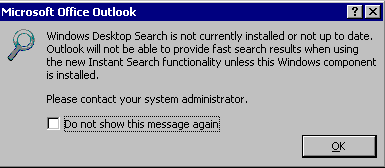
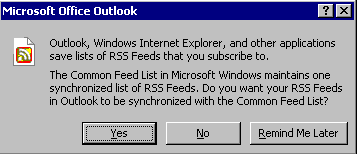
This script will prevent them from showing.
These options are held under the following key…
HKEY_CURRENT_USER\Software\Microsoft\Office\xx.0\Outlook\Options\General
…where xx is the Office version number.
Enjoy!
‘ This script will manage the “PONT_STRING” registry value to control the “Don’t Show
‘ Dialog” Setting” for some of the Outlook dialog boxes that don’t have a simple way
‘ of preventing them from showing via a Group Policy Setting, etc.
‘
‘ These options are held under the following key…
‘ HKEY_CURRENT_USER\Software\Microsoft\Office\xx.0\Outlook\Options\General
‘ where xx is the Office version number.
‘
‘ Note that the “PONT_STRING” string must end with a comma.
‘
‘ Simply set all Office versions you are using in the arrVersions array and the
‘ dialogs you want to prevent from displaying in the arrDialogs array.
‘
‘ Release 1.0
‘ Written by Jeremy@jhouseconsulting.com on 6th December 2009.
‘
Option Explicit
Dim arrVersions, arrDialogs, objShell, Version, strKeyRoot, strKeyPath
Dim Dialog, strValueData, arrValueData, BlnReturn
‘
arrVersions = Array(“12.0”)
‘ Note that…
‘ – Office 2000 = 9.0
‘ – Office XP/2002 = 10.0
‘ – Office 2003 = 11.0
‘ – Office 2007 = 12.0
‘
arrDialogs = Array(“60″,”48”)
‘ 60 – “Windows Desktop Search is not currently installed or not up to date. Outlook
‘ will not be able to provide fast search results when using the new Instant
‘ Search functionality unless this Windows component is installed. Please contact
‘ your system administrator.”
‘ 48 – “Outlook, Windows Internet Explorer, and other applications save lists of RSS
‘ Feeds that you subscribe to. The Common Feed List in Microsoft Windows
‘ maintains one synchronized list of RSS Feeds. Do you want your RSS Feeds in
‘ Outlook to be synchronized with the Common Feed List?”
‘
Set objShell = WScript.CreateObject(“WScript.Shell”)
strKeyRoot = “HKCU\”
strKeyPath = “Software\Microsoft\Office\”
If IsArray(arrVersions) AND IsArray(arrDialogs) Then
For Each Version in arrVersions
strKeyPath = strKeyPath & Version & “\Outlook\Options\General\”
If RegValueExists(strKeyRoot & strKeyPath & “PONT_STRING”) Then
strValueData = objShell.RegRead(strKeyRoot & strKeyPath & “PONT_STRING”)
arrValueData = Split(strValueData,”,”)
For Each Dialog in arrDialogs
BlnReturn = InArray(Dialog,arrValueData)
If NOT BlnReturn Then
strValueData = strValueData & Dialog & “,”
End If
Next
Else
For Each Dialog in arrDialogs
strValueData = strValueData & Dialog & “,”
Next
End If
objShell.RegWrite strKeyRoot & strKeyPath & “PONT_STRING”, strValueData
Next
End If
Set objShell = Nothing
wscript.quit(0)
Function RegValueExists(sRegValue)
‘ Returns True or False based of the existence of a registry value.
Dim oShell, RegReadReturn
Set oShell = CreateObject(“WScript.Shell”)
RegValueExists = True ‘ init value
On Error Resume Next
RegReadReturn = oShell.RegRead(sRegValue)
If Err.Number <> 0 Then
RegValueExists = False
End if
On Error Goto 0
Set oShell = Nothing
End Function
Function InArray(item,myarray)
Dim i
For i=0 To UBound(myarray) Step 1
If lcase(item)=lcase(myarray(i)) Then
InArray=True
Exit Function
End If
Next
InArray=False
End Function
