
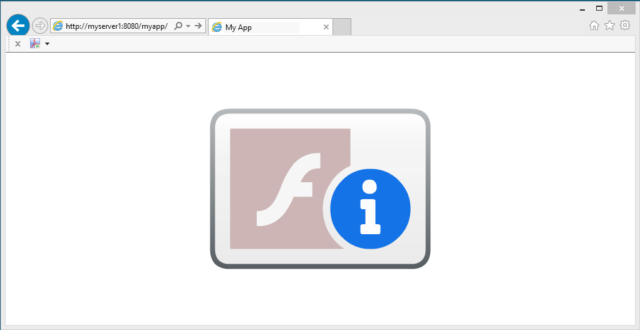
With the fast approaching end of life for Adobe Flash Player, some organisations have been caught out with legacy apps that have yet to be decommissioned or migrated to HTML5, etc. Some of these apps may be business critical. Unless you take action by the 11th January 2021, this is what your users will see on 12th January 2021.
Don’t panic! We can temporality fix this and you can continue to use Adobe Flash Player if correctly configured in a locked down state using the mms.cfg file.
Update: As of July 2021 all monthly and cumulative updates contain the Adobe Flash Removal Package. Therefore, deploying it will remove Adobe Flash. So if you do have an urgent need to test or work on an old Adobe Flash app, don’t patch beyond June 2021. This is not advice I would normally provide, but helps you get to a point should you need to revisit and use an Adobe Flash app.
Here’s how you do it.
- You must be running Adobe Flash Player version 32.0.0.445, which is the 2nd October Microsoft patch KB4580325.
- Earlier versions, such as 32.0.0.387, do not seem to correctly adhere to, honour and respect the mms.cfg settings. I believe this may have just been a bug according to several forum posts.
- You can download the update from the Microsoft Update Catalog website.
- Installing it does not require a reboot and the new version works immediately.
- You should also block update KB4577586, which will remove Adobe Flash Player. This update is currently not available in Windows Server Update Service (WSUS). It will be made available in early 2021. According to the documentation when KB4577586 will be distributed it will delete Flash for IE11 and will prevent it to be installed again.
- Create an mms.cfg as per the example below. The settings in the mms.cfg are documented in the Administration Guide.
- The AllowListUrlPattern acts like a whitelist.
- Once you have the AllowListUrlPattern set, you can test it by rolling the date forward beyond 11th January 2021 to ensure it continues to work for you.
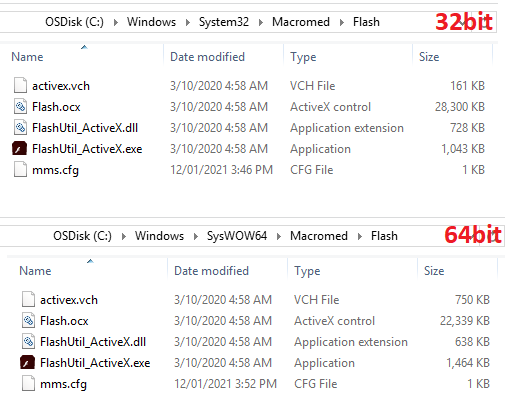
So your folder structure should end up looking like this…
An example mms.cfg file may look like this…
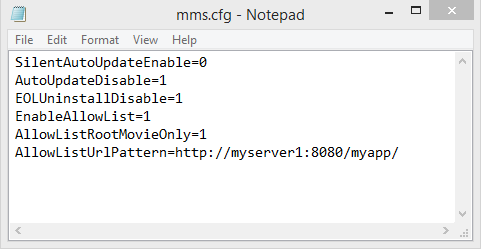
Note that you can have multiple AllowListUrlPattern lines and also use wildcards for pattern matching. Refer to the Administration Guide for further details. Not every pattern match will work. For example, http will always assume port 80. Hence why I have specified port 8080 in the example above.
In summary you need to:
- Deploy KB4580325
- Deploy the mms.cfg files with the correct AllowListUrlPattern(s) set.
- Block KB4577586
This is not a long term fix. As I understand it Microsoft may include the removal in a cumulative security update by mid 2021. However, this should buy you some time and get you out of trouble in the short term.
Hope this helps.
