
A message box may appear titled “WFCRUN32 ERROR”, with the message being “Failed to set Event Logging.” as per the following screenshot:
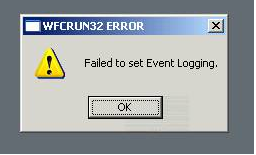
it’s related to the LogFileWin32 setting in the APPSRV.INI that points to the location of the log file.
For Example:
LogFileWin32=C:\Documents and Settings\[username]\Application Data\ICAClient\wfcwin32.log
The APPSRV.INI is found in the user’s “%APPDATA%\ICAClient” folder.
The wfcrun32.exe process is unable to create the wfcwin32.log because either the location is invalid, or the user does not have write permissions to that folder.
Either update the file or delete the folder and it will recreate what it needs.

Jeremy Saunders
Delivering customer success through tech: IT Infrastructure | Citrix | End User Computing | Platform Engineering | DevOps | Full Stack Developer | Technical Architect | Improvisor | Aspiring Comedian | Midlife Adventurer at J House Consulting
Jeremy Saunders is the Problem Terminator; the MacGyver of IT. Views and Intellectual Property (IP) published on this site belong to Jeremy. Please refer to the About page for more information about Jeremy.