
This is a process I’ve been working on since early 2017. I got it to a point where it works perfectly for my needs in my lab and several customer environments, and has been very reliable over the last few months, so I decided it was ready to release to the community in March 2019. I have continued to update and tweak this over the years so that it works under all PVS and MCS deployments and Windows Operating Systems.
UPDATED 17th May 2026
- A slight improvement to the logging by getting the state and startup mode of the BrokerAgent service up front.
It helps with troublshooting. - Added the Start-ServiceTransient function, which sends a service start request (non-blocking) allowing us to
immediately flip the service back to Disabled without waiting. This addresses the timing issue under 3.9 and
3.10.
UPDATED 27th March 2026
- Tweaked the updates completed under 3.9 as I experienced a timing issue. Added the Create-RegValue function to assist with this.
UPDATED 25th March 2026
- The updates added to 3.7 that starts the Broker service immediately if it is a Citrix MCS Master Image caused an issue because the Broker service was left in a Manual startup type. So the fix is to set it back to Disabled startup type after starting it. This allows this script to control how it starts once the MCS Master Image is deployed.
UPDATED 28th January 2026
- Added the Delete-BrokerAgentCachedData function, which clears the SavedListOfDDCsSids.xml as per CTX216883 to prevent registration issues caused by old or decommissioned Delivery Controllers or Cloud Connectors.
UPDATED 17th November 2025
- Improved the check for the Personality.ini and MCSPersonality.ini files based on the history of VDA changes.
- Replaced the Get-LastBootTime function with the Get-UpTime function. This starts to phase out the reliance on the Get-WmiObject cmdlet, with preference to use the Get-CimInstance cmdlet.
- Added a group policy update (gpupdate) to be invoked before it reads the VDAHelper registry values. I’ve
found this hit and miss with MCS images. So a gpupdate helps to ensures that the registry values are in
place. - Added a check to see if it is a Citrix MCS Master Image. The script will check the following value:
Key: HKEY_LOCAL_MACHINE\SOFTWARE\Citrix\Configuration
Type: DWORD
Value: MasterImage
Data: 1
This is important so that it starts the Broker service immediately so that it does not cause any issues
with the image preparation process.
UPDATED 21st July 2025
- Added extra error checking and further improved the coding
- When we set the Winlogon DefaultDomainName value we also need to set AutoAdminLogon value to 0 and clear the DefaultUserName value.
- If the Winlogon AutoAdminLogon value is 0 (disabled), and the TriggerOnTaskEndEvent is set to 1 (enabled), we change the TriggerOnTaskEndEvent to 0 (disabled). This reduces unnecessary further delay waiting for an event that will never run.
UPDATED 14th July 2025
- Replaced the Get-DeliveryControllers function with the Get-ListOfDDCs function. The name of the function may have been misleading given that it’s for both Delivery Controller or Cloud Connector addresses. It now allows for the C:\Personality.ini and C:\MCSPersonality.ini for MCS deployments.
- Added the UsePersonalityini value to the VDAHelper registry values, which is used to call the updated Get-ListOfDDCs function.
- Updated the XDPing function
- Changed the flow of some of the code
UPDATED 31st January 2023
- Added the DefaultDomainName value to the registry, which tells this script to set the Winlogon DefaultDomainName value in the registry once the autologon process has started. This allows us to use a local account for the Autologon process instead of a Domain service account, which won’t work if the Winlogon DefaultDomainName value has already been set to your preferred domain. This reduces the security footprint when using service accounts by allowing us to easily rotate passwords using a local account for the autologon process for each image build. Refer to my article Priming a Non-persistent Windows Image using an Autologon Process with an Auto Logoff Timer to understand how this works.
- You can now use the policies registry key for the registry settings:
- Policies Key: HKEY_LOCAL_MACHINE\SOFTWARE\Policies\Citrix\VDAHelper
- Preferences Key: HKEY_LOCAL_MACHINE\SOFTWARE\Citrix\VDAHelper
- Values set under the Policies key have a higher priority.
UPDATED 30th April 2022
- Improved the code so that the logon/logoff events are detected more efficiently across all Windows Operating Systems.
UPDATED 17th March 2020
- Enhanced the checking for the ListofDDCs registry value by also checking the Policies key structure.
UPDATED 18th July 2019
- The creation of the Scheduled Task needed for this script can be found in the Citrix Virtual Delivery Agent (VDA) Post Install Script. It’s important that the priority of the Scheduled Task is set to normal to prevent it from being queued.
- Enhanced the Get-LogonLogoffEvent function for backward support of Windows 7/2008R2
UPDATED 16th May 2019
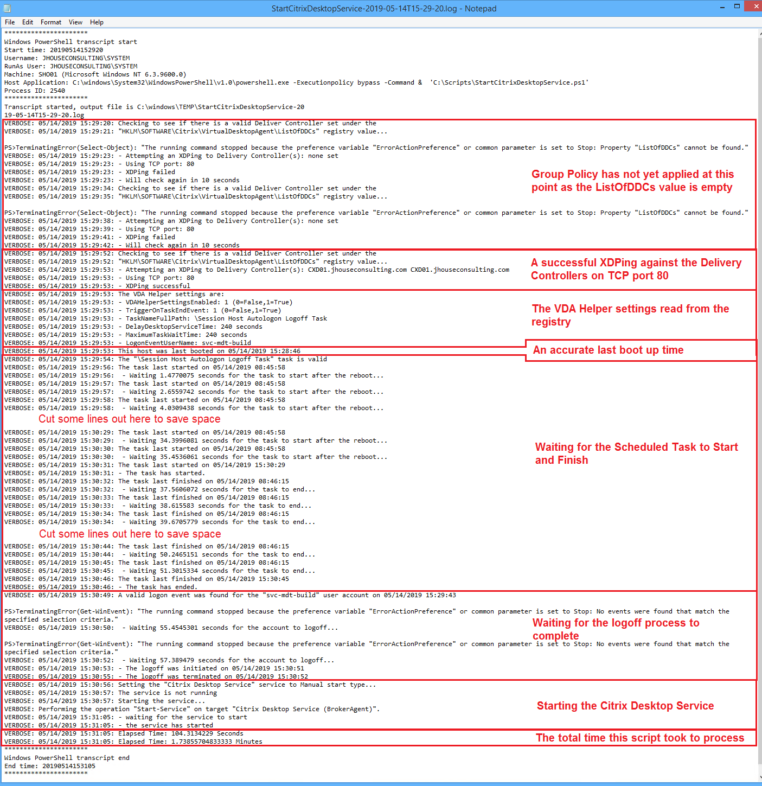
- Added much more logging with timestamps to help debug issues and correlate events. You’ll see from the screen shot of the log file below that it’s now quite comprehensive.
- Ensured that the format of the logging timestamp and LastBootUpTime were aligned so that its accuracy can be easily verified as I documented here.
- Added an XDPing function I wrote to health check the Delivery Controllers.
The challenge has always been that as a Session Host boots up the Citrix Desktop Service (BrokerAgent) starts and registers with the Delivery Controllers before the boot process is complete. Therefore, a user can potentially launch an application/desktop during the tail end of the boot process. When this happens it may fail the session launch, which can leave the Session Host in an unhealthy state, such as a stuck prelaunch state, with the user potentially needing to involve the Service Desk to clear the issue. So managing the timing of the start of the Citrix Desktop Service (BrokerAgent) is extremely important to ensure that your Session Hosts have completed their startup process before registering with the Delivery Controllers. This can be easier said than done!
To add to this complexity, power managed Workstation OS pools can get into a reboot loop if you use an autologon process. I use an autologon process similar to what George Spiers documented in his article “Reduce Citrix logon times by up to 75%“. So if the Session Host has registered with the Delivery Controllers before the autologon process has logged off, the logoff process will trigger another reboot. This can become a real problem to manage.
An ex-Citrix employee created a “Citrix Desktop Helper” tool. I had varying success with the tool. He left Citrix and no one took over the development and upkeep of this tool. As it was an unsupported Citrix tool with no ownership, I decided to stop using it and write my own, which included the logic I was after. Plus, my goal was to write it in PowerShell.
I have a post VDA install script that…
- Disables the Citrix Desktop Service (BrokerAgent) service
- Creates a Scheduled Task called “Start the Citrix Desktop Service”, which runs at computer startup under the local System account
Pretty easy so far.
The Scheduled Task starts the StartCitrixDesktopService.ps1 script, which is where all the smarts are. I wanted it to do 3 things:
- Wait until there is a valid server listed under the ListofDDCs registry value. This ensures Group Policy has applied, and you’re not starting the service with an empty list, or an invalid server. This is important for Gold Images where the VDA is installed with the /MASTERMCSIMAGE, /MASTERIMAGE or /MASTERPVSIMAGE switch.
- Set the delay based on a specified time, which is what the “Citrix Desktop Helper” tool does.
- Set the delay based on an event. This is the cool bit where I can make it an exact science. As mentioned, I use an autologon process, so I have another Scheduled Task called “Session Host Autologon Logoff Task”, which logs off this autologon session. This of course writes the logon and logoff events to the Windows Security Event Log, so the script simply triggers based on those events. This means that as soon as the autologon account logs off, the service will start and register with the Delivery Controller(s).
I decided to use registry values to manage most of these settings, which can be set via Group Policy Preferences. The script will read the values under either of the following registry keys to determine how long to wait before starting the Citrix Desktop Service:
- Policies Key: HKEY_LOCAL_MACHINE\SOFTWARE\Policies\Citrix\VDAHelper
- Preferences Key: HKEY_LOCAL_MACHINE\SOFTWARE\Citrix\VDAHelper
Values set under the Policies key have a higher priority.
The values I added are:
- The VDAHelperSettingsEnabled tells the script if it should action or ignore all other settings under this registry key
- Type: REG_DWORD
- Value: VDAHelperSettingsEnabled
- Data: 0=False; 1=True
- The DelayDesktopServiceTime value tells this script, in seconds, how long to wait before starting the Citrix Desktop Service
- Type: REG_DWORD
- Value: DelayDesktopServiceTime
- The TriggerOnTaskEndEvent value tells this script to wait for a task to end before starting the Citrix Desktop Service
- Type: REG_DWORD
- Value: TriggerOnTaskEndEvent
- Data: 0=False; 1=True
- The TaskNameFullPath value tells this script to which task to base the trigger event off before starting the Citrix Desktop Service
- Type: REG_SZ
- Value: TaskNameFullPath
- The MaximumTaskWaitTime value tells this script, in seconds, how long to wait for the task to start/end before starting the Citrix Desktop Service. This ensures that any failure in the task trigger events does not ultimately prevent the Citrix Desktop Service from starting.
- Type: REG_DWORD
- Value: MaximumTaskWaitTime
- The LogonEventUserName value tells this script which username will be in the logon event 4624 so that it can collect the “Logon ID” value to match it with a logoff event.
- Type: REG_SZ
- Value: LogonEventUserName
- The DefaultDomainName value tells this script to set the Winlogon DefaultDomainName value in the registry once the autologon process has started. This allows us to use a local account for the Autologon process instead of a Domain service account, which won’t work if the Winlogon DefaultDomainName value has already been set to your preferred domain. This reduces the security footprint when using service accounts by allowing us to easily rotate passwords using a local account for the autologon process for each image build. Adding this value is optional. If this value is present, the script will set the DefaultDomainName value under the “HKEY_LOCAL_MACHINE\SOFTWARE\Microsoft\Windows NT\CurrentVersion\Winlogon” registry key.
- Type: REG_SZ
- Value: DefaultDomainName
- The UsePersonalityini value tells this script to get the list of DDCs from the MCSPersonality.ini or Personality.ini, whichever is present.
- Type: REG_DWORD
- Value: UsePersonalityini
The following screen shot shows the registry values set under the Policies key.

Notes:
- The TriggerOnTaskEndEvent value (0 or 1) will determine if the script waits for the specified task to start and end or uses the DelayDesktopServiceTime value instead.
- During the initial implementation I found that the logoff event for the autologon account may occur a few seconds after the task ends. When this happens, and depending on how quickly the the VDA registers with the Delivery Controller, it may cause a power managed VDI machine to reboot again; creating a reboot loop. This is simply a timing issue. So to work around this, we also wait for the logoff event that tells us that the session has been destroyed/terminated. This presented me with a challenge as I was unable tie events 4624 (logon) and 4634 (logoff) together. We can, however, tie the 4624 (logon) event to the 4647 (logoff) event. However, this event just tells us that the logoff was initiated and not complete. A 4634 (logoff) event will follow, but there is no information in that event which allows us to formally tie them together. Therefore, we make the assumption that the 4634 event that follows the 4647 event is the
actual complete termination of the logoff, which is when the logon session is actually destroyed. At this point it’s then safe to start the Citrix Desktop Service without the risk of a reboot loop occurring. - I have found that it may take some time for the 4634 (logoff) event to come through that tells you that
the session has been destroyed/terminated. This is typically due to antivirus software. My experience was with Symantec Endpoint Protection (SEP).
A comprehensive log file is created that logs all steps of the process. This log is from the 16th May 2019 release. Each release since then has further improved the logging.
Future Improvements:
- The Validate-ListOfDDCs function needs to be updated to look in the C:\Personality.ini for MCS deployments
- Can take different actions based on image type or manual deployment: https://github.com/megamorf/CitrixImagingTools/issues/13
Some of what I’ve documented may seem a little over complicated and overwhelming. To help understand how I implemented the post VDA install tasks and the autologon and logoff process, refer to my articles:
- Citrix Virtual Delivery Agent (VDA) Post Install Script
- Priming a Non-persistent Windows Image using an Autologon Process with an Auto Logoff Timer
You don’t need to worry about this as part of your initial implementation. Simply start by using the DelayDesktopServiceTime value and you can enhance this at a later date.
I also want to acknowledge other scripts and methods available, neither of which provided the exact outcome I was after, but they may to others:
- Siva Mulpuru released a blog to “Delay VDA registration for XenDestop/Xenapp“
- The awesome Base Image Script Framework (BIS-F) has a setting to “Delay Citrix Desktop Service”
Here is the StartCitrixDesktopService.ps1 (8536 downloads ) script:
<#
This script will manage the start of the Citrix Desktop Service.
This script will read the values under the following registry key to determine how long to wait before
starting the Citrix Desktop Service.
- Key: HKEY_LOCAL_MACHINE\SOFTWARE\Policies\Citrix\VDAHelper
- Key: HKEY_LOCAL_MACHINE\SOFTWARE\Citrix\VDAHelper
- Note that the values set under the Policies key have a higher priority.
The VDAHelperSettingsEnabled tells the script if it should action or ignore all other settings under this
registry key
- Type: REG_DWORD
- Value: VDAHelperSettingsEnabled
- Data: 0=False; 1=True
The DelayDesktopServiceTime value tells this script, in seconds, how long to wait before starting the
Citrix Desktop Service
- Type: REG_DWORD
- Value: DelayDesktopServiceTime
The TriggerOnTaskEndEvent value tells this script to wait for a task to end before starting the Citrix
Desktop Service
- Type: REG_DWORD
- Value: TriggerOnTaskEndEvent
- Data: 0=False; 1=True
The TaskNameFullPath value tells this script to which task to base the trigger event off before starting
the Citrix Desktop Service
- Type: REG_SZ
- Value: TaskNameFullPath
The MaximumTaskWaitTime value tells this script, in seconds, how long to wait for the task to start/end
before starting the Citrix Desktop Service. This ensures that any failure in the task trigger events
does not ultimately prevent the Citrix Desktop Service from starting.
- Type: REG_DWORD
- Value: MaximumTaskWaitTime
The LogonEventUserName value tells this script which username will be in the logon event 4624 so that it
can collect the "Logon ID" value to match it with a logoff event.
- Type: REG_SZ
- Value: LogonEventUserName
The DefaultDomainName value tells this script what to set the Winlogon DefaultDomainName value to once
the autologon process has started. This allows us to use a local account for the Autologon process.
- Type: REG_SZ
- Value: DefaultDomainName
The UsePersonalityini value tells this script to get the list of DDCs from the MCSPersonality.ini or
Personality.ini, whichever is present.
- Type: REG_DWORD
- Value: UsePersonalityini
- Data: 0=False; 1=True
IMPORTANT NOTES:
- The TriggerOnTaskEndEvent value (0 or 1) will determine if the script waits for the specified task to
start and end or uses the DelayDesktopServiceTime value instead.
- During the initial implementation I found that the logoff event for the autologon account may occur a few
seconds after the task ends. When this happens, and depending on how quickly the the VDA registers with
the Delivery Controller or Cloud Connector, it may cause a power managed VDI machine to reboot again;
creating a reboot loop. This is simply a timing issue. So to work around this we also wait for the logoff
event that tells us that the session has been destroyed/terminated. This presented me with a challenge as
I was unable tie events 4624 (logon) and 4634 (logoff) together. We can, however, tie the 4624 (logon)
event to the 4647 (logoff) event. However, this event just tells us that the logoff was initiated and not
complete. A 4634 (logoff) event will follow, but there is no information in that event which allows us to
formally tie them together. Therefore, we make the assumption that the 4634 event that follows the 4647
event is the actual complete termination of the logoff, which is when the logon session is actually
destroyed. At this point it's then safe to start the Citrix Desktop Service without the risk of a reboot
loop occuring.
- I have found that it may take some time for the 4634 (logoff) event to come through that tells you that
the session has been destroyed/terminated. This is typically due to antivirus software.
Version 3.3 Updates
- Replaced the Get-DeliveryControllers function with the Get-ListOfDDCs function. The name of the function
may have been misleading given that it's for both Delivery Controller or Cloud Connector addresses. It
now allows for the C:\Personality.ini and C:\MCSPersonality.ini for MCS deployments.
- Added the UsePersonalityini value to the VDAHelper registry values, which is used to call the updated
Get-ListOfDDCs function.
- Updated the XDPing function
- Changed the flow of some of the code
Version 3.4 Updates
- Added extra error checking and further improved the coding
- When we set the Winlogon DefaultDomainName value we also need to set AutoAdminLogon value to 0 and clear
the DefaultUserName value.
- If the Winlogon AutoAdminLogon value is 0 (disabled), and the TriggerOnTaskEndEvent is set to 1 (enabled),
we change the TriggerOnTaskEndEvent to 0 (disabled). This reduces unnecessary further delay waiting for an
event that will never run.
Version 3.5 Updates
- Improved the check for the Personality.ini and MCSPersonality.ini files based on the history of VDA changes.
Version 3.6 Updates
- Replaced the Get-LastBootTime function with the Get-UpTime function. This starts to phase out the reliance
on the Get-WmiObject cmdlet, with preference to use the Get-CimInstance cmdlet.
Version 3.7 Updates
- Added a group policy update (gpupdate) to be invoked before it reads the VDAHelper registry values. I've
found this hit and miss with MCS images. So a gpupdate helps to ensures that the registry values are in
place.
- Added a check to see if it is a Citrix MCS Master Image. The script will check the following value:
Key: HKEY_LOCAL_MACHINE\SOFTWARE\Citrix\Configuration
Type: DWORD
Value: MasterImage
Data: 1
This is important so that it starts the Broker service immediately so that it does not cause any issues
with the image preparation process.
Version 3.8 Updates
- Added the Delete-BrokerAgentCachedData function, which clears the SavedListOfDDCsSids.xml as per CTX216883
to prevent registration issues caused by old or decommissioned Delivery Controllers or Cloud Connectors.
Version 3.9 Updates
- The updates added to 3.7 that starts the Broker service immediately if it is a Citrix MCS Master Image
caused an issue because the Broker service was left in a Manual startup type. So the fix is to set it back
to Disabled startup type after starting it. This allows this script to control how it starts once the MCS
Master Image is deployed.
Version 3.10 Updates
- Tweaked the updates completed under 3.9 as I experienced a timing issue. Added the Create-RegValue function
to assist with this.
Version 3.11 Updates
- A slight improvement to the logging by getting the state and startup mode of the BrokerAgent service up front.
It helps with troublshooting.
- Added the Start-ServiceTransient function, which sends a service start request (non-blocking) allowing us to
immediately flip the service back to Disabled without waiting. This addresses the timing issue under 3.9 and
3.10.
Future Improvements:
- Add an option so it only starts the Citrix Desktop Service after the session host has been joined to Azure AD.
https://github.com/EUCweb/BIS-F/issues/387
- Can take different actions based on image type or manual deployment.
https://github.com/megamorf/CitrixImagingTools/issues/13
Script name: StartCitrixDesktopService.ps1
Release 3.11
Written by Jeremy Saunders (jeremy@jhouseconsulting.com) 16th October 2017
Modified by Jeremy Saunders (jeremy@jhouseconsulting.com) 17th May 2026
#>
#-------------------------------------------------------------
# Set Powershell Compatibility Mode
Set-StrictMode -Version 2.0
# Enable verbose, warning and error mode
$VerbosePreference = 'Continue'
$WarningPreference = 'Continue'
$ErrorPreference = 'Continue'
$StartDTM = (Get-Date)
#-------------------------------------------------------------
$invalidChars = [io.path]::GetInvalidFileNamechars()
$datestampforfilename = ((Get-Date -format s).ToString() -replace "[$invalidChars]","-")
# Get the TEMP path
$logPath = [System.IO.Path]::GetTempPath()
$logPath = $logPath.Substring(0,$logPath.Length-1)
# Note that the GetTempPath changes in Windows from February 2025 means that the SYSTEM identity returns
# %WINDIR%\SystemTemp by default. Note the missing slash between System and Temp. Use $env:TEMP if you
# want it to return %WINDIR%\System\Temp instead.
# Reference:
# - https://support.microsoft.com/en-au/topic/gettemppath-changes-in-windows-february-cumulative-update-preview-4cc631fb-9d97-4118-ab6d-f643cd0a7259
$ScriptName = [System.IO.Path]::GetFilenameWithoutExtension($MyInvocation.MyCommand.Path.ToString())
$logFile = "$logPath\$ScriptName-$($datestampforfilename).log"
try {
Start-Transcript "$logFile"
}
catch {
write-verbose "$(Get-Date): This host does not support transcription"
}
#-------------------------------------------------------------
# Set to true to invoke a gpupdate before it reads the VDAHelper registry values.
$InvokeGPUpdate = $True
# Set to true if you want to check if there are valid Delivery Controller(s) or
# Cloud Connectors set under the following registry values:
# - HKLM\SOFTWARE\Policies\Citrix\VirtualDesktopAgent\ListOfDDCs
# - HKLM\SOFTWARE\Citrix\VirtualDesktopAgent\ListOfDDCs
# Note that the Policies value is checked first.
$CheckForValidity = $True
# Set the number of seconds to wait between validity checks of the ListOfDDCs
# registry value.
$interval = 10
# Set the number of times to repeat the validity before continuing.
$RepeatValidityCheck = 25
# Set to true if you want to restart the service(s) if already started.
$StopServiceIfAlreadyStarted = $True
# Create the hashtable for services to be started
$ServicesToStart = @{}
# Create an object for each service that needs to be started
$objService = New-Object -TypeName PSObject -Property @{
"Name" = "BrokerAgent"
"DisplayName" = "Citrix Desktop Service"
}
# Add the object to the hashtable
$ServicesToStart.Add($objService.Name,$objService)
#-------------------------------------------------------------
Function Get-VDAHelperSettings {
# This function read the values under the following registry key to determine how long to wait
# before starting the Citrix Desktop Service.
# - Key: HKEY_LOCAL_MACHINE\SOFTWARE\Policies\Citrix\VDAHelper
# - Key: HKEY_LOCAL_MACHINE\SOFTWARE\Citrix\VDAHelper
# Note that the values set under the Policies key have a higher priority.
$regKey1 = "SOFTWARE\Citrix\VDAHelper"
$regKey2 = "SOFTWARE\Policies\Citrix\VDAHelper"
$ResultProps = @{
VDAHelperSettingsEnabled = 0
DelayDesktopServiceTime = 0
TriggerOnTaskEndEvent = 0
TaskNameFullPath = ""
MaximumTaskWaitTime = 0
LogonEventUserName = ""
DefaultDomainName = ""
UsePersonalityini = 0
}
$results = @()
# Create an instance of the Registry Object and open the HKLM base key
$reg = [microsoft.win32.registrykey]::OpenRemoteBaseKey('LocalMachine',$env:computername)
Try {
$thisRegKey = $reg.OpenSubKey($regKey1)
ForEach ($Key in $($ResultProps.Keys)) {
Try {
If ($null -ne $thisRegKey.GetValue($Key)) {
If ($thisRegKey.GetValueKind($Key) -eq "String") {
$ResultProps.$Key = $thisRegKey.GetValue($Key).Trim()
} Else {
$ResultProps.$Key = $thisRegKey.GetValue($Key)
}
}
}
Catch [System.Exception] {
#$($_.Exception.Message)
}
}
}
Catch [System.Exception] {
#$($_.Exception.Message)
}
Try {
$thisRegKey = $reg.OpenSubKey($regKey2)
ForEach ($Key in $($ResultProps.Keys)) {
Try {
If ($null -ne $thisRegKey.GetValue($Key)) {
If ($thisRegKey.GetValueKind($Key) -eq "String") {
$ResultProps.$Key = $thisRegKey.GetValue($Key).Trim()
} Else {
$ResultProps.$Key = $thisRegKey.GetValue($Key)
}
}
}
Catch [System.Exception] {
#$($_.Exception.Message)
}
}
}
Catch [System.Exception] {
#$($_.Exception.Message)
}
$results += New-Object PsObject -Property $ResultProps
return $results
}
Function IsTaskValid {
param([string]$TaskNameFullPath)
If ($TaskNameFullPath -Match "\\") {
$TaskName = $TaskNameFullPath.Split('\')[1]
$TaskRootFolder = $TaskNameFullPath.Split('\')[0] + "\"
} Else {
$TaskName = $TaskNameFullPath
$TaskRootFolder = "\"
}
$TaskExists = $False
# Create the TaskService object.
Try {
[Object] $service = new-object -com("Schedule.Service")
If (!($service.Connected)){
Try {
$service.Connect()
$rootFolder = $service.GetFolder("$TaskRootFolder")
$rootFolder.GetTasks(0) | ForEach-Object {
If ($_.Name -eq $TaskName) {
$TaskExists = $True
} #If
} #ForEach
} #Try
Catch [System.Exception]{
"Scheduled Task Connection Failed"
}
} #If
} #Try
Catch [System.Exception]{
"Scheduled Task Object Creation Failed"
} #Catch
return $TaskExists
}
Function IsEventLogValid {
param([string]$EventLog)
$EventLogExists = $False
Try {
Get-WinEvent -ListLog "$EventLog" -ErrorAction Stop | out-null
$EventLogExists = $True
}
Catch [System.Exception]{
#$($_.Exception.Message)
}
return $EventLogExists
}
function Get-TaskEventRunTime {
param (
[switch]$start,
[switch]$end,
[string]$taskPath
)
$results = @()
$ResultProps = @{
EventFound = $False
TimeCreated = [datetime]"1/1/1600"
ErrorMessage = ""
}
# in case taskpath contains quotes, have to escape (double) them
$taskPath = $taskPath.Replace("'","''")
If ($Start) {
# fetch the most recent start event (100) event
$XPath = "*[System[(EventID=100)]] and *[EventData[Data[1]='" + $taskPath + "']]"
}
If ($End) {
# fetch the most recent success event (102) or failed (111) event
$XPath = "*[System[((EventID=102) or (EventID=111))]] and *[EventData[Data[1]='" + $taskPath + "']]"
}
Try {
get-winevent -LogName 'Microsoft-Windows-TaskScheduler/Operational' -FilterXPath $XPath -MaxEvents 1 -ErrorAction Stop | ForEach-Object{
$ResultProps.EventFound = $True
$ResultProps.TimeCreated = $_.TimeCreated
}
}
Catch {
$ResultProps.ErrorMessage = $($_.Exception.Message)
#$($_.Exception.Message)
}
$results += New-Object PsObject -Property $ResultProps
return $results
}
Function Get-UpTime {
# This function will get the uptime of the machine, returning both the LastBootUpTime in Date/Time
# format, and also as a TimeSpan.
param (
[switch]$UseWinRM,
[int]$WinRMTimeoutSec=30
)
$ResultProps = @{
LBTime = $null
TimeSpan = $null
Success = $False
}
Try {
If ($UseWinRM) {
# LastBootUpTime from Get-CimInstance is already been converted to Date/Time
$LBTime = (Get-CimInstance -ClassName Win32_OperatingSystem -OperationTimeoutSec $WinRMTimeoutSec -ErrorAction Stop).LastBootUpTime
} Else {
$LBTime = [Management.ManagementDateTimeConverter]::ToDateTime((Get-WmiObject -Class Win32_OperatingSystem -ErrorAction Stop).LastBootUpTime)
}
If ($LBTime -ne $null) {
[TimeSpan]$uptime = New-TimeSpan $LBTime $(get-date)
$ResultProps.LBTime = $LBTime
$ResultProps.TimeSpan = $uptime
$ResultProps.Success = $True
}
}
Catch {
$($_.Exception.Message)
}
return $ResultProps
}
function Get-LogonLogoffEvent {
param (
[switch]$Logon,
[switch]$Logoff,
[string]$UserName,
[string]$Event,
[string]$LogonID=""
)
$results = @()
$ResultProps = @{
EventFound = $False
TimeCreated = [datetime]"1/1/1600"
LogonID = ""
}
If ($Logon) {
# Query to check that the session has logged on.
$xmlquery=@"
<QueryList>
<Query Id="0" Path="Security">
<Select Path="Security">
*[System[(EventID='4624')]]
and
*[EventData[Data[@Name='TargetUserName'] and (Data='$UserName')]]
and
*[EventData[Data[@Name='LogonType'] and ((Data='2') or (Data='3'))]]
and
*[EventData[Data[@Name='ProcessName'] and ((Data='C:\Windows\System32\winlogon.exe') or (Data='C:\Windows\System32\svchost.exe'))]]
</Select>
</Query>
</QueryList>
"@
}
If ($Logoff -AND $Event -eq "4647") {
# Query to check that the logoff has been initiated
$xmlquery=@"
<QueryList>
<Query Id="0" Path="Security">
<Select Path="Security">
*[System[(EventID='4647')]]
and
*[EventData[Data[@Name='TargetUserName'] and (Data='$UserName')]]
and
*[EventData[Data[@Name='TargetLogonId'] and (Data='$LogonID')]]
</Select>
</Query>
</QueryList>
"@
}
If ($Logoff -AND $Event -eq "4634") {
# Query to check that the session has been terminated/destroyed
$xmlquery=@"
<QueryList>
<Query Id="0" Path="Security">
<Select Path="Security">
*[System[(EventID='4634')]]
and
*[EventData[Data[@Name='TargetUserName'] and (Data='$UserName')]]
and
*[EventData[Data[@Name='LogonType'] and ((Data='2') or (Data='3'))]]
</Select>
</Query>
</QueryList>
"@
}
Try {
Get-WinEvent -MaxEvents 1 -FilterXml $xmlquery -ErrorAction Stop | ForEach-Object{
$ResultProps.EventFound = $True
$ResultProps.TimeCreated = $_.TimeCreated
if ($_.ID -eq "4624") {
$ResultProps.LogonID = $_.Properties[7].Value
}
if ($_.ID -eq "4647") {
$ResultProps.LogonID = $_.Properties[3].Value
}
if ($_.ID -eq "4634") {
#
}
}
}
Catch {
#$($_.Exception.Message)
}
$results += New-Object PsObject -Property $ResultProps
return $results
}
Function Test-ScheduledTaskCompletionAfterRegistration {
# This function retrieves the most recent "Task Registered" event (Event ID 106) and then
# checks whether a "Task Completed" event (Event ID 102) occurred after that registration.
# It returns:
# - The registration time.
# - The most recent completion time (if any).
# - A Boolean indicating whether the task completed after registration.
# We can then use the CompletedAfterRegistration boolean value to determine if the task
# has run once since registration.
# If you delete the Scheduled Task, the Events will still be found in the
# "Microsoft-Windows-TaskScheduler/Operational" Event Log. This can be misleading. Always
# pair this function with the IsTaskValid and IsEventLogValid functions to ensure you get
# accurate results.
[CmdletBinding()]
param (
[Parameter(Mandatory)]
[string]$TaskName
)
$logName = "Microsoft-Windows-TaskScheduler/Operational"
try {
# Get the latest 'Task Registered' event (Event ID 106)
$registeredEvent = Get-WinEvent -LogName $logName -FilterXPath "*[System[(EventID=106)] and EventData[Data[@Name='TaskName']='$TaskName']]" -MaxEvents 1 -ErrorAction Stop
if (-not $registeredEvent) {
Write-Warning "No 'Task Registered' event found for task '$TaskName'."
return
}
$registeredTime = $registeredEvent.TimeCreated
$lastCompletedTime = $null
$completedAfterRegistration = $false
# Get recent 'Task Completed' events (Event ID 102)
$completedEvents = Get-WinEvent -LogName $logName -FilterXPath "*[System[(EventID=102)] and EventData[Data[@Name='TaskName']='$TaskName']]" -MaxEvents 100 -ErrorAction Stop
foreach ($event in $completedEvents) {
if ($event.TimeCreated -gt $registeredTime) {
$lastCompletedTime = $event.TimeCreated
$completedAfterRegistration = $true
break
}
}
[PSCustomObject]@{
TaskName = $TaskName
LastRegisteredTime = $registeredTime
LastCompletedTime = $lastCompletedTime
CompletedAfterRegistration = $completedAfterRegistration
}
}
catch {
#"Error occurred: $_"
}
}
Function XDPing {
# This function performs an XDPing to make sure the Delivery Controller or Cloud Connector is in a healthy state.
# It tests whether the Broker service is reachable, listening and processing requests on its configured port.
# We do this by issuing a blank HTTP POST requests to the Broker's Registrar service. Including "Expect: 100-continue"
# in the body will ensure we receive a respose of "HTTP/1.1 100 Continue", which is what we use to verify that it's in
# a healthy state.
# You will notice that you can also pass proxy parameters to the function. This is for test and development ONLY. I
# added this as I was using Fiddler to test the functionality and make sure the raw data sent was correctly formatted.
# I decided to leave these parameters in the function so that others can learn and understand how this works.
# To work out the best way to write this function I decompiled the VDAAssistant.Backend.dll from the Citrix Health
# Assistant tool using JetBrains decompiler.
# Written by Jeremy Saunders
param(
[Parameter(Mandatory=$True)][String]$ComputerName,
[Parameter(Mandatory=$True)][Int32]$Port,
[String]$ProxyServer="",
[Int32]$ProxyPort,
[Switch]$ConsoleOutput
)
$service = "http://${ComputerName}:${Port}/Citrix/CdsController/IRegistrar"
$s = "POST $service HTTP/1.1`r`nContent-Type: application/soap+xml; charset=utf-8`r`nHost: ${ComputerName}:${Port}`r`nContent-Length: 1`r`nExpect: 100-continue`r`nConnection: Close`r`n`r`n"
$log = New-Object System.Text.StringBuilder
$log.AppendLine("Attempting an XDPing against $ComputerName on TCP port number $port") | Out-Null
$listening = $false
If ([string]::IsNullOrEmpty($ProxyServer)) {
$ConnectToHost = $ComputerName
[int]$ConnectOnPort = $Port
} Else {
$ConnectToHost = $ProxyServer
[int]$ConnectOnPort = $ProxyPort
$log.AppendLine("- Connecting via a proxy: ${ProxyServer}:${ProxyPort}") | Out-Null
}
try {
$socket = New-Object System.Net.Sockets.Socket ([System.Net.Sockets.AddressFamily]::InterNetwork, [System.Net.Sockets.SocketType]::Stream, [System.Net.Sockets.ProtocolType]::Tcp)
try {
$socket.Connect($ConnectToHost,$ConnectOnPort)
if ($socket.Connected) {
$log.AppendLine("- Socket connected") | Out-Null
$bytes = [System.Text.Encoding]::ASCII.GetBytes($s)
$socket.Send($bytes) | Out-Null
$log.AppendLine("- Sent the data") | Out-Null
$numArray = New-Object byte[] 21
$socket.ReceiveTimeout = 5000
$socket.Receive($numArray) | Out-Null
$log.AppendLine("- Received the following 21 byte array: " + [BitConverter]::ToString($numArray)) | Out-Null
$strASCII = [System.Text.Encoding]::ASCII.GetString($numArray)
$strUTF8 = [System.Text.Encoding]::UTF8.GetString($numArray)
$log.AppendLine("- Converting to ASCII: `"$strASCII`"") | Out-Null
$log.AppendLine("- Converting to UTF8: `"$strUTF8`"") | Out-Null
$socket.Send([byte[]](32)) | Out-Null
$log.AppendLine("- Sent a single byte with the value 32 (which represents the ASCII space character) to the connected socket.") | Out-Null
$log.AppendLine("- This is done to gracefully signal the end of the communication.") | Out-Null
$log.AppendLine("- This ensures it does not block/consume unnecessary requests needed by VDAs.") | Out-Null
if ($strASCII.Trim().StartsWith("HTTP/1.1 100 Continue", [System.StringComparison]::CurrentCultureIgnoreCase)) {
$listening = $true
$log.AppendLine("- The service is listening and healthy") | Out-Null
} else {
$log.AppendLine("- The service is not listening") | Out-Null
}
try {
$socket.Close()
$log.AppendLine("- Socket closed") | Out-Null
} catch {
$log.AppendLine("- Failed to close socket") | Out-Null
$log.AppendLine("- ERROR: $_") | Out-Null
}
$socket.Dispose()
} else {
$log.AppendLine("- Socket failed to connect") | Out-Null
}
} catch {
$log.AppendLine("- Failed to connect to service") | Out-Null
$log.AppendLine("- ERROR: $_") | Out-Null
}
} catch {
$log.AppendLine("- Failed to create socket") | Out-Null
$log.AppendLine("- ERROR: $_") | Out-Null
}
If ($ConsoleOutput) {
Write-Host $log.ToString().TrimEnd()
}
return $listening
}
Function Start-ServiceTransient {
param (
[Parameter(Mandatory)]
[string]$Name,
[int]$PostStartDelayMs = 0, # Optional tiny delay if needed
[int]$WinRMTimeoutSec = 30
)
try {
Write-Verbose "$(Get-Date): Getting service: $Name" -verbose
$service = Get-CimInstance Win32_Service -Filter "Name='$Name'" -OperationTimeoutSec $WinRMTimeoutSec -ErrorAction Stop -verbose:$false
if ($service) {
Write-Verbose "$(Get-Date): - Setting startup type to Manual" -verbose
Try {
$result = Invoke-CimMethod -InputObject $service -MethodName ChangeStartMode -Arguments @{ StartMode = "Manual" } -OperationTimeoutSec $WinRMTimeoutSec -ErrorAction Stop -verbose:$false
if ($result.ReturnValue -ne 0) {
write-warning "$(Get-Date): - Failed to set startup type to Manual. ReturnValue: $($result.ReturnValue)" -verbose
}
}
catch {
Write-warning "$(Get-Date): - Error Setting startup type to Manual: $($_.Exception.Message)" -verbose
}
Write-Verbose "$(Get-Date): - Starting service (non-blocking)" -verbose
Try {
$result = Invoke-CimMethod -InputObject $service -MethodName StartService -OperationTimeoutSec $WinRMTimeoutSec -ErrorAction Stop -verbose:$false
if ($result.ReturnValue -ne 0 -and $result.ReturnValue -ne 10) {
# 0 = Success, 10 = Already running
write-warning "$(Get-Date): - Failed to start service. ReturnValue: $($result.ReturnValue)" -verbose
}
}
catch {
Write-warning "$(Get-Date): - Error Starting service: $($_.Exception.Message)" -verbose
}
if ($PostStartDelayMs -gt 0) {
Write-Verbose "$(Get-Date): - Sleeping for $PostStartDelayMs ms" -verbose
Start-Sleep -Milliseconds $PostStartDelayMs
}
Write-Verbose "$(Get-Date): - Setting startup type back to Disabled" -verbose
Try {
$result = Invoke-CimMethod -InputObject $service -MethodName ChangeStartMode -Arguments @{ StartMode = "Disabled" } -OperationTimeoutSec $WinRMTimeoutSec -ErrorAction Stop -verbose:$false
if ($result.ReturnValue -ne 0) {
write-warning "$(Get-Date): - Failed to set startup type to Disabled. ReturnValue: $($result.ReturnValue)" -verbose
}
}
catch {
Write-warning "$(Get-Date): - Error Setting startup type back to Disabled: $($_.Exception.Message)" -verbose
}
Write-Verbose "$(Get-Date): - Done" -verbose
} Else {
write-warning "$(Get-Date): - Service '$Name' not found." -verbose
}
}
catch {
Write-warning "$(Get-Date): Error processing service '$Name': $($_.Exception.Message)" -verbose
}
}
Function Delete-BrokerAgentCachedData {
# This function will delete the SavedListOfDDCsSids.xml
# The SavedListOfDDCsSids.xml file can onlt be accessed and deleted by the SYSTEM account. Therefore,
# this function will only work as expected when this script is run as a scheduled task.
param (
[int]$WinRMTimeoutSec=30
)
Try {
$PersistentDataLocation = (Get-CimInstance -Namespace 'root\citrix\desktopinformation' -ClassName 'Citrix_VirtualDesktopInfo' -OperationTimeoutSec $WinRMTimeoutSec -ErrorAction Stop).PersistentDataLocation
If (![string]::IsNullOrEmpty($PersistentDataLocation)) {
If (Test-Path -path "$PersistentDataLocation") {
$BrokerAgentInfoFolder = Join-Path $PersistentDataLocation 'BrokerAgentInfo'
$targets = @('SaveListOfDdcsSids.xml','ListOfSIDs.xml') | ForEach-Object { Join-Path $BrokerAgentInfoFolder $_ }
ForEach ($target in $targets) {
If (Test-Path -path "$target") {
write-verbose "$(Get-Date): Removing the `"$target`" file" -verbose
Remove-Item $target -Force -ErrorAction SilentlyContinue
}
}
}
}
}
Catch {
#$($_.Exception.Message)
}
}
Function Get-ListOfDDCs {
# This function will get the list of DDCs from either the Registry or the MCSPersonality.ini/Personality.ini,
# depending on the value of the UsePersonalityini parameter.
# You can get the list from either the Registry or ini file. I was initially considering prioritising it, but
# felt that this would be too confusing and lead to potential issues.
# If it gets the list from the registry, it will prioritise getting it from the Policy-based (LGPO or GPO) key
# over the Registry-based (manual, GPP, specified during VDA installation) key.
# Even though Citrix changed MCS images from Personality.ini to MCSPersonality.ini from VDA 2303, this function
# will check for both for legacy reasons.
# At least 1 controller in the list of DDCs must return True from the XDPing function for the IsServiceListening
# property to be set to True.
# References:
# - https://docs.citrix.com/en-us/citrix-virtual-apps-desktops/manage-deployment/vda-registration.html
# - https://portal.nutanix.com/page/documents/solutions/details?targetId=RA-2018-Citrix-Virtual-Apps-and-Desktops-Service-NCA-Disaster-Recovery:citrix-virtual-delivery-agent-registration.html
param (
[switch]$UsePersonalityini
)
#----------------- Set Variables ------------------
$UseRegistry = $False
If ($UsePersonalityini -eq $False) {
$UseRegistry = $True
}
$DeliveryControllers = ""
$Port = 80
$IsServiceListening = $False
$ListOfDDCsValue = "ListOfDDCs"
$ListOfDDCsPropertyExist = $False
$ListOfDDCsValueExist = $False
$ControllerRegistrarPortValue = "ControllerRegistrarPort"
$ControllerRegistrarPortValueExists = $False
$RegPath = ""
$RegPath1 = "HKLM:\SOFTWARE\Policies\Citrix\VirtualDesktopAgent"
$RegPath2 = "HKLM:\SOFTWARE\Citrix\VirtualDesktopAgent"
$FilePath = ""
#---------------- Process Registry ----------------
If ($UseRegistry) {
$ErrorActionPreference = "stop"
try {
If ((Get-ItemProperty -Path "$RegPath1" | Select-Object -ExpandProperty "$ListOfDDCsValue") -ne $null) {
$ListOfDDCsPropertyExist = $True
$ListOfDDCsValueExist = $True
$RegPath = $RegPath1
}
If ((Get-ItemProperty -Path "$RegPath1" | Select-Object -ExpandProperty "$ControllerRegistrarPortValue") -ne $null) {
$ControllerRegistrarPortValueExists = $True
}
}
catch {
#
}
$ErrorActionPreference = "Continue"
If ([String]::IsNullOrEmpty($RegPath)) {
$ErrorActionPreference = "stop"
try {
If ((Get-ItemProperty -Path "$RegPath2" | Select-Object -ExpandProperty "$ListOfDDCsValue") -ne $null) {
$ListOfDDCsPropertyExist = $True
$ListOfDDCsValueExist = $True
$RegPath = $RegPath2
}
If ((Get-ItemProperty -Path "$RegPath2" | Select-Object -ExpandProperty "$ControllerRegistrarPortValue") -ne $null) {
$ControllerRegistrarPortValueExists = $True
}
}
catch {
#
}
$ErrorActionPreference = "Continue"
}
}
#--------------- Process ini Files ----------------
If ($UsePersonalityini) {
# Due to VDA upgrades and the change from Personality.ini to MCSPersonality.ini from VDA 2303, both ini files can potentially exist in the root of the C drive.
# The assumption is that the one that was last written to is the live ini file.
$FilePath = Get-ChildItem -Path "${env:SYSTEMDRIVE}\" -Filter '*Personality.ini' | Where-Object {$_.Extension -eq ".ini"} | Sort-Object -Property LastWriteTime -Descending | Select-Object -First 1
If ($null -ne $FilePath) {
$Personalityini = (Get-Content -Path $FilePath.FullName) -match 'ListOfDDCs='
If ($Personalityini -ne $null) {
$ListOfDDCsPropertyExist = $True
$DeliveryControllers = ($Personalityini | Select-String "$ListOfDDCsValue" | ForEach-Object {$_.Line}).split('=')[1]
If (![string]::IsNullOrEmpty($DeliveryControllers)) {
$ListOfDDCsValueExist = $True
}
}
}
}
#----------------- Process output -----------------
If ($ListOfDDCsValueExist) {
If ($UseRegistry) {
$DeliveryControllers = Get-ItemProperty -Path "$RegPath" | Select-Object -ExpandProperty "$ListOfDDCsValue"
If ($ControllerRegistrarPortValueExists) {
$Port = Get-ItemProperty -Path "$RegPath" | Select-Object -ExpandProperty "$ControllerRegistrarPortValue"
}
}
If (![string]::IsNullOrEmpty($DeliveryControllers)) {
$delimiters = "[, ]+" # Splits by comma or space, handling multiple delimiters
$DeliveryControllers -split $delimiters | ForEach{
# Check to to make sure it is an FQDN, so contains at least 1 decimal point
$charCount = ($_.ToCharArray() | Where-Object {$_ -eq '.'} | Measure-Object).Count
If ($charCount -gt 0) {
# Check that at least 1 Delivery Controller is valid
$TestConnection = (XDPing -ComputerName "$_" -Port $Port)
If ($TestConnection) { $IsServiceListening = $True }
}
}
} Else {
$DeliveryControllers = "Not found"
}
} Else {
$DeliveryControllers = "Not found"
}
$results = @()
$ResultProps = @{
UseRegistry = $UseRegistry
RegPath = $RegPath.replace("HKLM:\","HKLM\")
UsePersonalityini = $UsePersonalityini
FilePath = $FilePath
ListOfDDCsPropertyExist = $ListOfDDCsPropertyExist
ListOfDDCsValueExist = $ListOfDDCsValueExist
DeliveryControllers = $DeliveryControllers
Port = $Port
IsServiceListening = $IsServiceListening
}
$results += New-Object PsObject -Property $ResultProps
return $results
}
Function Create-RegValue {
param (
[String]$Path,
[String]$Value,
[String]$Data,
[String]$Type
)
$ValueExists = $False
$ErrorActionPreference = "stop"
try {
If ((Get-ItemProperty -Path "$Path" | Select-Object -ExpandProperty "$Value") -ne $null) {
$ValueExists = $True
}
}
catch {
#
}
$ErrorActionPreference = "Continue"
If ($ValueExists) {
write-verbose "- Setting the $Value registry value to $Data" -verbose
Set-ItemProperty -Path "$Path" -Name "$Value" -Type $Type -Value $Data -Force
} Else {
write-verbose "- Creating the $Value registry value and setting it to $Data" -verbose
New-ItemProperty -Path "$Path" -Name "$Value" -PropertyType $Type -Value $Data | Out-Null
}
}
#-------------------------------------------------------------
$IsMCSMasterImage = $False
$WinRMTimeoutSec = 30
$ServiceExists = $null
$VerbosePreference = 'SilentlyContinue'
Try {
$ServiceExists = Get-CimInstance -ClassName Win32_Service -Filter "Name='BrokerAgent'" -OperationTimeoutSec $WinRMTimeoutSec -ErrorAction Stop
}
Catch {
Write-warning "$(Get-Date): Error processing service '$Name': $($_.Exception.Message)" -verbose
}
$VerbosePreference = 'Continue'
if ($ServiceExists) {
write-verbose "$(Get-Date): The `"$($ServiceExists.DisplayName)`" service was found" -verbose
write-verbose "$(Get-Date): - State: $($ServiceExists.State)" -verbose
write-verbose "$(Get-Date): - Start Mode: $($ServiceExists.StartMode)" -verbose
$ErrorActionPreference = "stop"
try {
If ((Get-ItemProperty -Path "HKLM:\SOFTWARE\Citrix\Configuration" | Select-Object -ExpandProperty "MasterImage") -ne $null) {
[int]$MasterImageValue = (Get-ItemProperty -Path "HKLM:\SOFTWARE\Citrix\Configuration" -Name "MasterImage").MasterImage
If ($MasterImageValue -eq 1) {
$IsMCSMasterImage = $True
}
}
}
catch {
#
}
$ErrorActionPreference = "Continue"
If ($IsMCSMasterImage -eq $False) {
# Get the Operating System Major, Minor, Build and Revision Version Numbers
$OSVersion = [System.Environment]::OSVersion.Version
[int]$OSMajorVer = $OSVersion.Major
[int]$OSMinorVer = $OSVersion.Minor
[int]$OSBuildVer = $OSVersion.Build
# Get the UBR (Update Build Revision) from the registry so that the full build number
# is the same as the output of of the ver command line.
[int]$OSRevisionVer = 0
$Path = "HKLM:\SOFTWARE\Microsoft\Windows NT\CurrentVersion"
$ValueExists = $False
$ErrorActionPreference = "stop"
try {
If ((Get-ItemProperty -Path "$Path" | Select-Object -ExpandProperty "UBR") -ne $null) {
$ValueExists = $True
}
}
catch {
#
}
$ErrorActionPreference = "Continue"
If ($ValueExists) {
[int]$OSRevisionVer = (Get-ItemProperty -Path "$Path" -Name UBR).UBR
}
If ($InvokeGPUpdate) {
# Update group policy.
write-verbose "$(Get-Date): Invoking a Group Policy Update..." -verbose
$gpupdate = Invoke-Command { gpupdate.exe /force }
# Split up the results between Computer Policy and User Policy
$computerResult = $gpupdate | Select-String "Computer Policy"
If ($computerResult | Select-String "errors") {
write-warning "$(Get-Date): - Group Policy Update failed!" -verbose
} Else {
write-verbose "$(Get-Date): - Group Policy Update was successful." -verbose
}
}
#-------------------------------------------------------------
$VDAHelperSettings = Get-VDAHelperSettings
write-verbose "$(Get-Date): The VDA Helper settings are:" -verbose
$VDAHelperSettingsEnabled = $VDAHelperSettings.VDAHelperSettingsEnabled
write-verbose "$(Get-Date): - VDAHelperSettingsEnabled: $VDAHelperSettingsEnabled (0=False,1=True)" -verbose
$TriggerOnTaskEndEvent = $VDAHelperSettings.TriggerOnTaskEndEvent
write-verbose "$(Get-Date): - TriggerOnTaskEndEvent: $TriggerOnTaskEndEvent (0=False,1=True)" -verbose
$TaskNameFullPath = $VDAHelperSettings.TaskNameFullPath
write-verbose "$(Get-Date): - TaskNameFullPath: $TaskNameFullPath" -verbose
$DelayDesktopServiceTime = $VDAHelperSettings.DelayDesktopServiceTime
write-verbose "$(Get-Date): - DelayDesktopServiceTime: $DelayDesktopServiceTime seconds" -verbose
$MaximumTaskWaitTime = $VDAHelperSettings.MaximumTaskWaitTime
write-verbose "$(Get-Date): - MaximumTaskWaitTime: $MaximumTaskWaitTime seconds" -verbose
$LogonEventUserName = $VDAHelperSettings.LogonEventUserName
write-verbose "$(Get-Date): - LogonEventUserName: $LogonEventUserName" -verbose
$DefaultDomainName = $VDAHelperSettings.DefaultDomainName
write-verbose "$(Get-Date): - DefaultDomainName: $DefaultDomainName" -verbose
$UsePersonalityini = $VDAHelperSettings.UsePersonalityini
write-verbose "$(Get-Date): - UsePersonalityini: $UsePersonalityini (0=False,1=True)" -verbose
# To avoid any issues using passing UsePersonalityini as a parameter for the Get-ListOfDDCs function, we cast it to [bool].
# - [bool]0 evaluates to $false
# - [bool]1 (or any non-zero value) evaluates to $true
$UsePersonalityini = [bool]$UsePersonalityini
If ($TriggerOnTaskEndEvent) {
$AutoAdminLogon = "0"
$ErrorActionPreference = "stop"
try {
If ((Get-ItemProperty -Path "HKLM:\Software\Microsoft\Windows NT\CurrentVersion\Winlogon" | Select-Object -ExpandProperty "AutoAdminLogon") -ne $null) {
[string]$AutoAdminLogon = (Get-ItemProperty -Path "HKLM:\Software\Microsoft\Windows NT\CurrentVersion\Winlogon" -Name "AutoAdminLogon").AutoAdminLogon
}
}
catch {
#
}
$ErrorActionPreference = "Continue"
If ($AutoAdminLogon -eq "0") {
write-verbose "$(Get-Date): - Disabled the TriggerOnTaskEndEvent because AutoAdminLogon is disabled." -verbose
$TriggerOnTaskEndEvent = 0
}
}
# There may be circumstances when WinRM fails if is being reconfigured and or restarted at computer startup.
# This may happen if there is a conflicting startup script running in your environment. So we just loop until
# it's successful.
$LastBootTime = $null
Do {
$GetUpTime = Get-UpTime -UseWinRM:$True
If ($GetUpTime.Success) {
$LastBootTime = $GetUpTime.LBTime
} Else {
write-warning "$(Get-Date): Could not retrieve the LastBootTime. Will try again in 1 second!" -verbose
Start-Sleep -Milliseconds 1000
}
} Until ($GetUpTime.Success)
write-verbose "$(Get-Date): This host was last booted on $LastBootTime" -verbose
If ($CheckForValidity -AND $ServiceExists) {
$SkippingValidationTest = $False
$DeliveryControllers = ""
$i = 0
Do {
If ($UsePersonalityini -eq $False) {
write-verbose "$(Get-Date): Checking to see if there is a valid DDCs set under the following registry values:" -verbose
write-verbose "$(Get-Date): - `"HKLM\SOFTWARE\Policies\Citrix\VirtualDesktopAgent\ListOfDDCs`"" -verbose
write-verbose "$(Get-Date): - `"HKLM\SOFTWARE\Citrix\VirtualDesktopAgent\ListOfDDCs`"" -verbose
} Else {
write-verbose "$(Get-Date): Checking to see if there is a valid DDCs set in the following ini files:" -verbose
write-verbose "$(Get-Date): - `"${env:SYSTEMDRIVE}\Personality.ini`"" -verbose
write-verbose "$(Get-Date): - `"${env:SYSTEMDRIVE}\MCSPersonality.ini`"" -verbose
}
$IsValid = Get-ListOfDDCs -UsePersonalityini:$UsePersonalityini
# If the Personality.ini does not contain a ListOfDDCs Property, it's not an MCS image
# that leverages the Personality.ini, so we skip the validation tests and break out of
# the Do Until loop.
If ($UsePersonalityini -AND $IsValid.ListOfDDCsPropertyExist -eq $False) {
write-verbose "$(Get-Date): - The host does not contain the ListOfDDCs Property in the Personality.ini" -verbose
$SkippingValidationTest = $True
break
}
$DeliveryControllers = $IsValid.DeliveryControllers
$Port = $IsValid.Port
If ([String]::IsNullOrEmpty($DeliveryControllers) -OR $DeliveryControllers -eq "Not found") { $DeliveryControllers = "none set" }
If ($UsePersonalityini -eq $False) {
write-verbose "$(Get-Date): - Values found under `"$($IsValid.RegPath)`"" -verbose
} Else {
write-verbose "$(Get-Date): - Values found under `"$($IsValid.FilePath)`"" -verbose
}
write-verbose "$(Get-Date): - Attempting an XDPing to Delivery Controller(s) or Cloud Connector(s): $DeliveryControllers" -verbose
write-verbose "$(Get-Date): - Using TCP port: $Port" -verbose
write-verbose "$(Get-Date): - Note that at least one Delivery Controller or Cloud Connector must test successfully." -verbose
If (!$IsValid.IsServiceListening) {
write-verbose "$(Get-Date): - XDPing failed" -verbose
write-verbose "$(Get-Date): - Will check again in $interval seconds" -verbose
$i++
If ($i -eq $RepeatValidityCheck) { break }
Start-Sleep -Seconds $interval
}
} Until ($IsValid.IsServiceListening -eq $True)
If ($IsValid.IsServiceListening) {
write-verbose "$(Get-Date): - XDPing successful" -verbose
} Else {
If ($SkippingValidationTest) {
write-verbose "$(Get-Date): - Continuing without validating Delivery Controller(s) or Cloud Connector(s): $DeliveryControllers" -verbose
} Else {
write-verbose "$(Get-Date): - Continuing with invalid Delivery Controller(s) or Cloud Connector(s): $DeliveryControllers" -verbose
}
}
}
$SetDefaultDomainName = $False
$TaskExists = $False
$EventLogExists = $False
If (![string]::IsNullOrEmpty($TaskNameFullPath)) {
$TaskExists = IsTaskValid -TaskName:"$TaskNameFullPath"
$EventLog = "Microsoft-Windows-TaskScheduler/Operational"
$EventLogExists = IsEventLogValid -EventLog:"$EventLog"
If ($EventLogExists -eq $False) {
write-warning "The `"$EventLog`" Event Log does not" -verbose
write-warning "exist. This may be because there's a new disk attached to the virtual" -verbose
write-warning "machine and the Event Logs haven't finished being moved to the new" -verbose
write-warning "location. If this is the case, restarting the Virtual Machine again" -verbose
write-warning "should address this issue." -verbose
}
}
If ($VDAHelperSettingsEnabled -AND $ServiceExists) {
If ($LastBootTime -gt (Get-Date)) {
If ($TriggerOnTaskEndEvent) {
$TriggerOnTaskEndEvent = $False
write-warning "$(Get-Date -format "dd/MM/yyyy HH:mm:ss"): The last boot up time is greater than the current time. This means that we are unable to trigger on a task event because we cannot accurately correlate the Event logs due to not having a valid starting point." -verbose
}
}
If ($TriggerOnTaskEndEvent -AND $TaskExists -AND $EventLogExists) {
write-verbose "$(Get-Date): The `"$TaskNameFullPath`" task is valid" -verbose
$StartPhase = (Get-Date)
$ValidStart = $False
$ValidEnd = $False
$ValidLogoffInitiated = $False
$ValidLogoffTerminated = $False
Do {
$TaskLastStartTime = (Get-TaskEventRunTime -Start -Taskpath "$TaskNameFullPath").TimeCreated
write-verbose "$(Get-Date): The task last started on $TaskLastStartTime" -verbose
If ($LastBootTime -lt $TaskLastStartTime) {
write-verbose "$(Get-Date): - The task has started." -verbose
$ValidStart = $True
} Else {
write-verbose "$(Get-Date): - Waiting $(((Get-Date)-$StartPhase).TotalSeconds) seconds for the task to start after the reboot..." -verbose
}
If ($(((Get-Date)-$StartPhase).TotalSeconds) -ge $MaximumTaskWaitTime) {
$ValidStart = $True
$ValidEnd = $True
}
Start-Sleep -Seconds 1
} Until ($ValidStart -eq $True)
Do {
$TaskLastEndTime = (Get-TaskEventRunTime -End -Taskpath "$TaskNameFullPath").TimeCreated
write-verbose "$(Get-Date): The task last finished on $TaskLastEndTime" -verbose
If ($LastBootTime -lt $TaskLastEndTime -AND $TaskLastStartTime -lt $TaskLastEndTime){
write-verbose "$(Get-Date): - The task has ended." -verbose
$ValidEnd = $True
} Else {
write-verbose "$(Get-Date): - Waiting $(((Get-Date)-$StartPhase).TotalSeconds) seconds for the task to end..." -verbose
}
If ($(((Get-Date)-$StartPhase).TotalSeconds) -ge $MaximumTaskWaitTime) {
$ValidEnd = $True
}
Start-Sleep -Seconds 1
} Until ($ValidEnd -eq $True)
# Confirming that the session has logged on.
$LogonEvent = Get-LogonLogoffEvent -Logon -UserName:"$LogonEventUserName"
If ($LogonEvent.EventFound) {
write-verbose "$(Get-Date): A valid logon event was found for the `"$LogonEventUserName`" user account on $($LogonEvent.TimeCreated)" -verbose
Do {
# Confirming that the logoff has been initiated.
$LogoffEvent4647 = Get-LogonLogoffEvent -Logoff -Event:"4647" -UserName:"$LogonEventUserName" -LogonID:"$($LogonEvent.LogonID)"
If ($LogonEvent.TimeCreated -lt $LogoffEvent4647.TimeCreated){
write-verbose "$(Get-Date): - The logoff was initiated on $($LogoffEvent4647.TimeCreated)" -verbose
$ValidLogoffInitiated = $True
} Else {
write-verbose "$(Get-Date): - Waiting $(((Get-Date)-$StartPhase).TotalSeconds) seconds for the account to logoff..." -verbose
}
If ($(((Get-Date)-$StartPhase).TotalSeconds) -ge $MaximumTaskWaitTime) {
$ValidLogoffInitiated = $True
$ValidLogoffTerminated = $True
}
Start-Sleep -Seconds 1
} Until ($ValidLogoffInitiated -eq $True)
Do {
# Confirming that the session has been terminated/destroyed.
For ($i=1; $i -le 10) {
If ($OSMajorVer -eq 6 -AND $OSMinorVer -eq 1) {
$LogoffEvent4634 = Get-LogonLogoffEvent -Logoff -Event:"4634" -UserName:"${env:computername}$"
$i = 10
} Else {
$LogoffEvent4634 = Get-LogonLogoffEvent -Logoff -Event:"4634" -UserName:"DWM-$i"
}
If ($LogoffEvent4647.TimeCreated -le $LogoffEvent4634.TimeCreated){
write-verbose "$(Get-Date): - The logoff for user DWM-$i was terminated on $($LogoffEvent4634.TimeCreated)" -verbose
$ValidLogoffTerminated = $True
} Else {
write-verbose "$(Get-Date): - Waiting $(((Get-Date)-$StartPhase).TotalSeconds) seconds for the account to logoff..." -verbose
}
If ($(((Get-Date)-$StartPhase).TotalSeconds) -ge $MaximumTaskWaitTime) {
$ValidLogoffTerminated = $True
}
If ($ValidLogoffTerminated) {
Break
}
$i++
}
Start-Sleep -Seconds 1
} Until ($ValidLogoffTerminated -eq $True)
# Disable the TriggerOnTaskEndEvent to reduce further delay waiting for an event that will never run.
$TriggerOnTaskEndEvent = 0
} Else {
write-verbose "$(Get-Date): No valid logon event was found for the `"$LogonEventUserName`" user account." -verbose
}
} Else {
If ($TriggerOnTaskEndEvent) {
If ($TaskExists -eq $False) {
write-warning "The `"$TaskNameFullPath`" task does not exist" -verbose
}
}
write-verbose "$(Get-Date): Delaying the starting of the Citrix Desktop Service for $DelayDesktopServiceTime seconds" -verbose
Start-Sleep -s $DelayDesktopServiceTime
}
}
$SetDefaultDomainName = $True
If ($TriggerOnTaskEndEvent) {
If (![string]::IsNullOrEmpty($TaskNameFullPath)) {
If ($TaskExists -AND $EventLogExists) {
$HasTaskCompleteOnce = Test-ScheduledTaskCompletionAfterRegistration -TaskName:"$TaskNameFullPath"
If ($VDAHelperSettingsEnabled -AND $HasTaskCompleteOnce.CompletedAfterRegistration -eq $False) {
$SetDefaultDomainName = $False
Write-Verbose "$(Get-Date): The `"$TaskNameFullPath`" Scheduled Task has not completed." -verbose
If (!([String]::IsNullOrEmpty($DefaultDomainName))) {
$WaitTimeInMinutes = 10
Write-Verbose "$(Get-Date): - waiting up to $($WaitTimeInMinutes) minutes for the Scheduled Task to run and complete." -verbose
$i = 0
Do {
$HasTaskCompleted = Test-ScheduledTaskCompletionAfterRegistration -TaskName:"$TaskNameFullPath"
Start-Sleep -s 60
$i = $i + 1
If ($i -eq $WaitTimeInMinutes) {
$HasTaskCompleted = $True
}
} Until ($HasTaskCompleted -eq $True)
}
}
}
}
}
$WinlogonPath = "HKLM:\Software\Microsoft\Windows NT\CurrentVersion\Winlogon"
If (!([String]::IsNullOrEmpty($DefaultDomainName))) {
If ($SetDefaultDomainName) {
Write-Verbose "$(Get-Date): Setting the DefaultDomainName Winlogon value to `"$DefaultDomainName`"" -verbose
Set-ItemProperty -Path $WinlogonPath -Name "DefaultDomainName" -Value "$DefaultDomainName" -Type STRING -Force
Write-Verbose "$(Get-Date): Setting the AutoAdminLogon registry value to 0." -verbose
Set-ItemProperty -Path $WinlogonPath -Name AutoAdminLogon -Value 0 -Type STRING -Force
Write-Verbose "$(Get-Date): Clearing the DefaultUserName registry value." -verbose
Set-ItemProperty -Path $WinlogonPath -Name DefaultUserName -Value "" -Type STRING -Force
} Else {
Write-Verbose "$(Get-Date): The DefaultDomainName Winlogon registry value will not be set." -verbose
}
} Else {
Write-Verbose "$(Get-Date): DefaultDomainName does not have a value set under the VDAHelper registry key." -verbose
}
} Else {
Write-Warning "$(Get-Date): This Citrix VDA is the MCS Master Image." -verbose
Write-Warning "$(Get-Date): The Broker service will be started immediately to avoid issues during the image preparation process." -verbose
Start-ServiceTransient -Name:"BrokerAgent"
}
If ($ServiceExists -AND $IsMCSMasterImage -eq $False) {
Delete-BrokerAgentCachedData
ForEach ($key in $ServicesToStart.keys) {
$ServiceName = $ServicesToStart.$key.Name
$ServiceDisplayName = $ServicesToStart.$key.DisplayName
write-verbose "$(Get-Date): Setting the `"$ServiceDisplayName`" service to Manual start type..." -verbose
# Possible results using the sc.exe command line tool:
# [SC] ChangeServiceConfig SUCCESS
# [SC] OpenSCManager FAILED 5: Access is denied.
# [SC] OpenSCManager FAILED 1722: The RPC server is unavailable." --> Computer shutdown
# [SC] OpenService FAILED 1060: The specified service does not exist as an installed service." --> Service not installed
Invoke-Command {cmd /c sc.exe config "$ServiceName" start= demand} | out-null
If ($StopServiceIfAlreadyStarted) {
# Stop the service
$objservice = Get-Service "$ServiceName" -ErrorAction SilentlyContinue
If ($objService) {
If ($objService.Status -eq "Running") {
write-verbose "$(Get-Date): Stopping the service..." -verbose
stop-service -name "$ServiceName" -verbose
do {
Start-sleep -s 5
write-verbose "$(Get-Date): - waiting for the service to stop" -verbose
}
until ((get-service "$ServiceName").Status -eq "Stopped")
write-verbose "$(Get-Date): - the service has stopped" -verbose
} Else {
If ($objService.Status -eq "Stopped") {
write-verbose "$(Get-Date): The service is not running" -verbose
}
}
} Else {
write-verbose "$(Get-Date): The `"$ServiceDisplayName`" service does not exist" -verbose
}
}
# Start the Service
$objservice = Get-Service "$ServiceName" -ErrorAction SilentlyContinue
If ($objService) {
If ($objService.Status -eq "Stopped") {
write-verbose "$(Get-Date): Starting the service..." -verbose
start-service -name "$ServiceName" -verbose
# The following code was replaced with the Start-ServiceTransient function
#If ($IsMCSMasterImage) {
# If ($ServiceName -eq "BrokerAgent") {
# # We cannot set the Citrix Desktop Service (BrokerAgent) service back to Disabled until it's been started. However, if
# # the MCS image preparation process completes and starts to shutdown the machine whilst the service is still starting, the
# # command to disable the service will not run and therefore leave the service set to Manual start type. This is a timing
# # issue. So the trick here is to immediately set the service to disabled via the registry, which won't interfere with the
# # service starting, and will ensure that it is disabled in the image.
# write-verbose "$(Get-Date): Setting the `"$ServiceDisplayName`" service to Disabled start type so that this script will control how it starts once the MCS Master Image is deployed..." -verbose
# Create-RegValue -Path:"HKLM:\SYSTEM\CurrentControlSet\Services\$ServiceName" -Value:"Start" -Data:4 -Type:DWORD
# }
#}
do {
Start-sleep -s 5
write-verbose "$(Get-Date): - waiting for the service to start" -verbose
}
until ((get-service "$ServiceName").Status -eq "Running")
write-verbose "$(Get-Date): - the service has started" -verbose
} Else {
If ($objService.Status -eq "Running") {
write-verbose "$(Get-Date): The service is already running" -verbose
}
}
} Else {
write-verbose "$(Get-Date): The `"$ServiceDisplayName`" service does not exist" -verbose
}
}
}
} else {
write-warning "$(Get-Date): The `"Citrix Desktop Service`" service does not exist" -verbose
}
#-------------------------------------------------------------
$EndDTM = (Get-Date)
write-verbose "$(Get-Date): Elapsed Time: $(($EndDTM-$StartDTM).TotalSeconds) Seconds" -Verbose
write-verbose "$(Get-Date): Elapsed Time: $(($EndDTM-$StartDTM).TotalMinutes) Minutes" -Verbose
try {
Stop-Transcript
}
catch {
write-verbose "$(Get-Date): This host does not support transcription"
}
Enjoy!
