
I wanted to write valid PowerShell function to do an XDPing the same way Citrix do with their Health Assistant tool. I was struggling a little to get the PowerShell code working as expected, so in the end I used the JetBrains dotPeek .NET decompiler to decompile the VDAAssistant.Backend.dll, which is a component of the Citrix Health Assistant Tool. This allowed me to reverse engineer and understand how Citrix does it in C# .NET, which is then easy for me to convert to PowerShell. Yeah…okay, so I cheated at little 😉 I also released a C# (csharp) function I wrote back in 2020.
I used this PowerShell function in two scripts:
- Controlling the Starting of the Citrix Desktop Service (BrokerAgent)
- The Citrix Virtual Apps and Desktops & Desktops as a Service Health Check Script on Steroids
To test if the Broker service is reachable, listening and processing requests on its configured port, you can issue blank HTTP POST requests at the Broker’s Registrar service, which is located at /Citrix/CdsController/IRegistrar. If the first line displayed/returned is “HTTP/1.1 100 Continue“, then the Broker service responded and is deemed to be healthy.
Function XDPing {
  # This function performs an XDPing to make sure the Delivery Controller or Cloud Connector is in a healthy state.
  # It tests whether the Broker service is reachable, listening and processing requests on its configured port.
  # We do this by issuing a blank HTTP POST requests to the Broker's Registrar service. Including "Expect: 100-continue"
  # in the body will ensure we receive a respose of "HTTP/1.1 100 Continue", which is what we use to verify that it's in
  # a healthy state.
  # You will notice that you can also pass proxy parameters to the function. This is for test and development ONLY. I
  # added this as I was using Fiddler to test the functionality and make sure the raw data sent was correctly formatted.
  # I decided to leave these parameters in the function so that others can learn and understand how this works.
  # To work out the best way to write this function I decompiled the VDAAssistant.Backend.dll from the Citrix Health
  # Assistant tool using JetBrains decompiler.
  # Written by Jeremy Saunders
  param(
    [Parameter(Mandatory=$True)][String]$ComputerName,
    [Parameter(Mandatory=$True)][Int32]$Port,
    [String]$ProxyServer="",
    [Int32]$ProxyPort,
    [Switch]$ConsoleOutput
  )
  $service = "http://${ComputerName}:${Port}/Citrix/CdsController/IRegistrar"
  $s = "POST $service HTTP/1.1`r`nContent-Type: application/soap+xml; charset=utf-8`r`nHost: ${ComputerName}:${Port}`r`nContent-Length: 1`r`nExpect: 100-continue`r`nConnection: Close`r`n`r`n"
  $log = New-Object System.Text.StringBuilder
  $log.AppendLine("Attempting an XDPing against $ComputerName on TCP port number $port") | Out-Null
  $listening = $false
  If ([string]::IsNullOrEmpty($ProxyServer)) {
    $ConnectToHost = $ComputerName
    [int]$ConnectOnPort = $Port
  } Else {
    $ConnectToHost = $ProxyServer
    [int]$ConnectOnPort = $ProxyPort
    $log.AppendLine("- Connecting via a proxy: ${ProxyServer}:${ProxyPort}") | Out-Null
  }
  try {
    $socket = New-Object System.Net.Sockets.Socket ([System.Net.Sockets.AddressFamily]::InterNetwork, [System.Net.Sockets.SocketType]::Stream, [System.Net.Sockets.ProtocolType]::Tcp)
    try {
      $socket.Connect($ConnectToHost,$ConnectOnPort)
      if ($socket.Connected) {
        $log.AppendLine("- Socket connected") | Out-Null
        $bytes = [System.Text.Encoding]::ASCII.GetBytes($s)
        $socket.Send($bytes) | Out-Null
        $log.AppendLine("- Sent the data") | Out-Null
        $numArray = New-Object byte[] 21
        $socket.ReceiveTimeout = 5000
        $socket.Receive($numArray) | Out-Null
        $log.AppendLine("- Received the following 21 byte array: " + [BitConverter]::ToString($numArray)) | Out-Null
        $strASCII = [System.Text.Encoding]::ASCII.GetString($numArray)
        $strUTF8 = [System.Text.Encoding]::UTF8.GetString($numArray)
        $log.AppendLine("- Converting to ASCII: `"$strASCII`"") | Out-Null
        $log.AppendLine("- Converting to UTF8: `"$strUTF8`"") | Out-Null
        $socket.Send([byte[]](32)) | Out-Null
        $log.AppendLine("- Sent a single byte with the value 32 (which represents the ASCII space character) to the connected socket.") | Out-Null
        $log.AppendLine("- This is done to gracefully signal the end of the communication.") | Out-Null
        $log.AppendLine("- This ensures it does not block/consume unnecessary requests needed by VDAs.") | Out-Null
        if ($strASCII.Trim().StartsWith("HTTP/1.1 100 Continue", [System.StringComparison]::CurrentCultureIgnoreCase)) {
          $listening = $true
          $log.AppendLine("- The service is listening and healthy") | Out-Null
        } else {
          $log.AppendLine("- The service is not listening") | Out-Null
        }
        try {
          $socket.Close()
          $log.AppendLine("- Socket closed") | Out-Null
        } catch {
          $log.AppendLine("- Failed to close socket") | Out-Null
          $log.AppendLine("- ERROR: $_") | Out-Null
        }
        $socket.Dispose()
      } else {
        $log.AppendLine("- Socket failed to connect") | Out-Null
      }
    } catch {
      $log.AppendLine("- Failed to connect to service") | Out-Null
      $log.AppendLine("- ERROR: $_") | Out-Null
    }
  } catch {
    $log.AppendLine("- Failed to create socket") | Out-Null
    $log.AppendLine("- ERROR: $_") | Out-Null
  }
  If ($ConsoleOutput) {
    Write-Host $log.ToString().TrimEnd()
  }
  return $listening
}
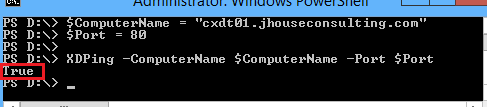
Then you can call the function from within your script. Just give it the FQDN of a Delivery Controller or Cloud Connector and the port it’s listening on, which is 80 by default. You will either receive a return value of True or False from the function.
$ComputerName = "cxdt01.jhouseconsulting.com"
$Port = 80

XDPing -ComputerName $ComputerName -Port $Port
Enjoy!
