
This PowerShell script will enumerate all user accounts in a Domain and report on the primary groups (primaryGroupID) in use.
It will also total up the number of enabled and disabled user accounts that each group is applied to.
The output of this script helps with remediation tasks and perhaps even a redesign to implement some standards for the many different use cases.
As the output is reasonably small and manageable, it outputs to both the screen and a CSV for convenience.
You can use the $ProcessDisabledUsers variable to exclude disabled accounts, but I personally prefer to do a full report across all enabled and disabled user accounts.
The following screen shot is from a recent health check I completed.
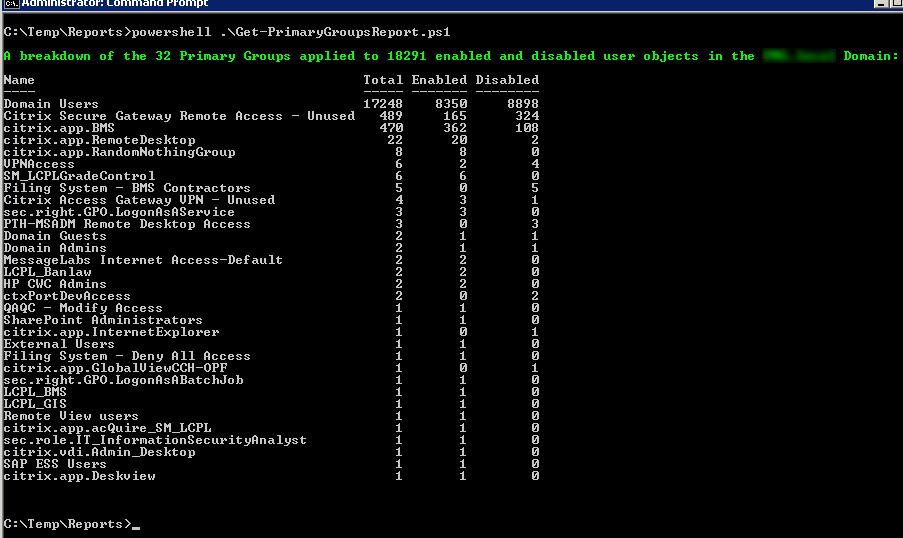
Here is the Get-PrimaryGroupsReport.ps1 script:
<#
  This script will enumerate all user accounts in a Domain and report
  on the primary groups in use. It will also total up the number of
  enabled and disabled user accounts that each group is applied to.

  The output of this script helps with remediation tasks and perhaps
  even a redesign to implement some standards for the many different
  use cases.

  Syntax examples:

  - To execute the script in the current Domain:
      Get-PrimaryGroupsReport.ps1

  - To execute the script against a trusted Domain:
      Get-PrimaryGroupsReport.ps1 -TrustedDomain mydemosthatrock.com

  Script Name: Get-PrimaryGroupsReport.ps1
  Release 1.1
  Written by Jeremy@jhouseconsulting.com 27/12/2013
  Modified by Jeremy@jhouseconsulting.com 26/05/2014

#>
#-------------------------------------------------------------
param([String]$TrustedDomain)
#-------------------------------------------------------------

# Set this value to true if you want to see the progress bar.
$ProgressBar = $True

# Set this to true to include disabled user accounts.
$ProcessDisabledUsers = $True

#-------------------------------------------------------------
# Get the script path
$ScriptPath = {Split-Path $MyInvocation.ScriptName}
$ScriptName = [System.IO.Path]::GetFilenameWithoutExtension($MyInvocation.MyCommand.Path.ToString())
$ReferenceFile = $(&$ScriptPath) + "\" + $ScriptName + ".csv"

$TrustedDomain = ""
if ([String]::IsNullOrEmpty($TrustedDomain)) {
  # Get the Current Domain Information
  $domain = [System.DirectoryServices.ActiveDirectory.Domain]::GetCurrentDomain()
} else {
  $context = new-object System.DirectoryServices.ActiveDirectory.DirectoryContext("domain",$TrustedDomain)
  Try {
    $domain = [System.DirectoryServices.ActiveDirectory.Domain]::GetDomain($context)
  }
  Catch [exception] {
    write-host -ForegroundColor red $_.Exception.Message
    Exit
  }
}

# Get AD Distinguished Name
$DomainDistinguishedName = $Domain.GetDirectoryEntry() | select -ExpandProperty DistinguishedName

$array = @()
$primarygroups = @{}
$TotalUsersProcessed = 0
$UserCount = 0

If ($ProcessDisabledUsers) {
  # Create an LDAP search for all users not marked as criticalsystemobjects to avoid system accounts
  $ADFilter = "(&(objectClass=user)(objectcategory=person)(!(isCriticalSystemObject=TRUE))(!name=IUSR*)(!name=IWAM*)(!name=ASPNET))"
  $AccountStatus = "enabled and disabled"
} else {
  # Create an LDAP search for all enabled users not marked as criticalsystemobjects to avoid system accounts
  $ADFilter = "(&(objectClass=user)(objectcategory=person)(!userAccountControl:1.2.840.113556.1.4.803:=2)(!(isCriticalSystemObject=TRUE))(!name=IUSR*)(!name=IWAM*)(!name=ASPNET))"
  $AccountStatus = "enabled"
}
# There is a known bug in PowerShell requiring the DirectorySearcher
# properties to be in lower case for reliability.
$ADPropertyList = @("distinguishedname","samaccountname","objectsid","primarygroupid")
$ADScope = "SUBTREE"
$ADPageSize = 1000
$ADSearchRoot = New-Object System.DirectoryServices.DirectoryEntry("LDAP://$($DomainDistinguishedName)")
$ADSearcher = New-Object System.DirectoryServices.DirectorySearcher
$ADSearcher.SearchRoot = $ADSearchRoot
$ADSearcher.PageSize = $ADPageSize
$ADSearcher.Filter = $ADFilter
$ADSearcher.SearchScope = $ADScope
if ($ADPropertyList) {
  foreach ($ADProperty in $ADPropertyList) {
    [Void]$ADSearcher.PropertiesToLoad.Add($ADProperty)
  }
}
$colResults = $ADSearcher.Findall()
$UserCount = $colResults.Count

if ($UserCount -ne 0) {
  foreach($objResult in $colResults) {
    $lastLogonTimeStamp = ""
    $lastLogon = ""
    $UserDN = $objResult.Properties.distinguishedname[0]
    $samAccountName = $objResult.Properties.samaccountname[0]

    # Get user SID
    $arruserSID = New-Object System.Security.Principal.SecurityIdentifier($objResult.Properties.objectsid[0], 0)
    $userSID = $arruserSID.Value

    # Get the SID of the Domain the account is in
    $AccountDomainSid = $arruserSID.AccountDomainSid.Value

    # Get User Account Control & Primary Group by binding to the user account
    # ADSI Requires that / Characters be Escaped with the \ Escape Character
    $UserDN = $UserDN.Replace("/", "\/")
    $objUser = [ADSI]("LDAP://" + $UserDN)
    If (($objUser.useraccountcontrol | Measure-Object).Count -gt 0) {
      $UACValue = $objUser.useraccountcontrol[0]
    } else {
      $UACValue = ""
    }
    $primarygroupID = $objUser.primarygroupid
    # Primary group can be calculated by merging the account domain SID and primary group ID
    $primarygroupSID = $AccountDomainSid + "-" + $primarygroupID.ToString()
    $primarygroup = [adsi]("LDAP://<SID=$primarygroupSID>")
    $primarygroupname = $primarygroup.name[0]
    $objUser = $null

    $Enabled = $True
    switch ($UACValue)
    {
      {($UACValue -bor 0x0002) -eq $UACValue} {
        $Enabled = $False
      }
    }

    $obj = New-Object -TypeName PSObject
    $obj | Add-Member -MemberType NoteProperty -Name "Name" -value $primarygroupname
    # Create a hashtable to capture a count of each Primary Group
    If (!($primarygroups.ContainsKey($primarygroupname))) {
      $TotalCount = 1
      If ($Enabled -eq $True) { $EnabledCount = 1;$DisabledCount = 0 }
      If ($Enabled -eq $False) { $DisabledCount = 1;$EnabledCount = 0 }
      $obj | Add-Member -MemberType NoteProperty -Name "Total" -value $TotalCount
      $obj | Add-Member -MemberType NoteProperty -Name "Enabled" -value $EnabledCount
      If ($ProcessDisabledUsers) {
        $obj | Add-Member -MemberType NoteProperty -Name "Disabled" -value $DisabledCount
      }
      $primarygroups = $primarygroups + @{$primarygroupname = $obj}
    } else {
      $value = $primarygroups.Get_Item($primarygroupname)
      $TotalCount = $value.Total + 1
      If ($Enabled -eq $True) { $EnabledCount = $value.Enabled + 1;$DisabledCount = $value.Disabled }
      If ($Enabled -eq $False) { $DisabledCount = $value.Disabled + 1;$EnabledCount = $value.Enabled }
      $obj | Add-Member -MemberType NoteProperty -Name "Total" -value $TotalCount
      $obj | Add-Member -MemberType NoteProperty -Name "Enabled" -value $EnabledCount
      If ($ProcessDisabledUsers) {
        $obj | Add-Member -MemberType NoteProperty -Name "Disabled" -value $DisabledCount
      }
      $primarygroups.Set_Item($primarygroupname,$obj)
    } # end if

    $TotalUsersProcessed ++
    If ($ProgressBar) {
      Write-Progress -Activity 'Processing Users' -Status ("Username: {0}" -f $samAccountName) -PercentComplete (($TotalUsersProcessed/$UserCount)*100)
    }
  }

  write-host -ForegroundColor Green "`nA breakdown of the $($primarygroups.count) Primary Groups applied to $TotalUsersProcessed $AccountStatus user objects in the $domain Domain:"
  $Output = $primarygroups.values | ForEach {$_ } | ForEach {$_ } | Sort-Object Total -descending
  $Output | Format-Table -AutoSize

  # Write-Output $Output | Format-Table
  $Output | Export-Csv -Path "$ReferenceFile" -Delimiter ',' -NoTypeInformation

  # Remove the quotes
  (get-content "$ReferenceFile") |% {$_ -replace '"',""} | out-file "$ReferenceFile" -Fo -En ascii

} else {
  write-host -ForegroundColor Red "`nNo user objects found!"
}
Enjoy!
