
This PowerShell script will Create, Import and Export Group Policy WMI Filters.
I wrote this script to cover a number of different scenarios:
- To create a default set of GPO WMI Filters for new builds.
- To document existing WMI filters for health checks and audits.
- To provide a mechanism to migrate WMI filters between Dev, Test, QA and Prod.
The following screen shot shows the default set of GPO WMI Filters that I typically use.

The following screen shot shows how they look from within the GPMC.
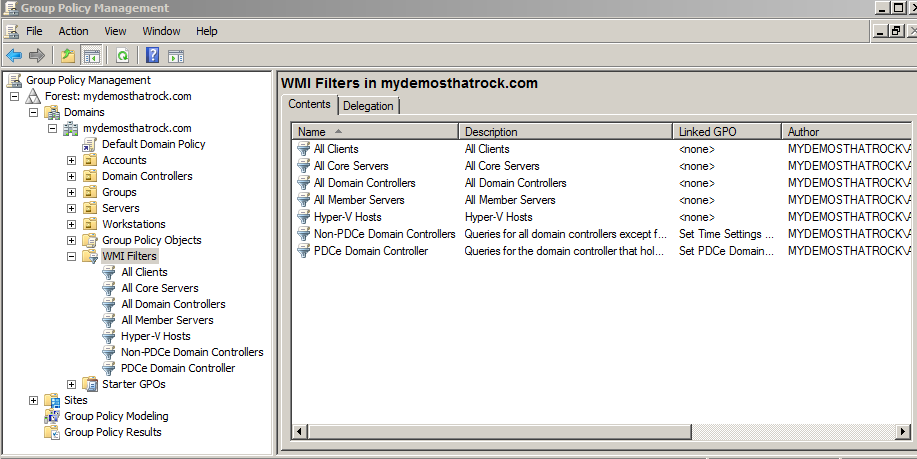
These particular WMI queries are not performance intensive, and therefore quick to process. However, it’s important to be careful how you construct them, as WMI is often known to be slow and inefficient. And of course a corrupt or inconsistent WMI repository doesn’t help.
As always it is recommended to use a tool such as the WMI Filter Validation Utility to ensure the WMI query is valid and efficient.
Here are the contents of the DefaultWMIFilters.csv file that can be used to create the default set of filters I use.
Here is the ManageWMIFilters.ps1 script:
<#
  This script will Create, Import and Export Group Policy WMI Filters

  Syntax examples:
    Create:
      ManageWMIFilters.ps1 -Action Create -ReferenceFile DefaultWMIFilters.csv
    Export:
      ManageWMIFilters.ps1 -Action Export -ReferenceFile WMIFiltersExport.csv
    Import:
      ManageWMIFilters.ps1 -Action Import -ReferenceFile WMIFiltersExport.csv

  It was originally based on the following three scripts:
    1) Using Powershell to Automatically Create WMI Filters:
       http://gallery.technet.microsoft.com/scriptcenter/f1491111-9f5d-4c83-b436-537eca9e8d94
    2) Exporting and Importing WMI Filters with PowerShell: Part 1, Export:
       http://blogs.technet.com/b/manny/archive/2012/02/04/perform-a-full-export-and-import-of-wmi-filters-with-powershell.aspx
    3) Exporting and Importing WMI Filters with PowerShell: Part 2, Import:
       http://blogs.technet.com/b/manny/archive/2012/02/05/exporting-and-importing-wmi-filters-with-powershell-part-2-import.aspx

  Another great reference:
  - Digging Into Group Policy WMI Filters and Managing them through PowerShell
    http://sdmsoftware.com/group-policy-blog/gpmc/digging-into-group-policy-wmi-filters-and-managing-them-through-powershell/

  I left the code as 3 separate modules so that it can be easily split and
  reused if preferred. Hence the reason why there is currently some duplicate
  code between the create and import sections.

  Modified all code to completely remove the requirement for the Active
  Directory PowerShell Module.

  Fixed an issue where it was not calculating the length of the supplied
  namespace. ie. The script would only import correctly if the namespace was
  root\CIMv2. But when using the root\virtualization namespace it would fail.
  This is actually an error found in all GPO WMI creation script I've found.
  They all assume that root\CIMv2 is the only namespace used.

  If your Active Directory is based on Windows 2003 or has been upgraded
  from Windows 2003, you may may have an issue with System Owned Objects.
  Importing or adding a WMI Filter object into AD used to be a system only
  operation. So you previously needed to enable system only changes on a
  domain controller for a successful ldifde import.
  If this is the case you will need to set the following registry value:
    Key: HKEY_LOCAL_MACHINE\SYSTEM\CurrentControlSet\services\NTDS\Parameters
    Type: REG_DWORD
    Value: Allow System Only Change
    Data: 1

  Release 1.3
  Written by Jeremy@jhouseconsulting.com 11th September 2013
  Modified by Jeremy@jhouseconsulting.com 9th June 2014

#>

#-------------------------------------------------------------
param([String]$Action,[String]$ReferenceFile)

Write-Host -ForegroundColor Green "Verifying script parameters...`n"

$helptext = $False

if ([String]::IsNullOrEmpty($Action)) {
  write-host -ForeGroundColor Red "Action is a required parameter.`n"
  $helptext = $True
} else {
  switch ($Action)
  {
    "Create" {$Create = $true;$Import = $false;$Export = $false}
    "Import" {$Create = $false;$Import = $true;$Export = $false}
    "Export" {$Create = $false;$Import = $false;$Export = $true}
    default {$Create = $false;$Import = $false;$Export = $false}
  }
  if ($Create -eq $false -AND $Import -eq $false -AND $Export -eq $false) {
    write-host -ForeGroundColor Red "The Action parameter is invalid.`n"
    $helptext = $True
  }
}

if ([String]::IsNullOrEmpty($ReferenceFile)) {
  write-host -ForeGroundColor Red "ReferenceFile is a required parameter. Exiting Script.`n"
  $helptext = $True
}

If ($helptext) {
  $Message = "Syntax examples:"
  $Message = $Message + "`n`tCreate:"
  $Message = $Message + "`n`t`tManageWMIFilters.ps1 -Action Create -ReferenceFile DefaultWMIFilters.csv"
  $Message = $Message + "`n`tExport:"
  $Message = $Message + "`n`t`tManageWMIFilters.ps1 -Action Export -ReferenceFile WMIFiltersExport.csv"
  $Message = $Message + "`n`tImport:"
  $Message = $Message + "`n`t`tManageWMIFilters.ps1 -Action Import -ReferenceFile WMIFiltersExport.csv"
  write-host -ForeGroundColor Green $Message
  write-host -ForeGroundColor Red "`nExiting Script."
  Exit
}

#-------------------------------------------------------------

# Set this to true to set the Allow System Only Change registry value
$EnableAllowSystemOnlyChange = $False

#-------------------------------------------------------------
function Enable-ADSystemOnlyChange([switch] $disable)
{
    # This function has been taken directly from the GPWmiFilter.psm1
    # module written by Bin Yi from Microsoft.
    $valueData = 1
    if ($disable)
    {
        $valueData = 0
    }
    $key = Get-Item HKLM:\System\CurrentControlSet\Services\NTDS\Parameters -ErrorAction SilentlyContinue
    if (!$key) {
        New-Item HKLM:\System\CurrentControlSet\Services\NTDS\Parameters -ItemType RegistryKey | Out-Null
    }
    $kval = Get-ItemProperty HKLM:\System\CurrentControlSet\Services\NTDS\Parameters -Name "Allow System Only Change" -ErrorAction SilentlyContinue
    if (!$kval) {
        New-ItemProperty HKLM:\System\CurrentControlSet\Services\NTDS\Parameters -Name "Allow System Only Change" -Value $valueData -PropertyType DWORD | Out-Null
    } else {
        Set-ItemProperty HKLM:\System\CurrentControlSet\Services\NTDS\Parameters -Name "Allow System Only Change" -Value $valueData | Out-Null
    }
}

#-------------------------------------------------------------
If ($Import -eq $true) {

  if ((Test-Path $ReferenceFile) -eq $False) {
    Write-Host -ForegroundColor Red "The $ReferenceFile file is missing. Cannot import WMI Filters.`n"
    exit
  }

  $Header = "Name","Description","Filter"
  $WMIFilters = import-csv $ReferenceFile -Delimiter "`t" -Header $Header

  $RowCount = $WMIFilters | Measure-Object | Select-Object -expand count

  if ($RowCount -gt 0) {

    write-host -ForeGroundColor Green "Importing $RowCount WMI Filters`n"

    $Domain = [System.DirectoryServices.ActiveDirectory.Domain]::GetCurrentDomain()
    $DomainName = $Domain.Name
    $DomainDistinguishedName = $Domain.GetDirectoryEntry() | Select-Object -ExpandProperty DistinguishedName

    $UseAdministrator = $False
    If ($UseAdministrator -eq $False) {
      $msWMIAuthor = [System.Security.Principal.WindowsIdentity]::GetCurrent().Name
    } Else {
      $msWMIAuthor = "Administrator@" + $DomainName
    }

    foreach ($WMIFilter in $WMIFilters) {
      $WMIGUID = [string]"{"+([System.Guid]::NewGuid())+"}"
      $WMIDN = "CN="+$WMIGUID+",CN=SOM,CN=WMIPolicy,CN=System,"+$DomainDistinguishedName
      $WMICN = $WMIGUID
      $WMIdistinguishedname = $WMIDN
      $WMIID = $WMIGUID

      $now = (Get-Date).ToUniversalTime()
      $msWMICreationDate = ($now.Year).ToString("0000") + ($now.Month).ToString("00") + ($now.Day).ToString("00") + ($now.Hour).ToString("00") + ($now.Minute).ToString("00") + ($now.Second).ToString("00") + "." + ($now.Millisecond * 1000).ToString("000000") + "-000"
      $msWMIName = $WMIFilter.Name
      $msWMIParm1 = $WMIFilter.Description + " "
      $msWMIParm2 = $WMIFilter.Filter

      $array = @()
      $SearchRoot = [adsi]("LDAP://CN=SOM,CN=WMIPolicy,CN=System,"+$DomainDistinguishedName)
      $search = new-object System.DirectoryServices.DirectorySearcher($SearchRoot)
      $search.filter = "(objectclass=msWMI-Som)"
      $results = $search.FindAll()
      ForEach ($result in $results) {
        $array += $result.properties["mswmi-name"].item(0)
      }

      if ($array -notcontains $msWMIName) {
        write-host -ForeGroundColor Green "Importing the $msWMIName WMI Filter from $ReferenceFile`n"
        If ($EnableAllowSystemOnlyChange) {
          Enable-ADSystemOnlyChange
        }
        $SOMContainer = [adsi]("LDAP://CN=SOM,CN=WMIPolicy,CN=System,"+$DomainDistinguishedName)
        $NewWMIFilter = $SOMContainer.create('msWMI-Som',"CN="+$WMIGUID)
        $NewWMIFilter.put("msWMI-Name",$msWMIName)
        $NewWMIFilter.put("msWMI-Parm1",$msWMIParm1)
        $NewWMIFilter.put("msWMI-Parm2",$msWMIParm2)
        $NewWMIFilter.put("msWMI-Author",$msWMIAuthor)
        $NewWMIFilter.put("msWMI-ID",$WMIID)
        $NewWMIFilter.put("instanceType",4)
        $NewWMIFilter.put("showInAdvancedViewOnly","TRUE")
        $NewWMIFilter.put("distinguishedname",$WMIdistinguishedname)
        $NewWMIFilter.put("msWMI-ChangeDate",$msWMICreationDate)
        $NewWMIFilter.put("msWMI-CreationDate",$msWMICreationDate)
        $NewWMIFilter.setinfo()
      } Else {
        write-host -ForeGroundColor Yellow "The $msWMIName WMI Filter already exists`n"
      }
    }
  } else {
    Write-Host -ForegroundColor Red "The data in the $ReferenceFile file is missing.`n"
  }
}

#-------------------------------------------------------------
If ($Export -eq $true) {

  set-content $ReferenceFile $NULL

  $WMIFilters = @()

  $Domain = [System.DirectoryServices.ActiveDirectory.Domain]::GetCurrentDomain()
  $DomainName = $Domain.Name
  $DomainDistinguishedName = $Domain.GetDirectoryEntry() | Select-Object -ExpandProperty DistinguishedName
  $SearchRoot = [adsi]("LDAP://CN=SOM,CN=WMIPolicy,CN=System,"+$DomainDistinguishedName)
  $search = new-object System.DirectoryServices.DirectorySearcher($SearchRoot)
  $search.filter = "(objectclass=msWMI-Som)"
  $results = $search.FindAll()
  ForEach ($result in $results) {
    $obj = New-Object -TypeName PSObject
    $obj | Add-Member -MemberType NoteProperty -Name "DistinguishedName" -value $result.properties["distinguishedname"].item(0)
    $obj | Add-Member -MemberType NoteProperty -Name "msWMI-Name" -value $result.properties["mswmi-name"].item(0)
    $obj | Add-Member -MemberType NoteProperty -Name "msWMI-Parm1" -value $result.properties["mswmi-parm1"].item(0)
    $obj | Add-Member -MemberType NoteProperty -Name "msWMI-Parm2" -value $result.properties["mswmi-parm2"].item(0)
    $obj | Add-Member -MemberType NoteProperty -Name "Name" -value $result.properties["name"].item(0)
    $WMIFilters += $obj
  }

  $RowCount = $WMIFilters | Measure-Object | Select-Object -expand count

  if ($RowCount -ne 0) {
    write-host -ForeGroundColor Green "Exporting $RowCount WMI Filters`n"

    foreach ($WMIFilter in $WMIFilters) {
      write-host -ForeGroundColor Green "Exporting the" $WMIFilter."msWMI-Name" "WMI Filter to $ReferenceFile`n"
      $NewContent = $WMIFilter."msWMI-Name" + "`t" + $WMIFilter."msWMI-Parm1" + "`t" + $WMIFilter."msWMI-Parm2"
      add-content $NewContent -path $ReferenceFile
    }
    write-host -ForeGroundColor Green "An export of the WMI Filters has been stored at $ReferenceFile`n"

  } else {
    write-host -ForeGroundColor Green "There are no WMI Filters to export`n"
  }
}

#-------------------------------------------------------------
If ($Create -eq $true) {

  if ((Test-Path $ReferenceFile) -eq $False) {
    Write-Host -ForegroundColor Red "The $ReferenceFile file is missing. Cannot create WMI Filters.`n"
    exit
  }

  $Domain = [System.DirectoryServices.ActiveDirectory.Domain]::GetCurrentDomain()
  $DomainName = $Domain.Name
  $DomainDistinguishedName = $Domain.GetDirectoryEntry() | Select-Object -ExpandProperty DistinguishedName

  $UseAdministrator = $False
  If ($UseAdministrator -eq $False) {
    $msWMIAuthor = [System.Security.Principal.WindowsIdentity]::GetCurrent().Name
  } Else {
    $msWMIAuthor = "Administrator@" + $DomainName
  }

  # Import WMI Filters From CSV
  # Name,Description,Filter
  $WMIFilters = import-csv $ReferenceFile

  $RowCount = $WMIFilters | Measure-Object | Select-Object -expand count

  if ($RowCount -gt 0) {

    write-host -ForeGroundColor Green "Creating $RowCount WMI Filters`n"

    foreach ($WMIFilter in $WMIFilters) {
      $WMIGUID = [string]"{"+([System.Guid]::NewGuid())+"}"
      $WMIDN = "CN="+$WMIGUID+",CN=SOM,CN=WMIPolicy,CN=System,"+$DomainDistinguishedName
      $WMICN = $WMIGUID
      $WMIdistinguishedname = $WMIDN
      $WMIID = $WMIGUID

      $now = (Get-Date).ToUniversalTime()
      $msWMICreationDate = ($now.Year).ToString("0000") + ($now.Month).ToString("00") + ($now.Day).ToString("00") + ($now.Hour).ToString("00") + ($now.Minute).ToString("00") + ($now.Second).ToString("00") + "." + ($now.Millisecond * 1000).ToString("000000") + "-000"

      $msWMIName = $WMIFilter.Name
      $msWMIParm1 = $WMIFilter.Description + " "
      $msWMIParm2 = "1;3;" + $WMIFilter.Namespace.Length.ToString() + ";" + $WMIFilter.Query.Length.ToString() + ";WQL;" + $WMIFilter.Namespace + ";" + $WMIFilter.Query + ";"

      $array = @()
      $SearchRoot = [adsi]("LDAP://CN=SOM,CN=WMIPolicy,CN=System,"+$DomainDistinguishedName)
      $search = new-object System.DirectoryServices.DirectorySearcher($SearchRoot)
      $search.filter = "(objectclass=msWMI-Som)"
      $results = $search.FindAll()
      ForEach ($result in $results) {
        $array += $result.properties["mswmi-name"].item(0)
      }

      if ($array -notcontains $msWMIName) {
        write-host -ForeGroundColor Green "Creating the $msWMIName WMI Filter from $ReferenceFile`n"
        If ($EnableAllowSystemOnlyChange) {
          Enable-ADSystemOnlyChange
        }
        $SOMContainer = [adsi]("LDAP://CN=SOM,CN=WMIPolicy,CN=System,"+$DomainDistinguishedName)
        $NewWMIFilter = $SOMContainer.create('msWMI-Som',"CN="+$WMIGUID)
        $NewWMIFilter.put("msWMI-Name",$msWMIName)
        $NewWMIFilter.put("msWMI-Parm1",$msWMIParm1)
        $NewWMIFilter.put("msWMI-Parm2",$msWMIParm2)
        $NewWMIFilter.put("msWMI-Author",$msWMIAuthor)
        $NewWMIFilter.put("msWMI-ID",$WMIID)
        $NewWMIFilter.put("instanceType",4)
        $NewWMIFilter.put("showInAdvancedViewOnly","TRUE")
        $NewWMIFilter.put("distinguishedname",$WMIdistinguishedname)
        $NewWMIFilter.put("msWMI-ChangeDate",$msWMICreationDate)
        $NewWMIFilter.put("msWMI-CreationDate",$msWMICreationDate)
        $NewWMIFilter.setinfo()
      } Else {
        write-host -ForeGroundColor Yellow "The $msWMIName WMI Filter already exists`n"
      }
    }
  } else {
    Write-Host -ForegroundColor Red "The data in the $ReferenceFile file is missing.`n"
  }
}
Enjoy!
