Priming a Non-persistent Windows Image using an Autologon Process with an Auto Logoff Timer

Several years ago, and inspired by an article written by George Spiers to reduce login times, where “the second logon is quicker”, together with some code from Maurice Daly, I created a methodology and scripts that is designed to Autologon a non-persistent Session Host (both VDI and RDS), and then log it off again before another script will Start the Citrix Desktop Service (BrokerAgent).

It has been working flawlessly for years. However, I was never 100% happy with it because the process was using a domain (service) account for the Autologon process. The main challenge here was trying to change the password on a regular basis to stay compliant when managing multiple images. You cannot realistically do it without an outage. And in a 24×7 environment, it becomes difficult and onerous. I also felt that using a domain account can be “heavy” during a boot storm as you need to ensure you are excluding this account from profile management and policies where possible. Sometimes that is easier said than done. There is a level of risk here, as someone can easily make a change that will cause issues. The ability to roll the password and stay compliant was my biggest concern and where I got stuck for quite some time.


Read more

How to ensure the Test-WSMan cmdlet doesn’t give you false positives?

I was recently creating some health check tests that would use both the Get-CimInstance and Invoke-Command cmdlets. These use the Windows Remote Management (WinRM) protocol. To make the process more efficient I added a function that first tests that WinRM is enabled and healthy on the remote host using the Test-WSMan cmdlet.

That was working well until I hit a couple of unhealthy machines and received a response from Test-WSMan that provided misleading information. Just by using the basic command line with no other parameters gave me a positive response.

Test-WSMan Sick Machine

Read more

The Citrix Virtual Apps and Desktops & Desktops as a Service Health Check Script on Steroids

UPDATE: Version 1.5.9 released on 3rd March 2026. See below for all the details.

Since November 2014 many of us have been using the amazing Sacha Thomet’s XenApp and XenDesktop Health Check Script. I’ve made my own modifications to it over the years, but never contributed and shared anything publicly until June 2025. My motivation is to give the community some amazing visibility of their Citrix environments that they’ve never had before. I took the last release from Sacha, which was the February 2022 update, together with some modules I’d previously written, and overhauled the whole process from top to bottom, and wrote even more modules. Sacha has kindly committed my pull requests to his GitHub repository, which officially adds me as Contributor!

CVAD & DaaS Health Check Script on Steroids

Read more

The Maptek User Support Tool to Help Manage Vulcan Support Challenges

I would like to introduce you to a PowerShell tool I built in 2023 and have been continually developing and adding features until this release. If you or your customer runs Maptek Vulcan, especially in a virtualised desktop platform from Vendors such as Citrix, Omnissa, Parallels, Dizzion, Microsoft and Amazon, you may want to consider using this tool to assist users with the support challenges for Maptek products, specifically Vulcan and BlastLogic. It primarily empowers the users with the ability to set, change and verify required Vulcan variables, ODBC connections, and mapped drives. It also facilitates setting the TEMP & TMP variables to a RAM Disk (if present), for the current process only, before starting Vulcan.

The Maptek products aside, this tool can be used as a template and modified to help enhance the delivery and experience for any application.

The following screen shot shows the user interface in two forms. Can you spot the differences? I will explain below what this means and all the functions the tool provides.

Maptek User Support Tools

Background

Maptek Vulcan is specialised 3D mining software used for geological modelling, mine design, and mine planning. It has been widely used in the mining industry since the mid 1980s by Geologists, Surveyors, Mine and Geotechnical Engineers to analyse, visualise, and optimise mineral resources. It is also used for resource evaluation, feasibility studies, and operational planning. It integrates with many other mining applications.

From an IT Support point of view, it’s a beast of an application that has several limitations due to legacy code and settings that creates challenges for users when deployed into a Virtual Desktop platform. It’s written to run on high end laptops and workstations where users are not locked down too heavily. So when you add Cyber policies and locked down devices and desktops, it can be challenging for users to configure the software as needed without assistance.

Read more

Microsoft High Performance Computing (HPC) Pack 2019 Service Resilience

A quick post to help make the services on the Microsoft High Performance Computing (HPC) 2019 Head Nodes more resilient by setting their recovery options.

Run the following PowerShell code on each of your Head Nodes which helps avoid failures for the users when starting the HPC Job Manager, or Admins when starting HPC Cluster Manager.

$HPCServices = Get-Service | where-object {$_.DisplayName  -like '*HPC *'}
ForEach ($HPCService in $HPCServices) {
  $ServiceDisplayName = $HPCService.DisplayName
  $ServiceName = $HPCService.Name
  write-verbose "Setting the `"$ServiceDisplayName`" service recovery options to:" -verbose
  write-verbose "- Restart the service 1 minute (60000 ms) after the first failure" -verbose
  write-verbose "- Restart the service 1 minute (60000 ms) after the second failure" -verbose
  write-verbose "- Restart the service 3 minute (180000 ms) after subsequent failures" -verbose
  write-verbose "- Reset the failure count every 1 day (86400 seconds)" -verbose
  Invoke-Command {cmd /c sc failure "$ServiceName" reset= 86400 actions= restart/60000/restart/60000/restart/180000} | out-null
}

HPC Pack 2019 logo

Read more

The Micromine Alastri Hub Launcher Tool that leverages a RAM Disk for Temporary Data

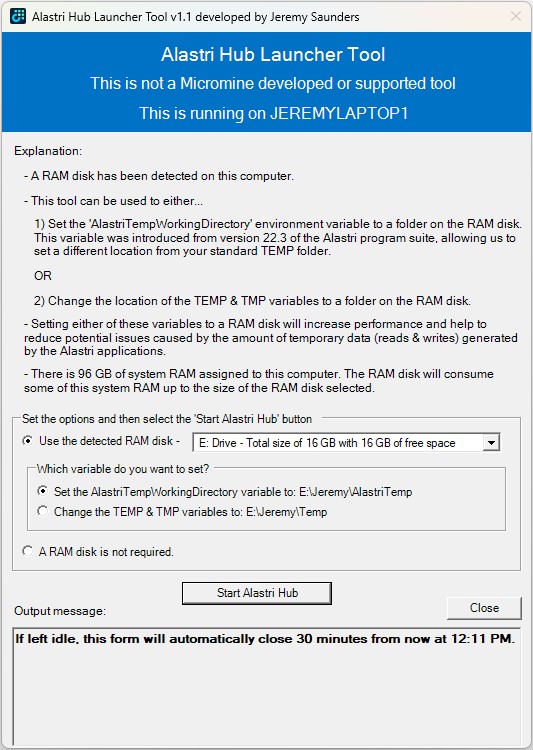
I would like to introduce you to a PowerShell tool I originally created in early 2024, which was in the research and planning stage for about 12 months previous to that whilst I was finding a suitable RAM Disk solution. If you or your customer runs Micromine Alastri Software, especially in a virtualised desktop platform from Vendors such as Citrix, Omnissa, Parallels, Dizzion, Microsoft and Amazon, you may want to consider using this tool to help increase performance and reduce potential issues caused by the amount of temporary data (reads & writes) generated and consumed by the Alastri applications.

Alastri Hub Launcher

Read more

Silently Installing and Automating the Arsenal Image Mounter (AIM) RAM Disk Feature

Updated 17th November 2025

I previously wrote about The best free for commercial use RAM Disk that works perfectly with Desktop Virtualisation. This is a follow on from that article that will focus on:

  • The installation of Arsenal Image Mounter (AIM)
  • The automation for the creation of a RAM Disk
  • The challenges I experienced with the creation of the RAM Disk
  • How to deploy it
  • The scripts themselves

Here are further articles to demonstrate the use cases:

Read more

Restoring the NVIDIA Control Panel and Tools after the Appx Package Change

Updated 12th August 2024:

  • Post install code snippets updated
  • Article wording updated

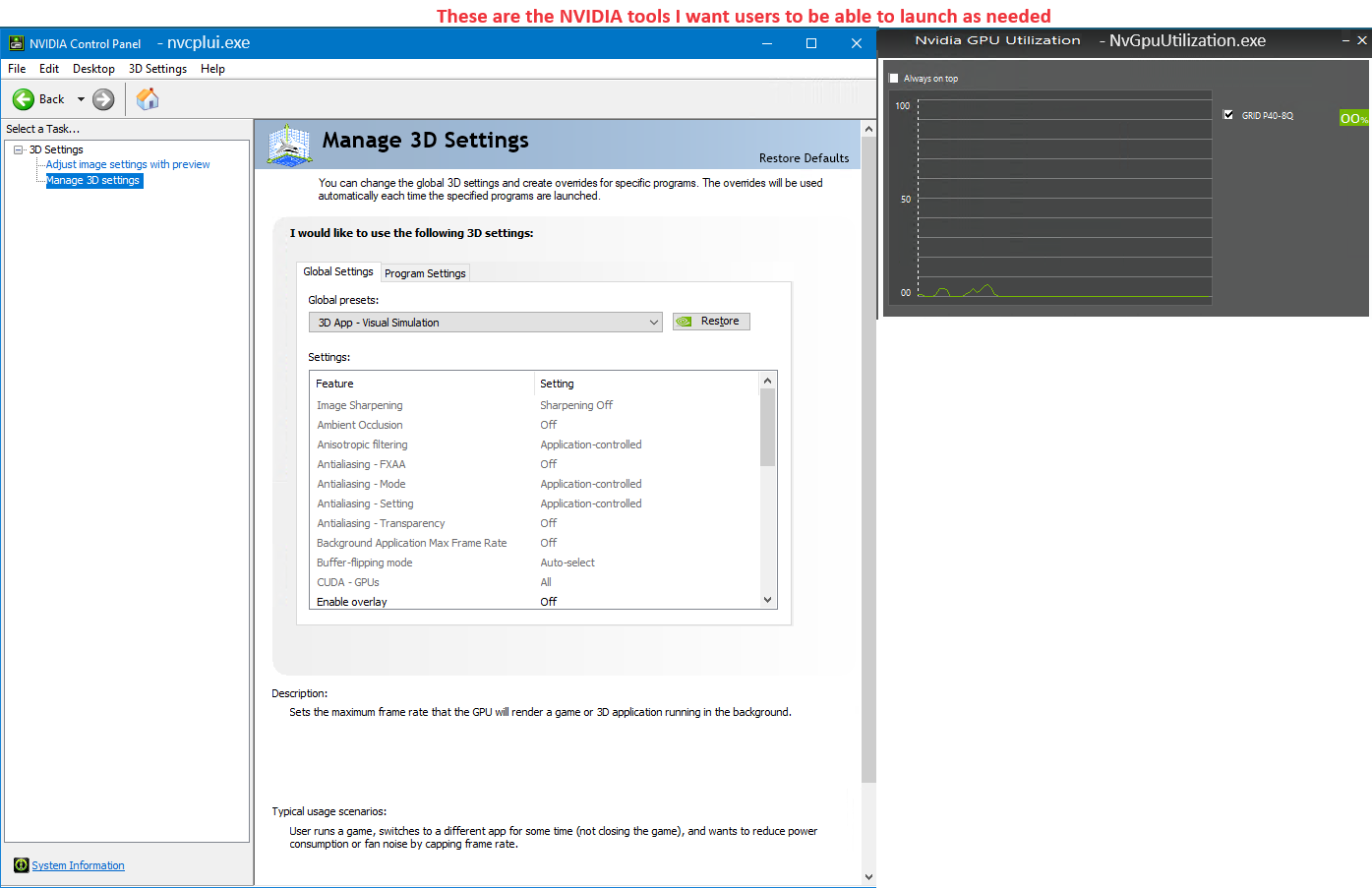
With the move from the Standard driver model to the DCH (Declarative Componentized Hardware) driver model implemented from GRID 15.0 (Windows driver version 527.41) and above, the NVIDIA Control Panel app is now distributed through the Microsoft Store as an Appx Package. Even though the base Appx Package is added as part of the driver package install, it might fail to be installed per user if the Microsoft Store is disabled, the system is not connected to the Internet, or installation of apps from the Microsoft Store is blocked by your system settings. Other than the Administrative user that installed the driver, this is not installed by default for other users using Windows Server 2019 and Windows 10 LTSC 2019 (version 1809).

Furthermore, even when the Appx Package is registered, users and local Administrators cannot directly launch the nvcplui.exe and NvGpuUtilization.exe tools.

NVIDIA Control Panel and Tools

Read more

The Citrix PVS Target Device Driver is a SCSI Adapter Bully

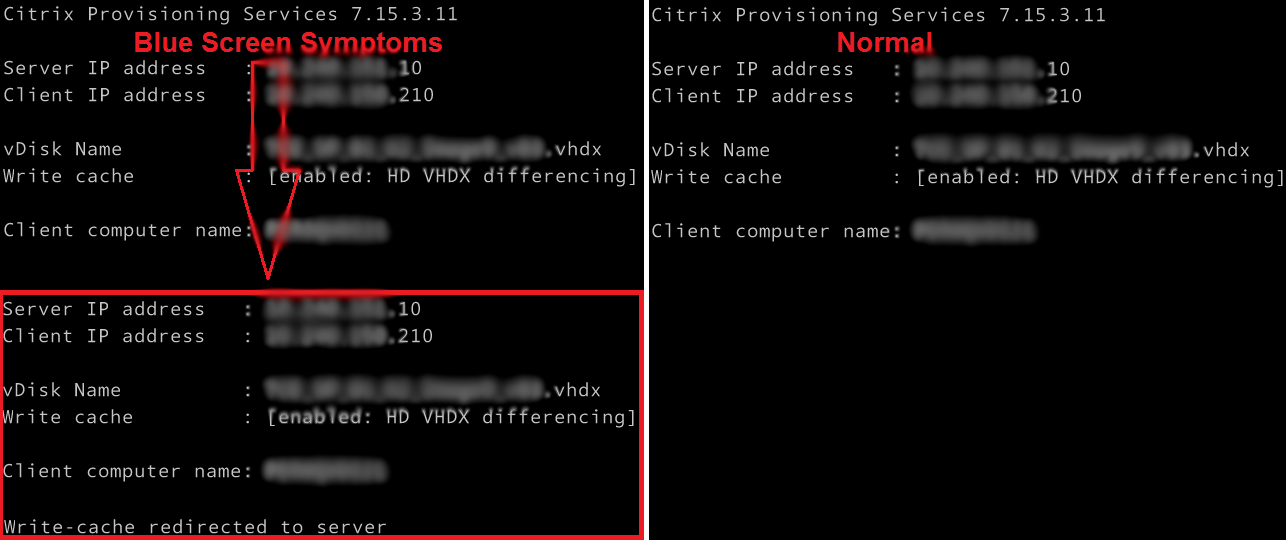
Working on a Citrix upgrade project a few years ago I was continually getting a blue screen when a Citrix PVS image booted. The symptom was obvious during the boot process. It was as if there were two NICs or the image was trying to load twice. PVS write-cache was also incorrectly being redirected to the server.

PVS Target Agent Blue Screen Symptoms

I checked and rechecked all the obvious suspects, such as ghosted NICs and other devices, old DHCP information, antivirus, etc. Everything looked good. It really did not make a lot of sense. I then stripped all the apps and tools out of the build and it worked! So what was I doing wrong?

Read more