
If you are used to checking, verifying, or even leveraging the Global variables, such as XDAuthToken, XDSDKAuth, XDSDKProxy and XDSDKUser, created by the Get-XDCredentials cmdlet, Citrix has made changes to the way these cmdlets store and use this data. They have now moved these 4 values into the new NonPersistentMetadata property of the Get-XDCredentials cmdlet output.
But of course there is no documentation to explain this change or even make us aware of it. In fact all their documentation still refers to the global variables. Very frustrating!
For me, rightly or wrongly, many of my scripts and tools check the Global:XDSDKProxy variable before continuing. In my view this was a way to verify success for the Citrix Cloud authentication process, as the output from these cmdlets is not the best.
With version 7.42.26188.47808 installed, I get the following output as expected.
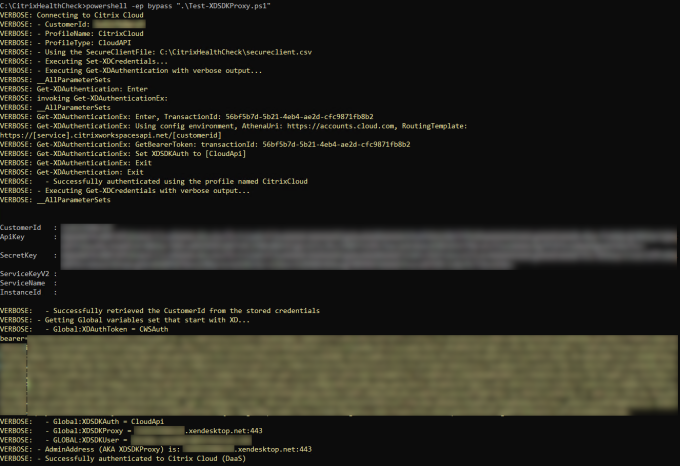
However, when recently upgrading to the latest version 7.46.26584.14299, my scripts and tools broke, as there was no longer a Global:XDSDKProxy variable to verify. Thinking that there was an error in my code, or something wrong with the jump host I was using, I commented out these lines and allowed my scripts to continue. To my astonishment they worked, which confused me for a while, until I added some verbose output to understand what was happening.
The change was easily understood when comparing the output from both versions. With version 7.46.26584.14299 installed and a tweak to my code, I can now verify that the AdminAddress, previously known as the XDSDKProxy global variable, has been set correctly, by getting it from the new NonPersistentMetadata property.

I discovered from reading a Citrix Developer Documentation article that using Get-XDAuthenticationEx instead of Get-XDAuthentication will set the Global:XDSerializedNonPersistentMetadata variable. Testing this cmdlet confirms that this is the only variable it sets. However, the Get-XDAuthenticationEx cmdlet documentation states that “This cmdlet is not intended to be used directly” as it’s an “Internally executed cmdlet“. I get the feeling that those writing the documentation are not aligned with product development and engineering. So using the Get-XDAuthentication cmdlet ensures we keep within the realms of support. I therefore feel that using the NonPersistentMetadata property is the best and most consistent solution.
Then I found the Deprecation documentation where Citrix mentions that the “Support for $XDSDKAuth for SDK Authentication” was both depreciated and removed in June 2025, which aligns with my findings. They didn’t really give us much time to fix code!
Feel free to use the following code, which will allow for both scenarios. I updated the code on 5th August 2025 to expose the bearer token in a variable which can then be used for Authorization in you scripts, such as in the header for OData API Authorization, as an example.
 Set-StrictMode -Version Latest

Add-PSSnapin Citrix.Broker.Admin.V2

# Set these 3 variable values that is relevant for your environment
$CustomerID = "<Your Customer ID>"
$SecureClientFile = "<The full path of your secureclient.csv file>"
$ProfileName = "<Profile Name you want to use>"

$ProfileType = "CloudAPI"

$CloudAuthSuccess = $True
write-verbose "Connecting to Citrix Cloud" -verbose
write-verbose "- CustomerId: $CustomerID" -verbose
write-verbose "- ProfileName: $ProfileName" -verbose
write-verbose "- ProfileType: $ProfileType" -verbose
If (Test-Path -path "$SecureClientFile") {
  write-verbose "- Using the SecureClientFile: $SecureClientFile" -verbose
  write-verbose "- Executing Set-XDCredentials..." -verbose
  Set-XDCredentials -CustomerId "$CustomerID" -SecureClientFile "$SecureClientFile" -ProfileType "$ProfileType" -StoreAs "$ProfileName"
} Else {
  write-verbose "- Using the APIKey and SecretKey" -verbose
  write-verbose "- Executing Set-XDCredentials..." -verbose
  Set-XDCredentials -CustomerId "$CustomerID" -APIKey "$APIKey" -SecretKey "$SecretKey" -ProfileType "$ProfileType" -StoreAs "$ProfileName"
}
Try {
  write-verbose "- Executing Get-XDAuthentication with verbose output..." -verbose
  # Using Get-XDAuthenticationEx instead of Get-XDAuthentication will set the Global:XDSerializedNonPersistentMetadata variable. This is the only
  # variable it sets. However, for the Get-XDAuthenticationEx cmdlet the documentation states that "This cmdlet is not intended to be used directly"
  # as it's an "Internally executed cmdlet". So using the Get-XDAuthentication cmdlet ensures we keep within the realms of support. Therefore, using
  # the NonPersistentMetadata property is the best solution.
  #Get-XDAuthenticationEx -ProfileName $ProfileName -verbose
  Get-XDAuthentication -ProfileName $ProfileName -verbose
  write-verbose "  - Successfully authenticated using the profile named $ProfileName" -verbose
  write-verbose "- Executing Get-XDCredentials with verbose output..." -verbose
  $CCCreds = Get-XDCredentials -ProfileName $ProfileName -verbose
  # Get-XDCredentials returns an object of Citrix.Sdk.Proxy.Cmdlets.Base.XDCredentials type from the Citrix.SdkProxy.PowerShellSnapIn.dll module.
  If($Null -ne $CCCreds) {
    If ($CCCreds.CustomerId -eq "$CustomerID") {
      $CCCreds
      write-verbose "  - Successfully retrieved the CustomerId from the stored credentials" -verbose
    } Else {
      $CloudAuthSuccess = $False
      write-warning "  - Failed to retrieved the CustomerId from the stored credentials" -verbose
    }
    write-verbose "- Getting Global variables set that start with XD..." -verbose
    $XDGlobalVariables = Get-Variable -Name "XD*" -Scope Global
    If (($XDGlobalVariables | Measure-Object).Count -gt 0) {
      $XDGlobalVariables | ForEach-Object {
        write-verbose "  - $($_.Name) = $($_.Value)" -verbose
      }
    } Else {
      write-verbose "  - There are no Global variables set that start with XD" -verbose
    }
    $BearerToken = ""
    Try {
      # The Bearer Token is both a direct property of the Get-XDCredentials output or within the NonPersistentMetadata property.
      If ($CCCreds.NonPersistentMetadata.BearerToken -ne $null) {
        write-verbose "- The NonPersistentMetadata property exists with the BearerToken value" -verbose
        $BearerToken = $CCCreds.NonPersistentMetadata.BearerToken
      }
    }
    Catch {
      write-warning "- The property 'NonPersistentMetadata' cannot be found on this object. Will try the Global XDAuthToken variable next." -verbose
    }
    $AdminAddress = ""
    Try {
      If ($CCCreds.NonPersistentMetadata.AdminAddress -ne $null) {
        write-verbose "- The NonPersistentMetadata property exists with the AdminAddress value" -verbose
        $AdminAddress = $CCCreds.NonPersistentMetadata.AdminAddress
      }
    }
    Catch {
      write-warning "- The property 'NonPersistentMetadata' cannot be found on this object. Will try the Global XDSDKProxy variable next." -verbose
    }
    If ([string]::IsNullOrEmpty($BearerToken)) {
      Try {
        Get-Variable -Name "XDAuthToken" -Scope Global -ErrorAction Stop | out-null
        write-verbose "- The Global XDAuthToken variable is set"
        $BearerToken = $Global:XDAuthToken
      }
      Catch {
        write-warning "- The Global XDSDKProxy variable cannot be retrieved" -verbose
      }
    }
    If ([string]::IsNullOrEmpty($AdminAddress)) {
      Try {
        Get-Variable -Name "XDSDKProxy" -Scope Global -ErrorAction Stop | out-null
        write-verbose "- The Global XDSDKProxy variable is set"
        $AdminAddress = $Global:XDSDKProxy
      }
      Catch {
        write-warning "- The Global XDSDKProxy variable cannot be retrieved" -verbose
      }
    }
    If (![string]::IsNullOrEmpty($BearerToken) -AND ![string]::IsNullOrEmpty($AdminAddress)) {
      write-verbose "- BearerToken (AKA XDAuthToken) is set under the BearerToken variable: (For security and confidentiality reasons we do not output the BearerToken here)" -verbose
      write-verbose "- AdminAddress (AKA XDSDKProxy) is set under the AdminAddress variable: $AdminAddress" -verbose
    } Else {
      $CloudAuthSuccess = $False
      If ([string]::IsNullOrEmpty($BearerToken)) {
        write-warning "- The BearerToken (AKA XDAuthToken) cannot be determined" -verbose
      }
      If ([string]::IsNullOrEmpty($AdminAddress)) {
        write-warning "- The AdminAddress (AKA XDSDKProxy) cannot be determined" -verbose
      }
    }
  } Else {
    $CloudAuthSuccess = $False
    write-warning "- Get-XDCredentials returned no data" -verbose
  }
}
Catch {
  write-warning "- $($_.Exception.Message)" -verbose
  $CloudAuthSuccess = $False
}
If ($CloudAuthSuccess) {
  write-verbose "- Successfully authenticated to Citrix Cloud (DaaS)" -verbose
} Else {
  write-warning "- Failed to authenticate using the profile named $ProfileName" -verbose
  Exit
}
Hope this helps.
