
I was recently creating some health check tests that would use both the Get-CimInstance and Invoke-Command cmdlets. These use the Windows Remote Management (WinRM) protocol. To make the process more efficient I added a function that first tests that WinRM is enabled and healthy on the remote host using the Test-WSMan cmdlet.
That was working well until I hit a couple of unhealthy machines and received a response from Test-WSMan that provided misleading information. Just by using the basic command line with no other parameters gave me a positive response.

So if you assume at this point the Test-WSMan cmdlet has returned a positive response, and then proceed to use the Get-CimInstance cmdlet against that machine, you receive an error that leaves you scratching your head.
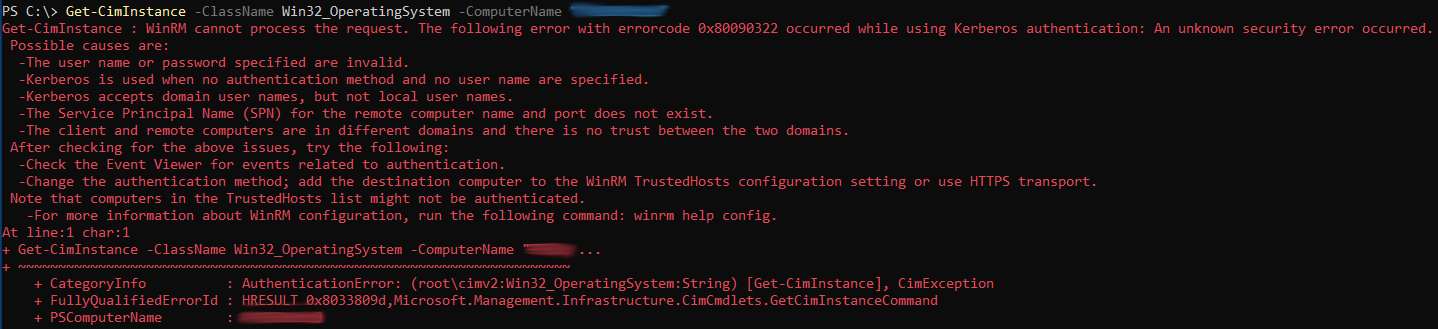
How did Test-WSMan give a positive response and yet Get-CimInstance failed with a Kerberos error?
Well it turns out that Test-WSMan by default sends the request to the remote computer anonymously, without using authentication. If the request is made anonymously, it returns no information that is specific to the operating-system version. Instead, this cmdlet displays null values for the operating system version and service pack level (OS: 0.0.0 SP: 0.0).
Get-CimInstance is using Kerberos authentication, but Test-WSMan didn’t test for that, as it just made an anonymous connection. Bad coding!
The trick is to use the the Authentication parameter with the Default value, which will use the authentication method implemented by the WS-Management protocol. When a client computer and a server are both part of the same Active Directory domain (or trusted domains), WinRM defaults to using Kerberos for authentication. So this will fail on Kerberos issues before we even get to the Get-CimInstance cmdlet.

Furthermore, when the Test-WSMan cmdlet is then run against a healthy computer using the Authentication parameter, the operating system version and service pack level are returned.

So this is how the Test-WSMan cmdlet should be used by default. Why on earth would Microsoft leave off the authentication by default. I know the documentation states this, but most don’t read it! It would be better to have it on by default and allow you to set the Authentication parameter value to Anonymous, if you really wanted that behaviour. I can not think of one reason you would ever want to test it anonymously. That doesn’t make sense to me. I can guarantee that many have used this incorrectly over the years.
I actually wrote a function for that health check script to ensure we get valid output. It simply returns True or False. Try it out!
Function IsWinRMAccessible {
  # The Get-CimInstance and Invoke-Command cmdlets uses WinRM, so we test to see if WinRM is enabled and responding correctly.
  # The Test-WSMan cmdlet submits an identification request that determines whether the WinRM service is running on a local or remote computer.
  # If the tested computer is running the service, the cmdlet displays the WS-Management identity schema, the protocol version, the product
  # vendor, and the product version of the tested service. By default the request is sent to the remote computer anonymously, without using
  # authentication. So we include the Authentication parameter and with the Default value, which will use the authentication method
  # implemented by the WS-Management protocol. When a client computer and a server are both part of the same Active Directory domain (or
  # trusted domains), WinRM defaults to using Kerberos for authentication. This will fail on Kerberos issues, for example. This can happen
  # when there is a missing SPN (Service Principal Name), the computer account has lost its domain trust, etc. Therefore, this test is only
  # successful if the Test-WSMan cmdlet hasn't returned a null (0.0.0) value for the operating system version.
  param ([string]$hostname)
  $success = $False
  try {
    $output = Test-WSMan -Computername $hostname -Authentication Default -ErrorAction Stop
    # Verify that Test-WSMan hasn't returned a null (0.0.0) value for the operating system version.
    If (($output.ProductVersion -split (" "))[1] -ne "0.0.0") {
      $success = $True
    }
  }
  Catch {
    #$_.Exception.Message
  }
  return $success
}
Hope that helps to demystify the Test-WSMan cmdlet.
Enjoy!
