Finding Orphaned Group Policy Objects

Group Policy Objects (GPOs) are stored in two parts:

  1. GPC (Group Policy Container). The GPC is where the GPO stores all the AD-related configuration under the CN=Policies,CN=System,DC=… container, which is replicated via AD replication.
  2. GPT (Group Policy Templates). The GPT is where the GPO stores the actual settings located within SYSVOL area under the Policies folder, which is replicated by either File Replication Services (FRS) or Distributed File System (DFS).

This script will help find GPOs that are missing one of the parts, which therefore makes it an orphaned GPO.
Read more

Installing the HP Universal Print Drivers on Citrix/Terminal Servers

I have found the latest batch of HP’s Universal Printer Drivers to be the very stable. The command line I use for installing the HP Universal Print Drivers on Citrix/Terminal servers is as follows:

Version 5.0 PCL 5

install.exe /q /npf /nd /dod /dos /dpm /ddu /dso /gdssnp /snptm=0 /dm /dmpa /dads /pqdmpa /pqdads

Version 5.0 PCL 6

install.exe /q /npf /nd /dod /dos /dpm /ddu /dso /gdssnp /snptm=0 /dm /dmpa /dads /pqdmpa /pqdads

Version 5.0 PS (Post Script)

install.exe /q /npf /nd /dod /dos /dpm /ddu /dso /gdssnp /snptm=0 /dm /dmpa /dads /pqdmpa /pqdads

Read more

How to prevent certain MS Outlook dialog boxes from showing?

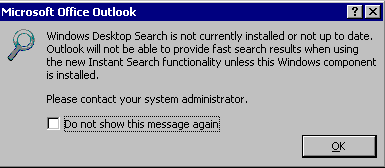
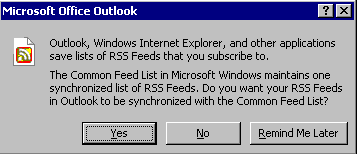
This script will manage the “PONT_STRING” registry value to control the “Don’t Show Dialog” Setting for some of the Outlook dialog boxes that don’t have a simple way of preventing them from showing via a Group Policy Setting, etc. Under Outlook 2007 there are two particular dialog boxes that may prompt the user when a new profile is created.

Read more

User-Self Help Tools for an SBC and VDI Deployment

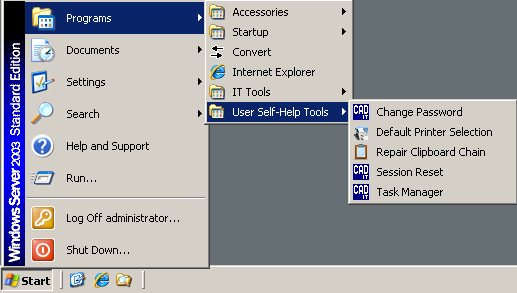
Whenever I implement a Citrix/Terminal Server farm, I always include certain applications and tools that I believe users will get some value from, which may in-turn assist IT Support by lowering the number of helpdesk calls. Who knows???

I have blogged about all these tools before…

Their Start Menu shortcuts can be seen in the screenshot below.

Read more

Script to Fix the Delivery Services Console Shortcut

This script will update any shortcuts to the Delievery Services Console (DSC) and Access Management Console (AMC).

Launching the DSC or AMC on 64-bit system is a bit of a challenge. The CmiLaunch.exe does not work correctly on a 64-bit system. It does not start and we receive the following three errors in the System Event Logs:

Event Source: SideBySide
Event ID: 59
Description: Generate Activation Context failed for C:\WINDOWS\SysWOW64\mmc.exe. Reference error message: The referenced assembly is not installed on your system.

Event Source: SideBySide
Event ID: 59
Description: Resolve Partial Assembly failed for Microsoft.Windows.Common-Controls. Reference error message: The referenced assembly is not installed on your system.

Event Source: SideBySide
Event ID: 32
Description: Dependent Assembly Microsoft.Windows.Common-Controls could not be found and Last Error was The referenced assembly is not installed on your system.

Read more

Script to Join a Computer to the Domain

This script will join a computer to a domain. You can either specify the parameters as command line arguments, or look them up in an ini file.

If an OU is not specified, the value is set to NULL, which means that the computer object will be placed in the OU/Container that is set as the Domain default within Active Directory, which is typically the Computers container.

It also checks to see if the computer object already exists in AD. If it does, it will join to the object in its existing location.

IMPORTANT: Refer to the %SystemRoot%\Debug\NetSetup.LOG file to help fault find any issues with the domain joining process.

Read more