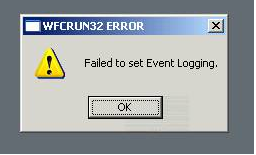
A message box may appear titled “WFCRUN32 ERROR”, with the message being “Failed to set Event Logging.” as per the following screenshot:

Delivering customer success through technology: IT Infrastructure | Citrix | End User Computing | Platform Engineering | DevOps | Full Stack Developer | Technical Architect | Improvisor | Aspiring Comedian | Midlife Adventurer
A message box may appear titled “WFCRUN32 ERROR”, with the message being “Failed to set Event Logging.” as per the following screenshot:
Sometimes you may find that the HTTP URL shortcut icon is “broken”; referencing %SystemRoot%\system32\SHELL32.dll,0 instead of %SystemRoot%\system32\url.dll,0. This is due to a bug that does not consistently set the default type and data for the HKEY_CLASSES_ROOT\HTTP\DefaultIcon value. When the icons are not displaying correctly, it will have a default value of type REG_SZ with Data “%1” when it should be of type REG_EXPAND_SZ with Data “%SystemRoot%\system32\url.dll,0”. Strangely, the DefaultIcon for the HTTPS (HKEY_CLASSES_ROOT\HTTPS\DefaultIcon) URL shortcut does not suffer from the same problem. I hope you find this information of value.
Updated 19th October 2010…
This is what I call the “bees knees” of scripts for deploying VMware Tools. It will detect if it’s being installed on a Terminal/Citrix Server, and remove the appropriate components that may impede performance, etc.
Like most IT professionals, I’ve been using Bginfo to embed some useful information in the wallpaper of a users Desktop for some years now. So what you say! Well…not too long ago Warren Simondson of CTRL-ALT-DEL IT Consultancy created a couple of cool utilities called TSBackdrop and PCBackdrop. I was specifically interested in the TSBackdrop utility, as it automatically displays items such as the Client Computer Name, Client IP address, Username and the Server which the Client is logged on to, on the user’s desktop background. This is great for Terminal and Citrix servers, and something that Bginfo lacks.
The new theory for placing a server off-line is to apply an “Out of service” load evaluator instead of disabling logons. The “Out of service” load evaluator consists of an empty Scheduling rule. The issue with this theory is that if you automate the move of a server into an “Out of service” load evaluator for maintenance, reboots, etc, then how do you know which load evaluator to move it back into when it’s ready to be placed back into production? I guess most would hard code this, or reference it from an ini file, etc, but that requires too much maintenance, as it can be difficult to manage in the larger farms that make use of different load evaluators across different hardware and load managed groups. So I enhanced the original version of this script to address this exact problem. It will read the existing load evaluator and write it against a registry value called PreviousLoadEvaluator under the HKLM\SOFTWARE\Citrix key. Then you can easily re-run this script with certain parameters to set the load evaluator back to what it was previously using. A simple concept that works very well.
Despite the new Health Monitoring & Recovery feature of XenApp 4.5, I continue to implementing a “Self Healing” mechanism for the Print Spooler service.
Here’s a pretty good article posted by Sven Huisman on behalf of Verron Martina from VMware: http://virtualfuture.info/2008/07/citrix-on-vi3x-recommendations/ Some more notes from Jamie Morrison: http://theether.net/kb/100072
It has always been my opinion that the CPU Utilisation and Page Swaps rules are highly variable, and therefore do not often represent the real load of a server. CPU Utilisation can often be too erratic to provide consistent load balancing. Now days you have the CPU Optimisation feature, or a 3rd Party management app controlling this. Once you’ve base-lined your systems, then a custom evaluator with the Server User Load and Memory Usage rule is about the best to receive a consistent balance across all servers.
This is the essentially an index to some blogs and articles for tuning and tweaking Terminal / Citrix Server environments. I am doing this for a number of reasons…
