Script to Create an Active Directory Schema Update Report

This PowerShell script was written by the awesome Ashley McGlone (AKA Goatee PFE) and published to the TechNet Script Center. It was also blogged on the Scriting Guy TechNet site. However, it did need some updates to keep up with the newer schema updates as well as adding the SCCM (ConfigMgr) versions. As Ashley has not updated it since 19th September 2013 I thought I’d update it myself and post it here until he gets the time to update the script and publish an updated version.

It will report the versions of the following products as per the sample screen shot from one of my customers:

  • Active Directory
  • Exchange
  • Lync
  • System Center Configuration Manager (SCCM) – ConfigMgr
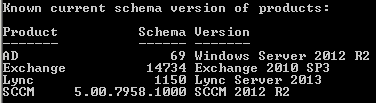
Schema Version of Products

Please ensure you read the Scripting Guy’s blog titled “How to Find Active Directory Schema Update History by Using PowerShell“, which provides some great documentation on the script as well as some valuable comments that have helped to implement the updates.

The original script can be found here on the TechNet Script Center: PowerShell Active Directory Schema Update Report

Read more

Script to Create an Overview of all Computer Objects in a Domain

This PowerShell script will provide an overview and count of all computer objects in a domain based on Operating System and Service Pack. It helps an organisation to understand the number of stale and active computers against the different types of operating systems deployed in their environment.

Computer objects are filtered into 4 categories:

  • Windows Servers
  • Windows Workstations
  • Other non-Windows (Linux, Mac, etc)
  • Windows Cluster Name Objects (CNOs) and Virtual Computer Objects (VCOs)

A Stale object is derived from 2 values ANDed together:

  • PasswordLastChanged > $MaxPasswordLastChanged days ago
  • LastLogonDate > $MaxLastLogonDate days ago

By default the script variable for $MaxPasswordLastChanged is set to 90 and the variable for $MaxLastLogonDate is set to 30. These can easily be adjusted to suite your definition of a stale object.

The Active objects column is calculated by subtracting the Enabled_Stale value from the Enabled value. This gives us an accurate number of active objects against each Operating System.

Read more

Script to Create a Report of Members of Privileged Groups

This PowerShell script will create a report of users that are members of the following privileged groups:

  • Enterprise Admins
  • Schema Admins
  • Domain Admins
  • Cert Publishers
  • Administrators
  • Account Operators
  • Server Operators
  • Backup Operators
  • Print Operators

This is the default list of privileged groups I’ve set, but you can adjust the privileged groups directly within the getForestPrivGroups function if needed.

The original script was written by Doug Symalla from Microsoft and posted onto the TechNet Script Center: List Membership In Privileged Groups

This was accompanied by two TechNet Blogs:

The script was okay, but needed several updates to be more accurate and bug free. As Doug had not published an update since 26th April 2013, I though that I would. The changes I made are documented in the script.

Read more

Script to Create, Import and Export Group Policy WMI Filters

This PowerShell script will Create, Import and Export Group Policy WMI Filters.

I wrote this script to cover a number of different scenarios:

  • To create a default set of GPO WMI Filters for new builds.
  • To document existing WMI filters for health checks and audits.
  • To provide a mechanism to migrate WMI filters between Dev, Test, QA and Prod.

Read more

Script to Create a Report on the Primary Groups (primaryGroupID) in Use

This PowerShell script will enumerate all user accounts in a Domain and report on the primary groups (primaryGroupID) in use.

It will also total up the number of enabled and disabled user accounts that each group is applied to.

The output of this script helps with remediation tasks and perhaps even a redesign to implement some standards for the many different use cases.

Read more

Script to Generate a Group Policy Object (GPO) Version Report

Is there a version match between your Group Policy Object (GPO) containers and templates?

This PowerShell script will check that the version of each GPO is consistent in the Active Directory Group Policy Container (GPC) and on each Domain Controller in the Group Policy Template (GPT).

All Windows Operating Systems (since Windows 2000) will apply the GPO regardless of a version mismatch. However, a version mismatch will typically mean that some settings will simply not be applied because they haven’t been replicated correctly across the environment. Replication issues with good old flaky FRS and perhaps (but rarely) the newer DFS-R is often the reason that the GPT gets out of sync and lags behind the GPC. This is such a common problem.

Read more

Active Directory Health Check, Audit and Remediation Scripts

PowerShell Logo

I’ve been doing Active Directory work for many years and as such have a library of hundreds of scripts to assist with health checks, audits, and remediation tasks that I would like to share with the community.

But it’s not just a case of providing a script that creates a CSV or screen output, etc, as the output needs to be thoroughly explained so that the results are correctly understood and interpreted. The last thing I want is for someone to take the output of one of my scripts and start looking for a problem that does not exist, or making unnecessary modifications to their environment. This means that each script requires a separate article of it’s own. I have been doing this to date, but wanted to create a post to list all scripts used for health checks, audits and remediation tasks; linking them in as I blog about each one. I will also link out to other peoples scripts and articles that I use and find valuable.

I hope you find this a valuable source of information.

Read more

Fee-Driven Consulting vs Purpose-Driven Consulting

This blog was inspired by a post to a LinkedIn group by a gentleman by the name of Jason Thurwanger. I felt that his words could not be wasted in a group so took it upon myself to blog about it. Aside from layout and a couple of grammatical changes I have not modified this at all. Jason deserves 100% credit for this next section that I’ve quoted.

Fee-Driven Consulting vs Purpose-Driven Consulting

Do you know the difference? If you have utilized consultants in the past, you almost certainly do.

Fee-Driven Consulting produces lengthy reports after the consultant spends “x” amount of time reviewing data, coupled with some first-hand observations. These consultants treat the workplace like a crime scene, careful not to get their fingerprints on anything that can be tied back to them. Routinely, these consultants justify taking such a “clinical” approach by stating that they don’t want to create confusion/blur the internal lines of communication by having people wonder whether they should listen to the consultant or their own manager. It sounds logical enough that most clients allow themselves to be led down this path of thinking.

However, there are many problems with this approach, including a real lack of accountability on the part of the consultant. You see, for a consultant that is interested only in a fee, they want to personally involve themselves as little as possible for two very prevalent reasons.

Read more

Introducing the new AppDNA Platinum Edition and Goodbye and RIP to the Standalone Editions

The Excitement:

Last June Citrix included a cut down licensed version of AppDNA as part of the XenDesktop 7 Platinum license. As excited as everyone was at the time, this license was so restrictive that you could only analyse applications using the SBC module. Back then I wrote an article titled “AppDNA is now included with XenDesktop 7 Platinum, or is it just a tease?“, which pointed out the limitations of this release. Clearly Citrix took my feedback seriously, as now they have included a full unrestricted license with XenApp or XenDesktop 7.5 Platinum. It is totally unlimited across all modules! How cool is that?

In the announcement they say that “The inclusion of all the AppDNA capabilities in Platinum editions helps IT address a variety of migration issues, including how to virtualize applications ahead of Microsoft Windows XP and Windows Server 2003 end-of-life milestones.” It’s a funny marketing statement given that Windows XP will reach it’s end-of-life milestone 13 days after these new capabilities are released into the Platinum editions!

The Disappointment:

To make matters worse Citrix, in their infinite wisdom, have also decided to drop the standalone versions altogether. So as of 28th April you will no longer be able to purchase the Standard or Enterprise editions. This is so uncool! In fact the EOM (End Of Maintenance) for the version 7.1 and later standalone editions is 31st October 2015, and the EOL (End Of Life) is 31st October 2016. So there is no value in purchasing the product if its last sale date is a little more than a month away. 

Read more

Script to Create the ADMX Central Store

I find it amazing how many Active Directory environments I review that do not have an ADMX Central Store set up. It’s been a best practice since the release of Windows Vista/2008 some 7 years ago now. What I find is that there tends to be ADMX sprawl across management servers and even the workstations of the IT Pros, which creates challenges when determining where to edit certain GPOs from. This is just down to lack of understanding and perhaps even laziness.

This PowerShell script will create the ADMX Central Store for you by copying the ADMX files from several source locations, such as a master source on an Administrative share and/or several management servers, including IT Pro workstations.

I use to do this via a batch script using xcopy, but the batch script needed some re-work before I was prepared to share it, so I took this opportunity to re-write it using PowerShell.

Read more