The best free for commercial use RAM Disk that works perfectly with Desktop Virtualisation

For context, a RAM Disk provides fast I/O (read and write) performance, faster than SSDs (Solid State Drives), with wider bandwidth and much lower latencies.

There are plenty of free and paid options for RAM Disk software available. This article is not about finding the fastest RAM Disk software available, so I haven’t gone out and benchmarked a range of products. My goal was to find the best “free for commercial use” RAM Disk software that works well and meets a list of requirements as laid out below. So I won’t be adding screen shots of output from tools like CrystalDiskMark, etc.

What is the best free for commercial use RAM Disk I hear you ask? The answer is Arsenal Image Mounter (AIM), from Arsenal Recon, which was developed by the legendary Olof Lagerkvist of ImDisk Toolkit fame.
Arsenal Image Mounter (AIM)

Okay, so I gave away the secret early in this article. But now I’m going to take you on a journey of how I got there, the use cases, the challenges, and the PowerShell scripts I used to deploy and create it.

Read more

Cold Starting and/or Hydrating Your Applications To Improve Their Startup Times

In the End User Computing (EUC) space we know that after the first time the application starts post reboot, the next time is faster. The first startup is referred to as a cold startup and all subsequent runs are warm startups. The first time the application starts, components of the application, such as the EXEs (executables) and DLLs (dynamic link libraries) need to be loaded from disk, which can delay the startup time. All subsequent runs will then read the data from the file system cache, which is memory managed by the Operating System.

Hydrate and Cold Start your applications

The way we prepare a system for a user is to cold start (pre-launch) the applications when the system starts. We do this by starting and then terminating each process, such as winword.exe.

Read more

Installing, Configuring, Securing and Using MDT Webservices – Part 3

In Part 1 we walked through the installation and configuration of Deployment Webservices.

In Part 2 we walked through securing the Webservice.

In this part I will demonstrate how to use the Webservice via a PowerShell script to securely move a computer object during the operating system deployment (OSD) task sequence using Microsoft Deployment Toolkit (MDT).

To achieve the end result we need to:

  • Create some deployment share rules in MDT (CustomSettings.ini)
  • Add two “Run PowerShell Script” tasks to the Task Sequence
  • Download and place the PowerShell Script into the deployment share Scripts folder

Read more

Installing, Configuring, Securing and Using MDT Webservices – Part 2

In Part 1 we walked through the installation and configuration of Deployment Webservices. In this part we will focus on securing the Webservice.

There are five (5) main areas that I focus on to lock down the Webservice, and I’ll include two (2) optional areas for consideration:

  1. Use Request Filtering, which is basically what the old URL Scan morphed into from IIS 7 (Windows 2008) and above. Request Filtering gives a tighter level of control over the settings and where they are applied than URL Scan ever did.
  2. Authentication – Disable anonymous authentication. That should be a no-brainer!
  3. Authorization Rules – Only allow specific users access.
  4. Changing the authenticatedUserOverride serverRuntime setting to UseWorkerProcessUser. IIS 7.5 (Windows 2008 R2) and above allows us to configure IIS so that the worker process identity is used for accessing resources, such as the file system, whilst the authenticated user is only used for authorization purposes. This means that you only need to set NTFS permissions for the worker process identity.
  5. Setting NTFS Permissions on the DeploymentWebservice folder for the worker process identity.
  6. Optionally, you can also exclude some of the higher risk AD Functions.
  7. Optionally, you can also SSL enable the site with a certificate.

Read more

Installing, Configuring, Securing and Using MDT Webservices – Part 1

This will be a three part article on installing, configuring, securing and using Maik Koster’s Deployment Webservice.

I’m a massive fan of Microsoft Deployment Toolkit (MDT) and use it for all customer deployments that don’t already have a modern and/or mature deployment model.

The Deployment Webservice is required to complement MDT for two main reasons:

  1. The Active Directory Net Framework classes are NOT supported in WinPE, which means that WinPE does not support the use of ADSI. So when you rebuild a device/image, you are unable to easily automate moving of the computer object to a build/staging OU before the Domain Join process. This is important when there is an existing object in Active Directory because you don’t want it to join to an existing object where unwanted Group Policy Objects may apply, that may in-turn break the build process, or at least make it unreliable.
  2. The MDT task sequence does not run as a Domain User with permissions to easily achieve this task. Whilst in MDT you can run a script as a different user, I don’t like using those configuration fields, as it means my task sequences end up being hard coded with credentials. I wanted a far more flexible approach so that I could pass it existing variables or derive them directly from the Task Sequence variables.

Read more

User-Self Help Tools for an SBC and VDI Deployment

Whenever I implement a Citrix/Terminal Server farm, I always include certain applications and tools that I believe users will get some value from, which may in-turn assist IT Support by lowering the number of helpdesk calls. Who knows???

I have blogged about all these tools before…

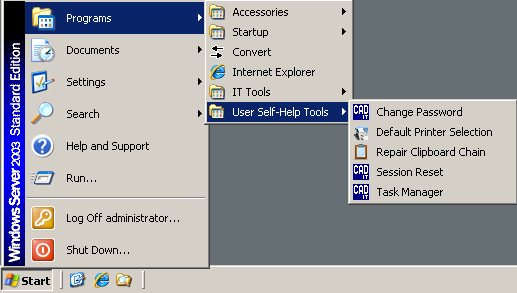
Their Start Menu shortcuts can be seen in the screenshot below.

Read more

Implementing a fully automated unattended build process

The methodology I use for deploying and managing Citrix XenApp solutions has proven very successful over the years.

To maintain a homogeneous environment conducive to stability, utilisation of a well-defined and automated server build process is a best practice. Automated server builds can save countless hours when deploying new servers, rebuilding a problematic one, or addressing test requirements. A server build process is based on building servers from initial hardware configuration through to application installation and configuration. In most of my cases this is heavily used for Citrix XenApp rollouts.

Read more